Version-controlled Tables
Version control ensures that changes made to folders, records, and data are tracked and managed.
When version control has been enabled on a Granta MI Table, the records in the Table all have a version state which determines whether or not users can see and/or edit them.
| Version state | Description |
|---|---|
| Unreleased |
This is the 'unapproved' version of the record. Unreleased records are not visible to Read users. When MI Viewer is in Edit Mode, Write users can:
|
| Released | This is the 'approved' version. Released records:
|
| Superseded | This is a released version of the record that has been 'superseded' by a
later released version. Superceded records:
|
| Withdrawn | This is a version of the record that was released and subsequently
'withdrawn'. Withdrawn records
|
Records may be moved from one state to another as follows:
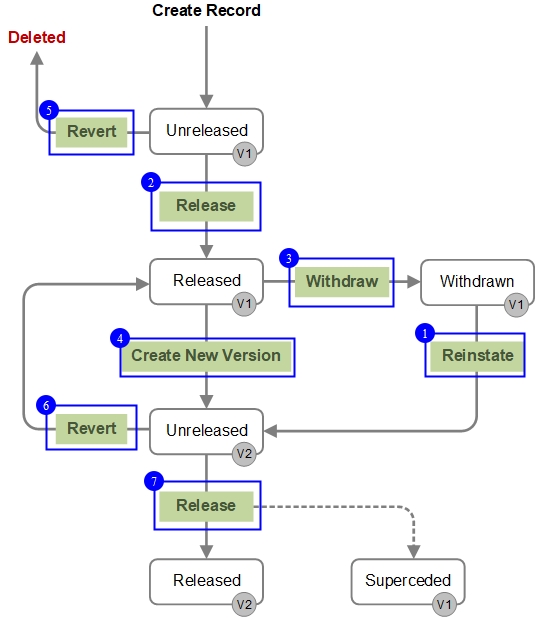
- Reinstating a record, folder, or Table
- Releasing a record, folder, or Table
- Withdrawing a record, folder, or Table
- Creating an Unreleased version
- Reverting a record, folder, or Table
- Reverting a record, folder, or Table
- Releasing a record, folder, or Table
Exporting & importing version-controlled records
Users with sufficient privileges can export specific versions of version-controlled records.
Released and Unreleased records can be exported and then imported back into the database.
Superceded records can be exported but cannot be re-imported, to prevent them overwriting later versions.
- v1 Superseded can be exported but not re-imported
- v2 Superseded can be exported but not re-imported
- v3 Released can be exported and re-imported (overwriting v4 Unreleased)
- v4 Unreleased can be exported and re-imported (overwriting itself)
Searching
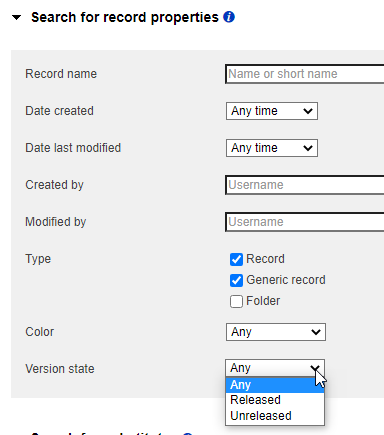
When searching version-controlled Tables, you can specify as one of the record property search criteria whether you want the Released or Unreleased version.
You can choose Any, Released, or Unreleased. This option is available in Edit mode only.