Exporting material cards
You can export material card information for use in CAD, CAE, or PLM applications from MI Explore.
Note: This feature is only available if your data view
has been configured to enable it.
All data types except file and picture data can be exported. The material card exporters available will depend on your installation: your Granta MI Data Administrator can provide exporters for different types of data, and different packages.
-
Right-click and choose Export material cards or click
 Export material
cards on the toolbar.
Export material
cards on the toolbar.
-
If
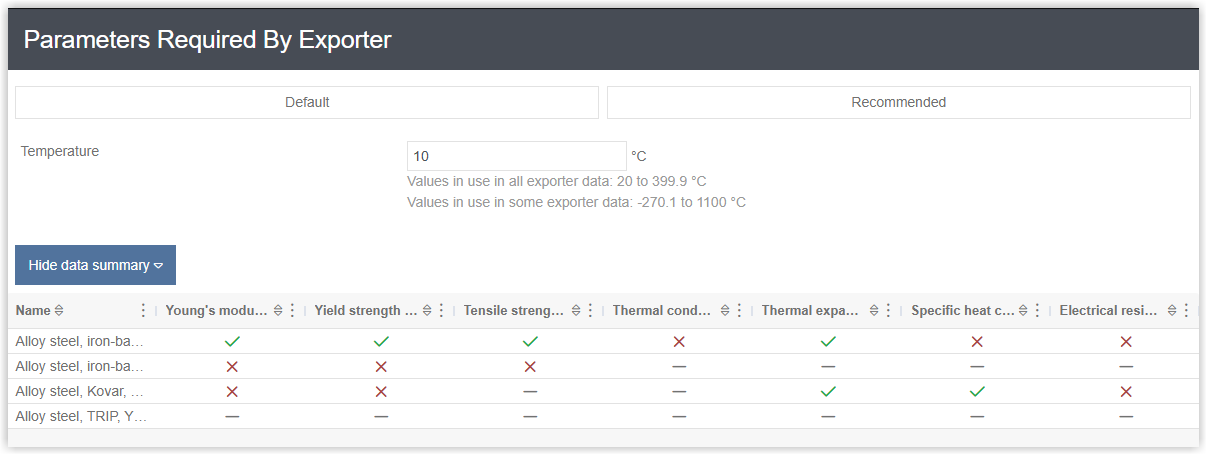
the export includes functional data, you may be able to choose the parameter values
at which the data will be exported.
- Choose Default to use the parameter default value. This is set at database level.
- Choose Recommended to use values that are optimized to
give the minimum number of missing data values, for all the materials you have
selected. Recommended values for functional data exports are calculated as follows:
- If the "best default" is consistent over all datums, use this value, where the "best default" = datum > attribute > database default > single value if there's only one value.
- Otherwise, if all the datums have the same attribute default, use this value.
- Otherwise, if all datums use the database default, use this value.
- Otherwise, if there's only one value used in all the datums, use this value.
- Otherwise, if there's no intersection and the database default is used, use this value.
- To specify the values to use, enter them.
- Click Show data summary to see, for each record, and for each attribute, whether or not any data will be exported at the given parameter value.
A tick means data exists at the specified parameter value, a cross means there is no data at the specified value, and a line means there is no data for this property in the record.