Viewing datasheets
Open a record datasheet to view all of the material property data.
Datasheets can be viewed in an embedded datasheet panel alongside the List, Thumbnails, Curves, and Scatter plot pages, or in a full-page view.
The properties you see on a datasheet and the headings under which they are organized are defined in the datasheet Layout specified in the data view configuration.
-
To open an expanded, full-page datasheet, click
 Show full
page datasheet on the embedded datasheet toolbar.
In the full page datasheet, you can view all of the record data, including complex Functional and Tabular data. You can also bookmark the datasheet URL here.
Show full
page datasheet on the embedded datasheet toolbar.
In the full page datasheet, you can view all of the record data, including complex Functional and Tabular data. You can also bookmark the datasheet URL here. -
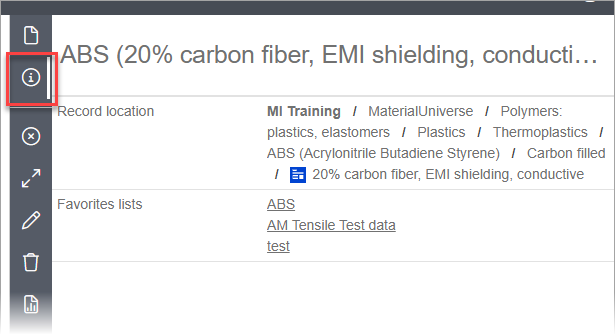
To view information about the record - its location in the database, and the
Favorites lists to which it belongs - click
 Record
details on the datasheet toolbar. This displays a separate tab where you
can click on a Favorites list to open it immediately in MI Favorites, for example
allowing you to easily view a particular list and remove the record from it.
Record
details on the datasheet toolbar. This displays a separate tab where you
can click on a Favorites list to open it immediately in MI Favorites, for example
allowing you to easily view a particular list and remove the record from it.