


Saving a custom template
Save your template to use a custom subset in a different project.
Each database has a number of templates associated with it. A template defines the data table, selection attributes, and record subset to use in a selection project. A number of standard templates are supplied with Granta Selector, or you can create a custom template using the custom subset dialog. Save your template to use the custom subset in a different project.
All template files are saved in the installation directory, in the Templates subfolder located in the same folder as the relevant database file (.gdb). For example:
C:\Program Files (x86)\Granta Selector\<versionnumber>\Database\<databasename>\Templates\
The standard templates supplied with Granta Selector are grouped by data table. The headers in the Select from list correspond to the folder names within the Templates folder. You can save new templates in either the data table subfolder that the template applies to, or create a new subfolder to store your custom templates.
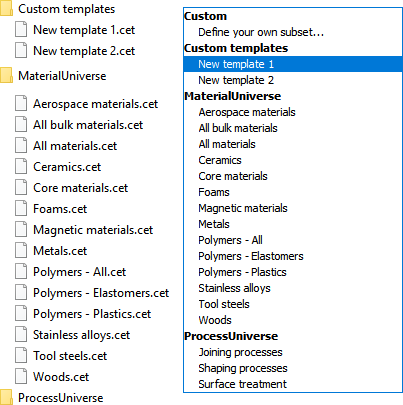
Figure 1. An example Templates folder. The folder names correspond to headers in the Select from list, and custom templates have been saved in a new Custom templates folder.
When you open a database, all templates saved within the relevant subfolder are available to use.
Creating a template
Create a custom template by creating a custom subset, and specifying the records and attributes to use.
Saving a template
-
Restart Granta Selector. Your new template will now be available in the
Select from list.
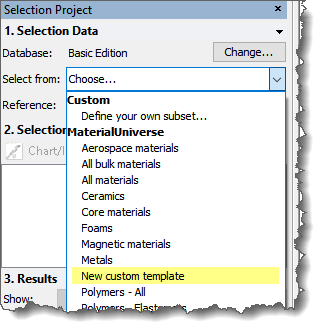
Figure 2. A Select from list with a custom template.
Note that step 4 of this process requires you to have administrator rights, or for Granta Selector to be Run as administrator. If you did not start Granta Selector using Run as administrator, then:
- Save the template in a folder that has write-access (for example, My Documents).
- Move the template to the correct folder using Windows File Explorer.