


Required certificates
SSL certificates are required to secure communication between certain Granta MI applications and services.
The following certificates are required on your Granta MI application server.
| Certificate | Certificate requirements | Install in this certificate store |
|---|---|---|
| MI Server API server certificate |
The
Wildcard SAN definitions are allowed:
If the MI Selection Service will be running under a specific user account (and not LocalSystem), that account requires read access to the MI Server API Server certificate Private Key. In the majority of cases, the certificate that you use in IIS for HTTPS is a good choice to use as the MI Server API server certificate, but you should check that it meets these certificate requirements first. The thumbprint of this certificate must be provided when configuring MI Server, MI Service Layer, and MI Selection Service during installation. |
Local Machine Personal store |
| MI Server API client certificate |
The thumbprint of this certificate must be provided when configuring MI Server, MI Selection Service, and MI Ansys Material Calibration Service. A certificate PFX file and Private Key password for this certificate are required during configuration of MI Service Layer. |
Local Machine Personal store |
These certificates are used to secure communication between different Granta MI services and applications as follows.
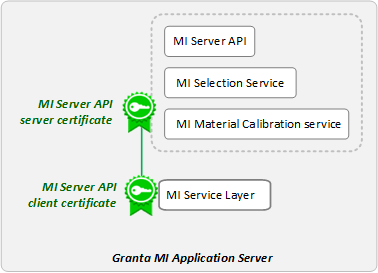
Note that MI Server and MI Selection Service both use the MI Server API server certificate. MI Selection Service uses this certificate for client authentication to MI Server, and also to authenticate requests from MI Service Layer.
A self-signed certificate is a good choice for a staging or development environment where you want to test or evaluate Granta MI functionality. In an enterprise production environment, you should consult with your IT personnel to ensure that certificates deployed for Granta MI comply with your organization's SSL certificate best practices.
Self-signed certificates for testing purposes may be generated using a Windows PowerShell cmdlet, see New-SelfSignedCertificate (pki) | Microsoft Docs for more information.
For example:
New-SelfSignedCertificate -FriendlyName "Certificate for testing MI" -DnsName "machine_name", "fq_machine_name" -Type SSLServerAuthentication -CertStoreLocation "Cert:\LocalMachine\My"where machine_name is the host name and
fq_machine_name is the fully-qualified host name, for
example, computername.yourcompany.com.
If using a self-signed certificate for the MI Server API Server certificate, it should be copied into the Trusted Root Certification Authorities store.