
Multithreading
By default, multithreading (execution on multiple cores) is enabled for Causality Checking and Macro Model export. Multithreading saves significant time in the Causality Check calculation, and improves the time for other state-space fitting operations. See Multithreading Technical Notes.
The Cores field in the Network Data Explorer Control pane defaults to half the number of cores detected on your computer.
For best performance, disable hyper-threading on your computer. When you enable hyper-threading, the number of cores includes the physical cores and an equal number of logical cores. When you disable hyper-threading, the display shows only half the number of physical cores.
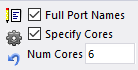
To disable multithreading, clear the check box.