
Configuring Distributed Analysis
To configure distributed analysis, select a distributed machine configuration. This is a list of machines to use for a simulation, based on considerations such as whether the simulation is more memory intensive or more CPU intensive, relative to the resources available on your network. See Selecting an Optimal Configuration for Distributed Analysis for a discussion of issues. To create a new distributed machine configuration, or to edit an existing one, see Editing Distributed Machine Configurations.
To select from an existing configuration:
- Click the HPC Options settings icon on the Simulation ribbon or click Tools > Options > HPC and Analysis Options.
This opens the HPC and Analysis Options dialog box. You can view a list of available configurations, as well as a report of the configuration details. From the current list, you can select a configuration to Make Active. You can also Add a new configuration, Edit an existing one, or Export as a Ansys Configuration file (*.acf). You can also Import a configuration file. This lists existing configurations, and shows all machines in the selected configuration, enabled or not. You can Copy an existing configuration, typically to edit the name and contents for other purposes.
Use the Options tab to queue all simulations.
For a more detailed discussion of this dialog box, see Setting HPC and Analysis Options.
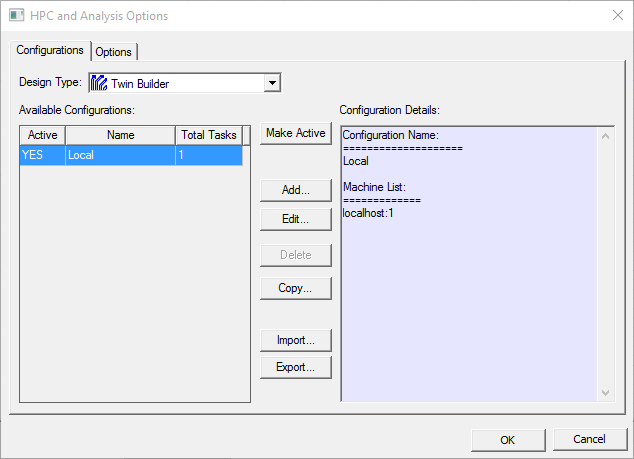
To define a new configuration, click Add to open the Analysis Configuration dialog box. See Editing Distributed Machine Configurations.