
Selecting SIwave Solution Setup Options
Make further changes to Ansys SIwave™ simulations by modifying the general Ansys SIwave™ solution setup parameters.
General Tab
Parameters on this tab only affect SYZ and Near Field simulations.
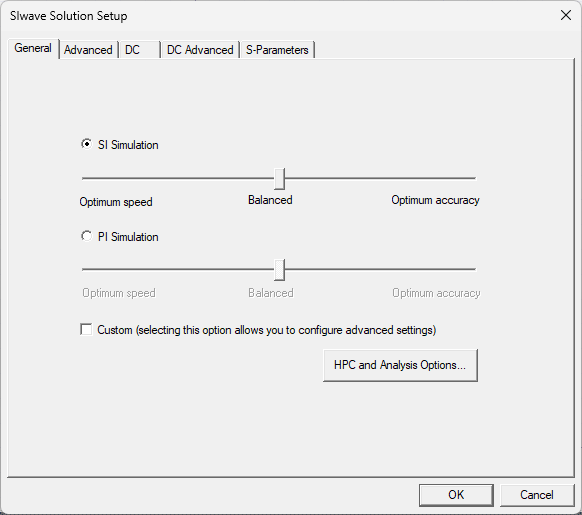
From the General tab, do the following:
- Select either SI simulation (i.e., Signal Integrity) or PI simulation (i.e., Power Integrity), and move the corresponding slider to adjust speed and accuracy.
- For SI simulations:
- Optimum speed — of the coupling options in the Advanced tab, only Trace Coupling is selected.
- Balanced — of the coupling options in the Advanced tab, Trace, Coplane, Split-Plane and Cavity Field Coupling are selected.
- Optimum accuracy — Trace Return Current Distribution is selected, in addition to Balanced.
-
For PI simulations:
- Optimum speed — no coupling options selected.
- Balanced — Cavity Field Coupling is selected.
- Optimum accuracy — Trace, Coplane, Split-Plane and Cavity Field are selected.
- Check the Custom box allows to configure additional options in the Advanced tab.
-
Click HPC and Analysis Options to open the HPC and Analysis Options window.
Advanced Tab
Parameters on this tab only affect SYZ and Near Field simulations.
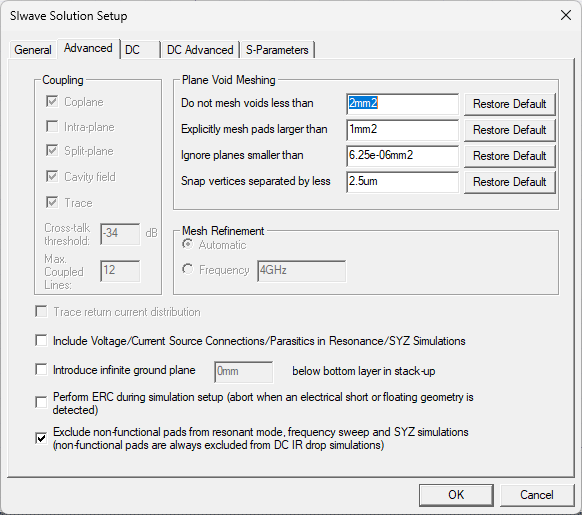
From the Advanced tab, do the following:
- Coupling — available only if the Custom box is checked in the General tab. If the Custom box is checked in the General tab, select any/all of these options.
- Plane Void Meshing — specify plane void meshing, control geometry defeaturing, and vertex snapping measurements and units, or Restore Default settings.
- Mesh Refinement — select Automatic or specify a Frequency.
- Trace return current distribution — available only if the Custom box is checked in the General tab. Check this option to accurately model the change of the characteristic impedance of transmission lines caused by a discontinuous ground plane. Instead of injecting the return current of a trace into a single point on the ground plane, the return current for a high impedance trace is spread out. The trace return current is not distributed when all traces attached to a node have a characteristic impedance of less than 75 ohms, or if the difference between two connected traces is less than 25 ohms.
- Include Voltage/Current Source Connections/Parasitics in Resonance/SYZ Simulations — determine whether to include the effect of parasitic elements from voltage and current sources.
- Introduce infinite ground plane — specify the elevation of the infinite unconnected ground plane to be placed under the design. The ground plane serves as a voltage reference for traces and planes if they are not defined in the layout.
- Perform ERC during simulation setup — determine whether to perform error checking while generating the solver input file. In some designs, the same net may be divided into multiple nets with separate names; these nets are connected at a “star point.” To simulate these nets, error checking for DC shorts must be deactivated. All overlapping nets are internally united during simulation.
- Exclude non-functional pads from resonant mode, frequency sweep and SYZ simulations — determine whether to remove non-functional pads. All layers in which a via does not make an electrical connection to any other geometry do not contain a pad. By default, non-functional pads are not included in the simulation. Typically non-functional pads are removed when a PCB is manufactured.
DC Tab
Parameters on this tab only affect DC IR simulations. However, if Compute exact DC point is checked on the Edit Frequency Sweep window during SYZ solution setup, then a DCIR simulation is effectively run during SYZ simulation.
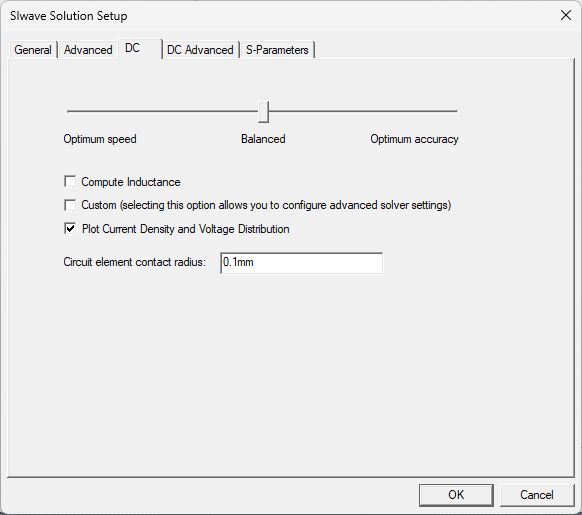
From the DC tab, do the following:
- Use the slider to balance speed and accuracy:
- Optimum Speed — all options in the DC Advanced tab are deactivated.
- Balanced — the Mesh Bondwires, Mesh Vias and Automatic Mesh Refinement are selected.
- Optimum Accuracy — the mesh are refined on bondwire and vias, and more aggressive refinement parameters are specified.
- Compute Inductance — check to compute inductance by integrating the vector potential at DC using an efficient, multi-level fast multipole method with two-level parallelization. In some cases, this may require significant computational time and memory.
- Custom — check to use simulation settings.
- Plot Current Density and Voltage Distribution — uncheck to save disk space if post-processing voltage and current plots is inappropriate (e.g., if users export a SPICE netlist after a DC simulation, it may not be helpful to save any field data to disk).
- Circuit Element Contact Radius — enter a value. Equal potential is enforced in the contact radius, and no mesh refinement is done inside the contact region.
DC Advanced Tab
Parameters on this tab only affect DC IR simulations. However, if Compute exact DC point is checked on the Edit Frequency Sweep window during SYZ solution setup, then a DCIR simulation is effectively run during SYZ simulation.
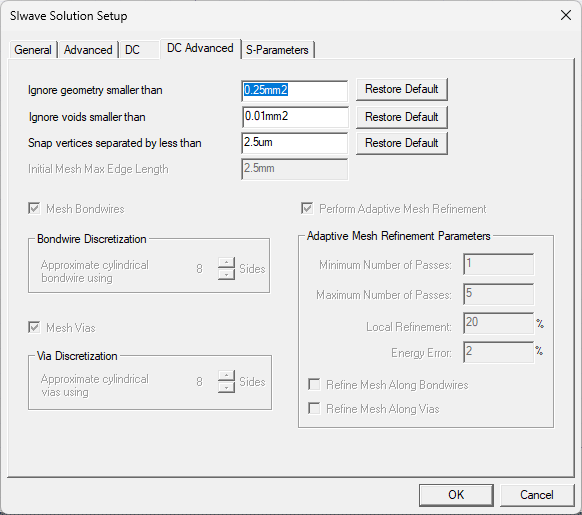
DC Advanced options include the following:
- Ignore geometry smaller than — geometry whose area (after being combined with any overlapping geometry) falls under this threshold is ignored during simulation.
- Ignore voids smaller than — geometry whose area (after being combined with any overlapping geometry) falls under this threshold is ignored during simulation.
- Snap vertices separated by less than — entities (e.g., vias) and vertices that are separated by less than this specified distance may be snapped together during solver pre-processing.
- Initial Mesh Max. Edge Length — specifies the maximum edge length chosen in the mesh (before any adaptive refinement occurs).
- Mesh Bondwires — check if users do not want to model bondwires as point connections to mesh. Specify the Bondwire Discretization (the number of sides used to approximate cylindrical bondwires). Specify any value between 6 and 64. The default value is 8.
- Mesh Vias — check if users do not want to model vias as point connections to mesh. Specify the Via Discretization (the number of sides used to approximate cylindrical vias). Specify any value between 6 and 64. The default value is 8.
- Perform Adaptive Mesh Refinement — check to perform Adaptive Mesh Refinement, and populate the fields:
- Minimum Number of Passes — an adaptive analysis does not stop unless the minimum number of passes specified has been completed, even if convergence criteria have been met.
- Maximum Number of Passes —
this value is the maximum number of mesh refinement cycles users want
the simulation to perform. This value is a stopping criterion for the adaptive
solution. If the maximum number of passes has been completed, the adaptive
analysis stops; otherwise, the adaptive analysis continues unless the
convergence criteria are reached.
Note:
The size of the finite element mesh — and the amount of memory required to generate a solution — increases with each adaptive refinement of the mesh. Setting the maximum number of passes too high can result in the Ansys Electronics Desktop (AEDT)TM electronics systems design platform requesting more memory than is available or taking excessive time to compute solutions.
- Local Refinement — this value determines how many triangles are added at each iteration of the adaptive refinement process. The triangles with the highest error is refined. The default value is 20%.
- Energy Error — the default value is 2%.
- Refine Mesh Along Bondwires — check to refine mesh along bondwires.
- Refine Mesh Along Vias — check to refine mesh along vias.
S-Parameters Tab
Parameters on this tab only affect SYZ and Near Field simulations.
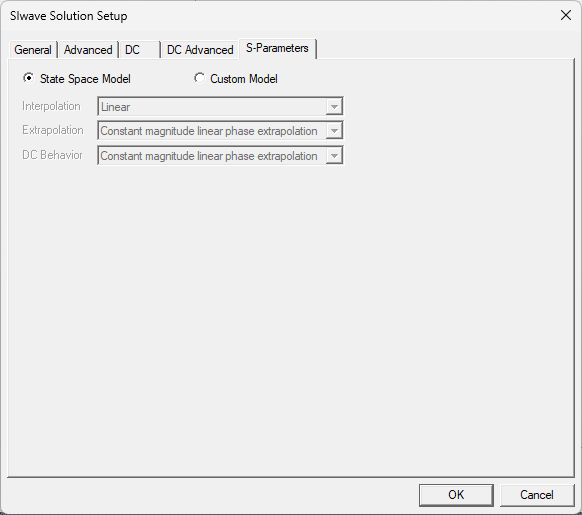
From the S-Parameters tab, do the following:
-
Select State Space Model or Custom Model. If Custom Model is selected, set the following options:
- Interpolation — select Point, Linear, or Step from the drop-down menu.
- Extrapolation — select Zero padding, Same as last point, Linear extrapolation from last 2 points, or Constant magnitude linear phase extrapolation from the drop-down menu.
- DC Behavior — select Zero padding, Same as last point, Linear extrapolation from last 2 points, or Constant magnitude linear phase extrapolation, Series Capacitor, or Leave all signal lines open circuited from the drop-down menu.