Nexxim Options Tab
From the Project Manager window, right-click on a design and select Design Settings to open the Design Settings window and click the Nexxim Options tab.
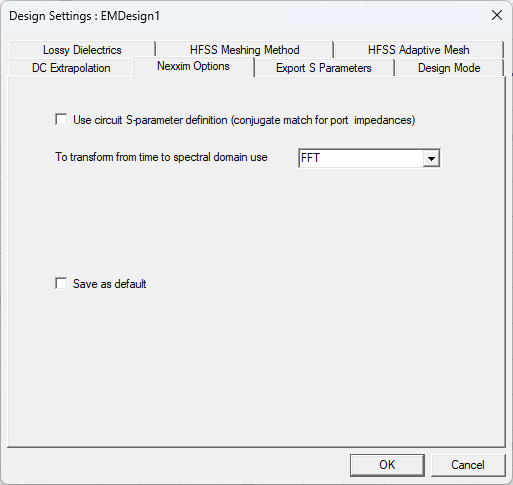
The Nexxim Options tab allows you to configure options for Nexxim setups.
- Use circuit S-parameter definition — Controls the definition for port impedances. For HFSS 3D Layout, this option should typically be unselected (check box unchecked). The definition of a “matched port” depends on the application. In applications that deal mostly with circuit quantities (including the Nexxim simulator), a “matched port” has a characteristic impedance that maximizes the power transfer. This is also called a “conjugate match.” In applications that deal mostly with electromagnetic quantities (including HFSS and Planar EM), a “matched port” has a characteristic impedance that maximizes the transfer of the voltage wave. The two definitions differ only by the conjugate of the characteristic impedance of the port. For real port impedances, there is no difference.
- To transform from time to spectral domain use – Allows you to select the method used to transform on the time domain to the spectral domain for all projects.
- Fourier Integration is very accurate but may be time-consuming for large datasets. The Fourier Integration method computes the projection of the signal on each of the requested harmonics via integration of the inner-product integral.
- FFT (Fast Fourier Transform, the default) achieves faster conversion with a slight reduction in accuracy. The FFT method samples the signal at 2*(maximum harmonic number) points, and outputs the FFT of the sampled signal. The FFT method may not be robust enough to avoid aliasing while converting some time-domain signals to the frequency domain.
- Select Save as default and click OK to save the causal material setting to the registry.
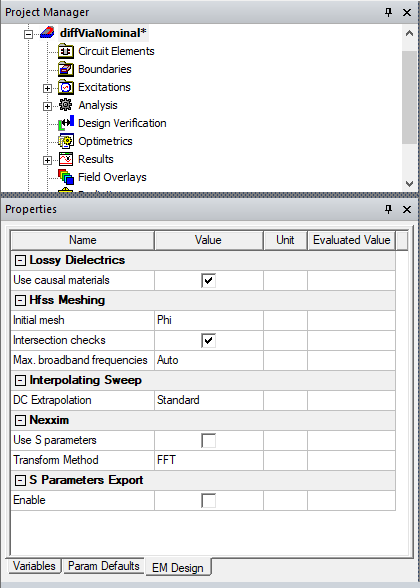
Selecting a active design in the Project Tree also displays the Design Settings in Properties window under EM Design tab.