
W-element Analysis
W-elements are a distributed model for transmission lines used in certain HSPICE-compatible circuit simulators. For designs containing traces and planes, SIwave can export the W-element in either single frequency or tabular format.
To export the W-element in SIwave:
- Open a project containing traces and planes.
- Select the layer containing the trace you want to analyze.
- Select the trace.
- Click Advanced > W-element Analysis.
The Export W-element window appears.
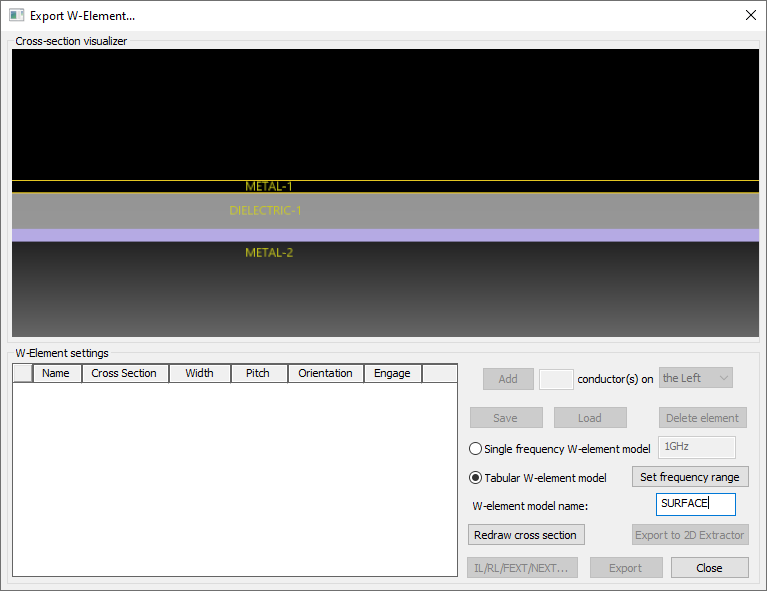
- Leave the Export W-element window open and click in the Modeling workspace to draw a cross-section over the trace.
From the following image, the trace is highlighted in yellow and the cross-section is the line intersecting it (indicated by a red arrow).
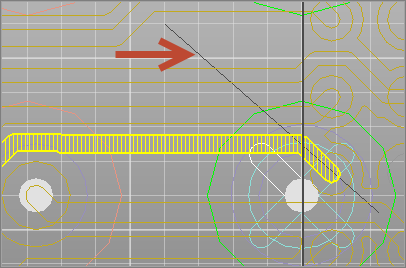
If you make a mistake, you can click Redraw cross section to retry.
Click OK. - Name – conductor name.
- Cross Section – indicates the shape of the cross section.
- Width – can be edited here directly, or imported from the Layer Stackup Wizard by selecting Use width/pitch in W-element.
- Pitch – can be edited here directly, or imported from the Layer Stackup Wizard by selecting Use width/pitch in W-element.
- Orientation – fixed, left, or right.
- Engage – enabling this check box engages the conductor in IL/RL/FEXT/NEXT simulations.
- Edit the Width and Pitch values directly in the table.
- Add aggressor(s) to the left, right, or on both sides of a selected victim element.
- Delete an element by selecting it and clicking Delete element.
- Export the W-element:
- Select Single frequency W-element model and enter a frequency for export, or select Tabular W-element model and click Set frequency range.
- Click Export to save the W-element as a Spice (*.sp) file, or click Export to 2D Extractor to save the W-element as a VB script (*.vbs) and run it in 2D Extractor. Generating this script launches a prompt asking if you want to run the script in Electronics Desktop. Consult the Q3D Extractor/2D Extractor help for instructions on running an analysis in 2D Extractor.
- Compute insertion/return loss and time domain crosstalk.
- Click Close to exit the Export W-element window.
Using the cross-section you entered, the Cross-section visualizer updates, and the list of conductors populates:
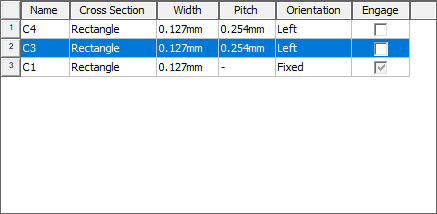
The grid displays the following for each conductor:
From here, you can:
You can also access the Export W-element window from the Layer Stackup Wizard.