
Using Reduce Matrix Operations in 2D Extractor
Reduce Matrix operations allow you to modify conductor definitions and generate new matrices containing fewer elements. Operations for 2D Extractor include:
Reduced matrices allow you to:
- Simulate parallel connections between conductors.
- Model floating conductors in a structure.
- Examine the effects of grounding in a structure.
- Set up differential pairs.
Based on these modifications, 2D Extractor generates new matrices without computing new field solutions for any selected parameters that already have field solutions. This saves computing time and resources and allows you to easily optimize ground assignments when you generate a SPICE equivalent circuit.
You can select any object in the Modeler window and right-click, then select Assign Reduce Matrix. If the selected objects are valid terminals for reduce matrix operation, they are considered for reduction; otherwise, they are ignored.
After reduction, reduced matrices and their Reduce Matrix operations appear in the Project Manager:
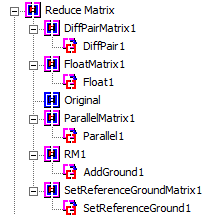
You can right-click the original or a reduced matrix in the project tree to see more options.
You can also right-click a Reduce Matrix operation and click Select Assignment to select the objects to which it applies.
Duplicating a Reduced Matrix
To duplicate a Reduce Matrix operation, right-click it in the Project Manager and select Duplicate.
Deleting a Reduced Matrix or Reduce Matrix Operation
To delete a reduced matrix or a Reduce Matrix operation, right-click it in the Project Manager and select Delete.
You cannot delete the original matrix!