
Setting Capacitance and Conductance (CG) Analysis Parameters in Q3D Extractor
To set up a capacitance and conductance (CG) analysis, first add a solution setup.
Then, from the Solve Setup window:
- Select the CG tab.
The CG options display.
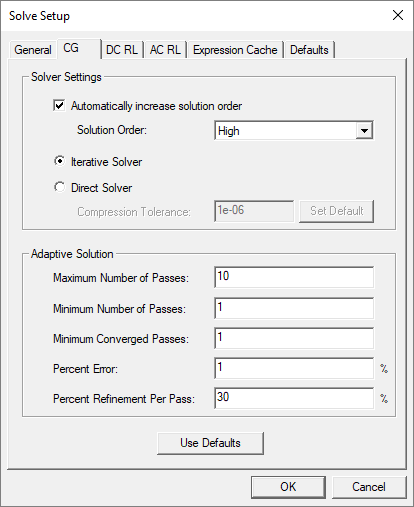
- In the Solver Settings area:
- Specify the Automatically increase solution order setting.
Solution order refers to the accuracy level. The solver will give accurate results at the Normal setting for most applications. The High, Higher, and Highest options offer greater accuracy at the expense of speed and memory.
- Select either Iterative Solver or Direct Solver.
- Iterative Solver – The Iterative Solver is generally the fastest option. However, it uses FMM compression, which may lead to slow convergence of GMRES iterations for poorly conditioned matrices.
- Direct Solver – The Direct Solver has a higher setup time and uses more memory than the Iterative Solver. In the setup phase of the direct solver, an LU factorization of the FMM-compressed MoM system of equations is performed. In the solution phase, each right hand side is solved using forward(L) and backward(U) substitutions.The Direct Solver converges quickly for poorly conditioned matrices and should only be used in cases requiring longer solution times (e.g., cases with extreme geometries and cases with more than 500 nets).
By default, the Direct Solver Solution Tolerance is 1e-6 for Normal or High solution order, 1e-7 for Higher, and ie-8 for Highest. Putting a larger tolerance requires less setup time and memory, while putting a tighter tolerance requires more setup time and memory but leads to rapid convergence and faster solution time.
- Specify the Automatically increase solution order setting.
- In the Adaptive Solution area, specify values for the following:
- Maximum Number of Passes – the maximum number of mesh refinement cycles that you would like Q3D
Extractor to perform. This value is a stopping criterion for the adaptive
solution; if the maximum number of passes has been completed, the adaptive
analysis stops. If the maximum number of passes has not been completed,
the adaptive analysis continues unless convergence criteria are reached.
Important:
The size of the finite element mesh — and the amount of memory required to generate a solution — increases with each adaptive refinement of the mesh. Setting the maximum number of passes too high can result in Q3D Extractor requesting more memory than is available or taking excessive time to compute solutions.
- Minimum Number of Passes – the minimum number of mesh refinement cycles. Q3D Extractor will not stop analysis until after this number of passes has been completed.
- Minimum Converged Passes – the minimum number of passes that must meet convergence criteria before the adaptive analysis will stop.
- Percent Error – the desired solution accuracy. Smaller values produce more accurate but slower solutions; larger values produce less accurate but faster solutions.
- Percent Refinement Per Pass – determines how many tetrahedra are added at each iteration of the adaptive refinement process. The tetrahedra with the highest error are refined. For example, entering 10 causes the mesh to increase approximately 10 percent each pass. If your mesh consisted of 1000 elements, the tetrahedra or triangles would be refined so that 100 new elements are added to the mesh. The default value is 30% and you can you generally accept the default value.
- Maximum Number of Passes – the maximum number of mesh refinement cycles that you would like Q3D
Extractor to perform. This value is a stopping criterion for the adaptive
solution; if the maximum number of passes has been completed, the adaptive
analysis stops. If the maximum number of passes has not been completed,
the adaptive analysis continues unless convergence criteria are reached.
- Click OK.
Temperature-Dependent CG Analysis
Q3D Extractor's CG solver can intake temperature-dependent dielectric materials.
The process generally involves:
- Adding a CG setup, as described above.
- Updating a dielectric material definition to include a thermal modifier.
- Adding a parametric setup for temperature analysis using the variable $temp_var.
- Viewing data by design variation. Each temperature is a design variation.
Distributed Memory CG Solutions (Beta)
Q3D Extractor's Distributed Memory CG Solver (MPI-FMM) can take advantage of cloud computing platforms in order to simulate very large designs. By redistributing the mesh so that each MPI task handles only a partial mesh, and by parallelizing tasks, MPI-FMM allows Q3D Extractor to handle designs containing 100 million+ mesh elements.
For more information, see: Distributed Memory CG Solutions.
Infinite Ground Planes
When infinite ground planes are present, CG results may differ slightly from releases prior to 2022 R2.