
Running More than One Simulation
To solve every enabled solution setup in a design:
- In the project tree, under the design you want to solve, select Analysis.
- Click
Each enabled solution setup is solved in the order it appears in the Project Manager.
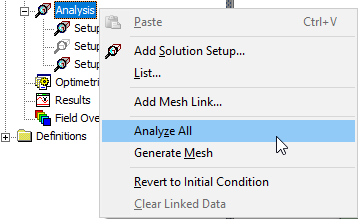
The example here shows an analysis invoked from the Project Manager shortcut menu with three setups: one disabled, two enabled.
Note:
The General tab for the Setup includes an Enabled check box. By default, this is checked. Clearing the Enabled check box excludes a setup from running