Monitoring the Solution Process
While a simulation is running, you can monitor the solution's progress in the Progress window. The progress bar shows the relative progress of the simulation.
You can also view a profile of the simulation as well as convergence data during or after the solution process.
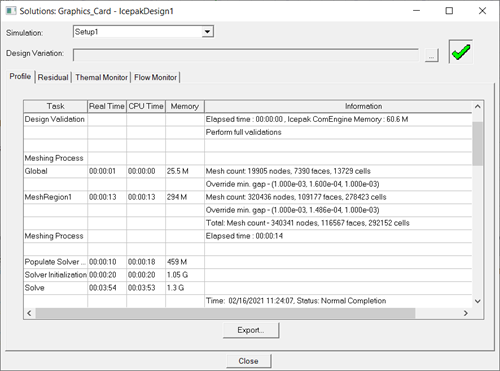
- The solution profile includes meshing information (memory, times, and mesh counts per region), solver times (input, initialization, and solve), surface and volume EM loss data, exported AC loss data from HFSS 3D Layout, and total solution process.
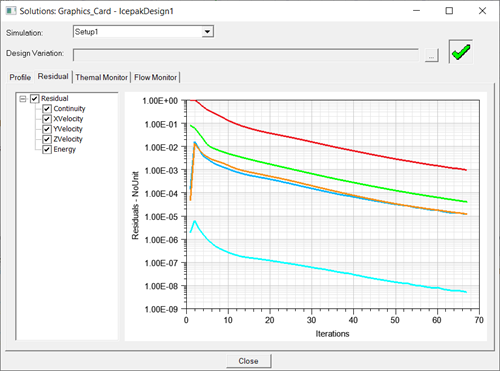
- The solution residuals include those for continuity, velocity, energy, and joule heating (if enabled).
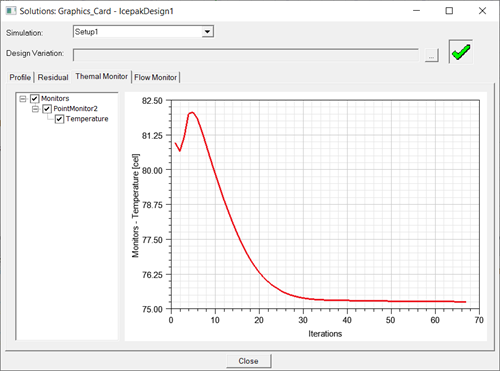
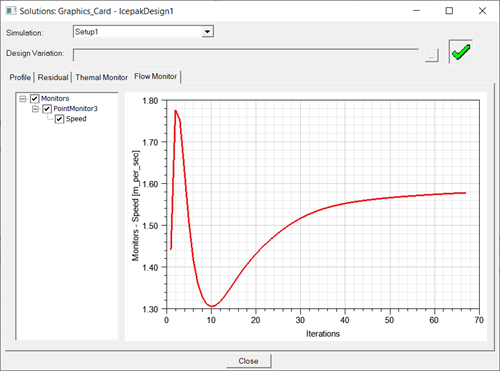
- The solution monitor includes data plotted for any defined thermal and flow monitor points.
To view the solution's profile information or convergence data:
- In the Project Manager, expand Analysis.
- Right-click the solution setup and select Profile, Residual, Thermal Monitor, or Flow Monitor.
- In the Solutions dialog box, toggle between the Profile, Residual, Thermal Monitor, and Flow Monitor tabs to view the information.
Tip: Toggle the top check box to display or hide all residual and monitor curves. To select multiple curves, press and hold Shift and click.