
Assigning Skin Depth-Based Mesh Refinement on Object Faces
The Skin Depth-based mesh refinement lets you calculate or specify a skin-depth for mesh refinement. You can also specify the number of layers of elements for refinement where the skin depth is the total depth of all layers combined. These layers provide an easy, alternative approach than by creating physical models of each layer, pseudo-sheet bodies. Whereas creating and adjusting a complex, layered physical model is difficult, changing the skin depth parameters and number of layers is very easy. For example, consider a Maxwell rotor, drawn as a stack of seven objects:
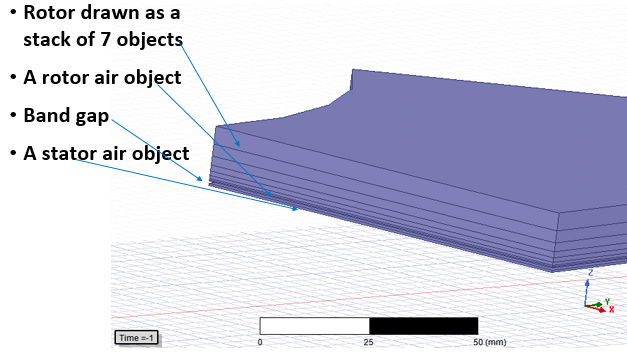
To test various stacking models with pseudo bodies involves recreating the model with different thicknesses and remaking the entire initial mesh. The Tau mesher may not be available for all layer heights. You can achieve comparable results by using skin depth based refinement by reverting to the initial mesh, changing settings and applying mesh operations. The following figure shows a cut-plane image of the interior of a model that uses skin-depth based refinement and layers of elements. The Skin Depth is the total depth of all layers combined. Layered elements apply to the selected faces of solid bodies. The elements are stretched parallel to face, and are compressed in the normal direction.
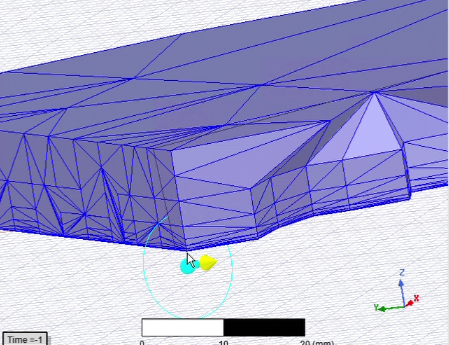
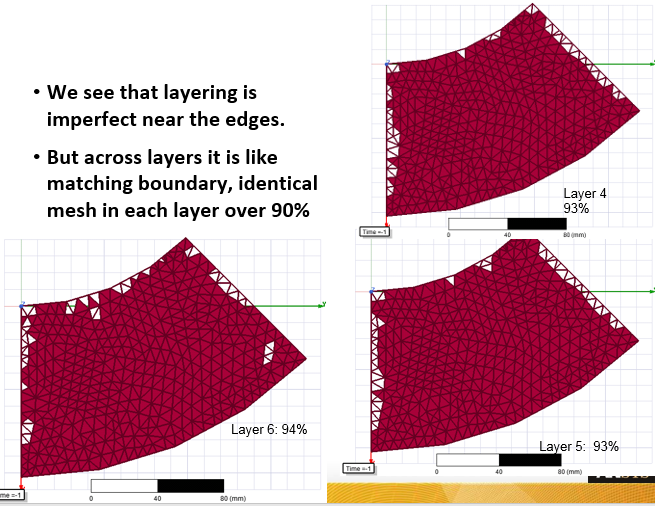
While in some places the edges have imperfect layering, the interior is very good. You can also view the results layer by layer by using the Model Analysis dialog.
The layered skin depth mesh operation provides a tool toward finding a good solution. You can try different settings to improve results toward a good solution. For instance, for this example, these different settings were tried. For comparison, a model built with seven layers required 85K tets.
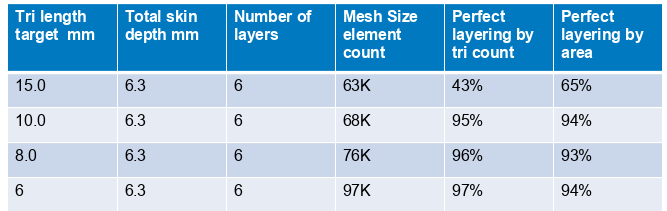
The goal is not to have perfect layering, but to have a good solution that is much easier to achieve.