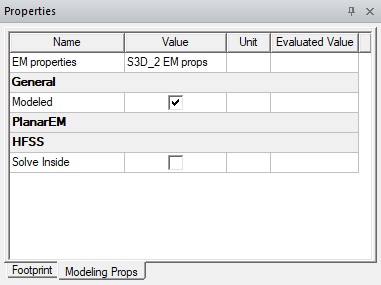
For most components, the following meshing controls are available under the Modeling Props tab of the Property window. Select items one by one in the Properties window and modify their Modeling Properties, as appropriate. To remove the Modeling Properties tab on the Property Window, click Draw > Remove Modeling Properties.
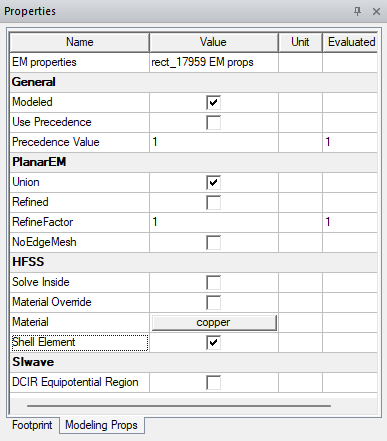
Select from the following:
- EM properties field — the editable name of the primitive.
General
- Modeled check box — specifies the object is meshed when the circuit is modeled.
- Use Precedence check box — specifies the mesher examines the Precedence Value when deciding object precedence.
- Precedence Value field — when Use Precedence is checked, enter any integer. Where polygons from different
layers/materials overlap, the mesher decides precedence on the basis
of Precedence
Prioritizing.
PlanarEM
- Unioncheck box — specifies that selected objects are unionizeded when modeled if Form polygon unions before meshings is checked in the Planar Setup: Advanced Tab window or the HFSS Setup: Advanced Tab window.
- Refined check box — causes the object to be refined. When unchecked, the object are not refined.
- RefineFactor field — enter a positive integer or variable value
that specifies the level of refinement. The larger the value, the greater the refinement. A value of one
specifies the same refinement relative to other objects. One-half specifies
half as much refinement relative to other objects, and two specifies
twice as much refinement. If a zero value is entered, the
Refined area is automatically unchecked. If a value less than
zero is entered, the value is automatically changed to 1.
Note:
Data with different meshing characteristics cannot overlap. Overlapping objects must possess the same RefineFactor and NoEdgeMesh values. If the values differ, the following warning message is displayed: “Data on Layer trace intersects data on the same layer with different properties.”
A warning message is also displayed if self-intersecting components yield unexpected results. Self-intersecting polygons and voids are allowed, but they may not mesh as expected.
- NoEdgeMesh — when checked, specifies that
no special rectangular-edge mesh is used during modeling.
HFSS
- Solve Inside — when checked, enables the HFSS “ solve inside” option for that particular mesh body. All intersecting mesh bodies should have a common set of modeling properties. If a touching polygon does not have “solve inside” set, the attribute is ignored (and a warning is issued).
- Material Override — specifies a material override for the HFSS solver. By default, this material is the same as the object or layer the selected object is drawn on. Click the button to open the materials editor. For a new primitive object, the default material is copper.
- Material — Click the button to open the materials editor. For a new primitive object, the default material is copper.
- Shell Element — assign a volumetric shell element to the primitive object.
SIwave
- DC IR Equipotential Region — when checked, the DC IR solver uses equipotential regions to force equal voltage across the object. Equipotential regions may be defined as rectangular areas on surface signal layers (i.e., top or bottom).
- Material — specifies a material override for the HFSS solver. By default, this material is the same as the object or layer the selected object is drawn on. Click the button to open the materials editor. For a new primitive object, the default material is copper.
Text should be placed in the symbol layer. Text placed in the signal layer, unless part of the electrical design, must have Modeling Properties added with the “Modeled” option unchecked — however, this is not the recommended method and may result in the meshing error “Polygon Meshing Failed”. The preferred method is to locate text in the nearest symbol layer.
Modeling Props for 3D Structures
When a 3D structure is selected, only the Modeled and Solver Inside controls appear under the Modeling Props tab of the Property window.