Calculating Impedance Using the Layer Stackup Wizard (HFSS 3D Layout)
From the Trace Computation Settings area of the Layer Stackup Wizard, you can configure and perform an impedance calculation.
Prerequisites:
- Use the View Pane to select a layer. The Selected Layer Name field displays the currently selected layer.
- Click Trace Cross Section to open the Trace Cross Section editor.
- Click the Frequency drop-down menu to select the frequency.
To calculate impedance:
- Select the Analysis tab.
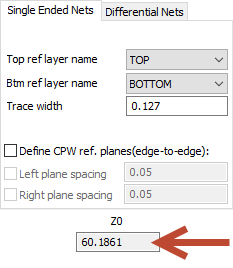
- Select the Single Ended Nets tab.
- Select your reference layers.
Note:
Top and bottom reference layer must be selected in order to use multi-layer features of W-element export.
- From the Trace Width field, enter a trace width.
- If you wish to define coplanar waveguide reference planes, select Define CPW ref. planes (edge-to-edge) to enable additional options.
- You may select Left plane spacing, Right plane spacing, or both.
- For W-element export, selecting Left plane spacing means that aggressors may only be added to the right of a victim trace; any traces to the left are removed. Selecting Right plane spacing means that aggressors may only be added to the left of a victim trace; any traces to the right are removed.
- Click Compute Z0.
- The Z0 field updates to show the result.
-
To apply this setting to one layer or all layers, click Apply or Apply to all.