
In certain instances it may be easier to define your dielectric and signal layer stackup by importing an XML based “control file" using the Edit Layers window (e.g., if you have a standard technology process, and you want to assure that all the designs you create use this process, you can import a control file to guarantee that all the stackups are identical).
The XML control file can be created using a third party text editor or a script. In some cases, extremely complex stackups can be more easily created outside of HFSS , then imported, rather than creating the stackups using the HFSS interface. For more information on the format of the XML layer control file, see Layout and ODB++ Control File.
The Edit Layers window has two drop-down menus: Stackup and Layer.
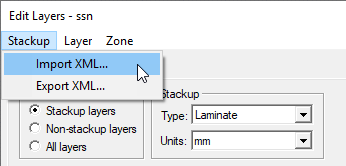
The Stackup menu allows users to import a stackup from an XML file and export the stackup in the window to an XML file.
To import a stackup, open the EditLayers window by clicking its toolbar icon or by selecting Layout > Layers. Next, click on Stackup > Import XML. A series of window opens that allow you to browse to the XML control file and import the stackup. The exact series of steps depends on whether the design has existing layers and whether the layers contain geometry. In certain instances the import mechanism adds additional dielectric/signal layers to create the pancake stackup.
The Design Does Not Have Existing Layers
The Layout/ODB++ Control file can be imported directly. A FileOpen window appears that allows you to browse to the XML layer control file.
The Design Has Existing Layers
After clicking ImportStackup, a warning may display that indicates at least one of the existing layers contains geometry. A window then offers the option of replacing or updating the existing layers. After choosing to update or replace existing layers, a FileOpen window appears that allows you to browse to the XML layer control file.
- Replace existing layers – All existing layers in the design are discarded and layers on the Layout/ODB++ Control File are inserted into the design. Geometry on any of the existing layers may be moved to different layers. After importing a stackup into a design with existing geometry, it is important to recheck your design.
- Update existing layers – The import mechanism attempts to merge the existing design layers with those in the Layout/ODB++ Control File. In some cases the import mechanism cannot merge the layers and you are not able to import the Layout/ODB++ Control file. The following examples illustrate the results when a one-to-one match does not exist between existing and imported layers. The XML file and existing stackup contain layers of type signal ("S") and dielectric ("D"). The name "S1" signifies a signal layer, but the layer names you select can be arbitrary.
Example 1: One to one mapping. This is the simplest case where existing layers are updated with new material properties and thicknesses. The matching of layer names is case insensitive.
|
XML File |
Existing |
Resulting Stackup |
|
S1 |
S1 |
S1 |
|
D0 |
D0 |
D0 |
|
S0 |
S0 |
S0 |
Example 2: Merge not possible. In this case the layers in the XML file are very different on the layers in the existing stackup and the import mechanism cannot create a merged stackup.
|
XML File |
Existing |
Resulting Stackup |
|
S1 |
S3 |
Not possible to merge |
|
D0 |
D1 |
|
|
S0 |
S2 |
|
|
XML File |
Existing |
Resulting Stackup |
|
S1 |
S1 |
Not possible to merge |
|
D0 |
D1 |
|
|
S0 |
S0 |
|
Example 3: Additional layers. In this case the XML file has one or more additional layers. The import mechanism updates existing material properties and thicknesses and add the additional layers.
|
XML File |
Existing |
Resulting Stackup |
|
D1 |
|
D1 |
|
S1 |
S1 |
S1 |
|
D0 |
D0 |
D0 |
|
S0 |
S0 |
S0 |
Example 4: Automatic layer addition. The import mechanism adds dielectric or signal layers to create a strict pancake stackup.
|
XML File |
Existing |
Resulting Stackup |
|
D1 |
|
D1 |
|
S2 |
|
S2 |
|
D0 |
|
D0 |
|
S1 |
S1 |
S1 |
|
S0 |
S0 |
S0_DIEL |
|
|
|
S0 |
Layer "S0_DIEL" is a dielectric layer added by the import mechanism with defaults for the material and thickness.