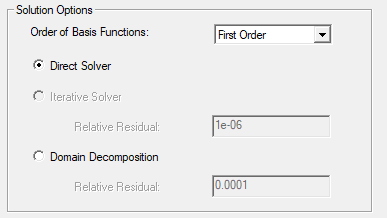
Enable Domain Decomposition
If a problem is too large to solve on one machine, HFSS can automatically partition a design into domains that can be solved by separate processes.
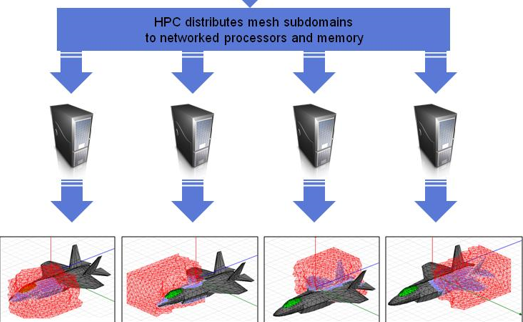
Before enabling solver domains, you must have the HPC license option, and you must have allocated at least three distributed machines to the solve workgroup. The number of domains that the solver creates will not exceed N-1, where N is the number of machines listed in the workgroup. (The first machine in the workgroup acts as the head node and is responsible for domain assembly, mesh refinement, and solution management). If more machines are present in the solve workgroup than are needed, HFSS creates the number of domains that leads to increased overall solver efficiency. Consequently, some machines remain idle if the problem size does not justify their use. See the Technical Note on domain decomposition for further details.
You can use the Domain Decomposition method and setup HPC to solve a large problem such as a helical antenna. HFSS automatically apportions the helical antenna design into domains and solves them by separate processes. See the discussion associated with the helical antenna example project that can be accessed with File > Open Examples > Antenna.
Domain use can be invoked for a solve when
- The Domain Decomposition radio button under
the Solution Setup Options tab is checked.
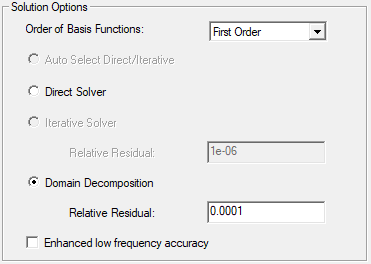
- You have the HPC License.
- You have provided at least three distributed machines in the workgroup.
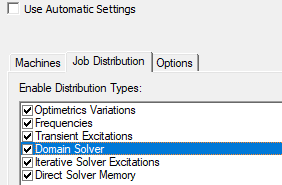
- Domain Solver is enabled in the Analysis configuration, either explicitly (as shown) or by selecting "Use automatic settings".
- The solver determines that the problem is large enough (the mesh has enough tets) to bother with domains.
- The design includes IE Regions and/or FE-BI Radiation Boundaries.
If you have configured your installations properly, the Domain solve can use Distributed Memory solutions. Memory used by the MPI-enabled HFSS solver is therefore limited by the set of machines that are available rather than the shared memory available on any single machine. This allows you to simulate larger structures than before and to optimally reconfigure the cluster of machines for the problem at hand. If an HFSS problem involves solver domains or a finite array, then frequency sweeps will not be done using DSO. Also, DSO for Optimetrics will not be allowed.
Restrictions on solver domains are that the design and analysis setup cannot include:
- The design cannot contain primary and secondary (Lattice Pair) boundaries.
- Eigenmode solution type.
- Fast frequency sweeps.
If any condition is not met, the problem is solved with the non-domain solver defined under the solution options. When these conditions are met:
- The solver chooses the number of domains to use, based on the machines available. The number of domains chosen will likely be close to the maximum. The maximum is one less than the total because the first machine in the workgroup is used to control domain iterations.
- The solver creates the domain meshes of roughly the same size
- Domain meshes are created every time the global mesh changes (before each adaptive pass)
- You provide resources for the distributed solve by adding machines to the distributed machine workgroup. A machine can appear in the workgroup more than once. You should use this capability to maintain a balanced load.
- Because the domains should be roughly the same size, you should provide balanced resources.
Beta Option for Domain Decomposition Allowing Distributed Direct Solver
This release includes a Beta Option allowing to use the Direct Solver for regular arrays and 3D component arrays. When the option is enabled, and the design is appropriate, the Direct Solver radio under the under the Solution Setup Options tab can be selected. Both non-distributed and distributed direct are used the same way as traditional direct solver. This can be very beneficial in some cases such as non-radiating structures which may a long time for standard Domain Decomposition iterations to converge.