


Vehicle and resistance force parameters should be input in this tab.
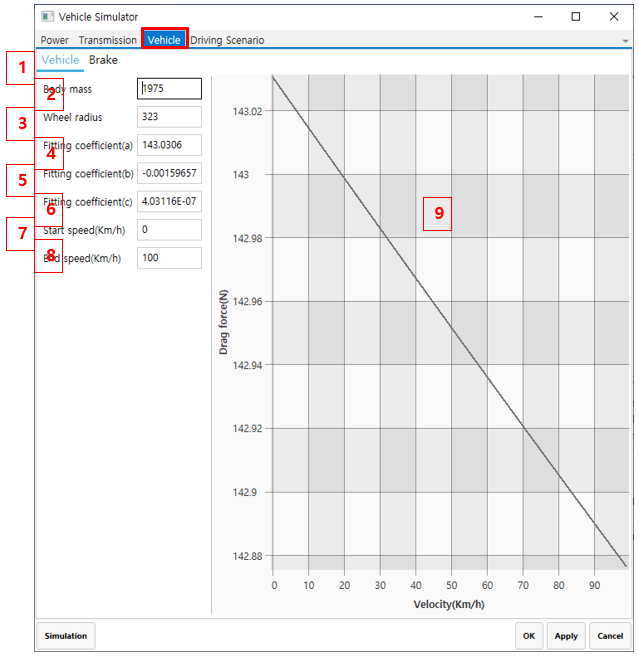
Figure 14.334: Vehicle tab parameters
| Parameter | Description | Dimension |
| 1. Vehicle | Use to set the vehicle parameters in this tab. | N/A |
| 2. Body mass | Use to set the body mass. This parameter is used for calculating the equivalent mass moment of inertia of vehicle. | Mass |
| 3. Wheel radius | Use to set the wheel radius. | N/A |
| 4. Fitting coefficient(a) |
Use to set the a coefficient for the drag force.
| Force |
| 5. Fitting coefficient(b) |
Use to set the b coefficient for the drag force.
| Force/velocity |
| 6. Fitting coefficient(c) |
Use to set the c coefficient for the drag force.
| Force/velocity2 |
| 7. Start speed(km/h) | Use to set the start speed. This value used only for estimating drag force in the 2D chart. | velocity |
| 8. End speed(km/h) | Use to set the end speed. This value used only for estimating drag force in the 2D chart. | velocity |
| 9. 2D chart | The drag force is shown in a 2D chart. | N/A |


