


How to Create Geometry File Variables
If a File variable contains geometry information and ModelCenter is able to associate it with a geometry rendering script, ModelCenter will automatically treat the File variable as a Geometry File variable and render the geometry in the Geometry View and/or the Analysis View.
How to Manually Create Geometry File Variables
If a File variable contains geometry information and ModelCenter does not automatically associate the file with a rendering script (or if the variable is associated with the wrong rendering script), you may manually specify the rendering script from the variable's File Variable Properties Dialog:
- Open the File Variable Properties dialog:
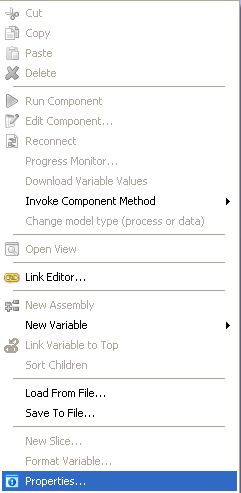
- Right-click a file variable in the Component Tree.
- Select "Properties" from the menu:
- Make sure the Render check box is selected.
Select the rendering script from the Rendering Script drop-down menu:
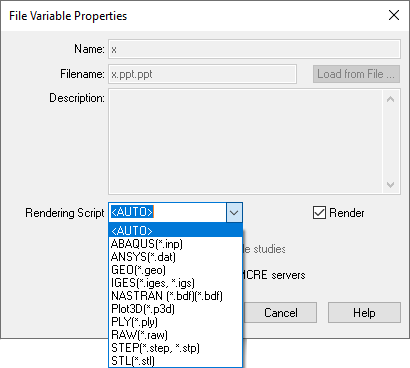
When "<AUTO>" is selected, ModelCenter will use the extension of the file that the File variable is pointing to and will attempt to automatically select the appropriate rendering script. If an appropriate rendering script is not present in the drop-down list, it is possible to create your own custom scripts.