
Adding an Eigenmode Solution Setup
For calculating the eigenmodes, or resonances, of a structure. The Eigenmode solver finds the resonant frequencies of the structure and the fields at those resonant frequencies. Eigenmode designs cannot contain design parameters that depend on frequency, for example a frequency-dependent impedance boundary condition. For an Eigenmode Solution Type, HFSS>Analysis Setup>Add Solution Setup... or right-click on Analysis in the Project tree, and select Add Solution Setup... from the shortcut menu displays the following dialog:
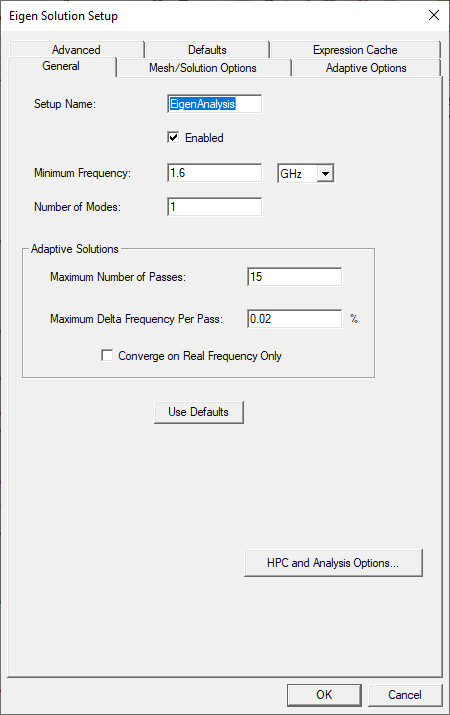
For Eigenmode solution types, do the following:
- Enter the Minimum Frequency and the frequency units.
- Enter the Number of Modes. The number must be greater than 0 and less than 20.
If you are performing an adaptive analysis, enter 2 or more passes in the Maximum Number of Passes box, and then specify the remaining adaptive analysis parameters for HFSS.
For Eigenmode solutions, if you are not performing an adaptive analysis, entering 0 will enable you to bypass the adaptive analysis process and just perform a frequency sweep. For driven problems HFSS always requires at least one adaptive pass. Entering 1 will also bypass adaptive analysis, generating a solution only at the solution frequency you specified.
You can check Converge on Real Frequency Only.
The lower right corner also contains a button for HPC and Analysis options. Here you can select or create an analysis configuration.
The Adaptive Options tab includes adaptive analysis settings.
- Maximum Refinement Per Pass
- Maximum Refinement
- Minimum Number of Passes
- Minimum Number of Converged Passes
The Mesh/Solution Options tab contains the following options: Mesh settings for lambda refinement options, the Order of Basis setting.
The Advanced tab contains settings for mesh linking, and whether to Save Fields and Save radiated fields only. You must save fields if you intend to plot or post process fields.