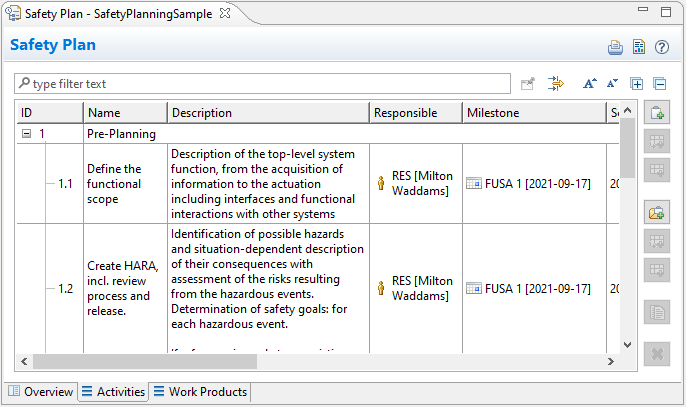
This chapter explains how you can break down your safety plans into activities or groups of activities and describe the list of work products.
You define the phases of the project by defining activities or activity groups that represent sublevels of activities. For each activity, you can specify a Description, assign a Responsible user, set Milestone and Scheduled Date, identify a Done status, and associate a Work Product. You can always add additional columns for describing information relevant to activity monitoring.
A Safety Plan is a new concept that you must add to your medini analyze project before you can describe the safety activities.
To create a safety plan, complete these steps:
In the Model Browser, insert a "Planning" package in your project.
Right-click the package and select > .
In the Model Browser, double-click the new Safety Plan to open it.
In the open Safety Plan, select the Activities tab. Use the buttons on the right to create, edit, delete, or reorder activities and sublevels of activities in the table.
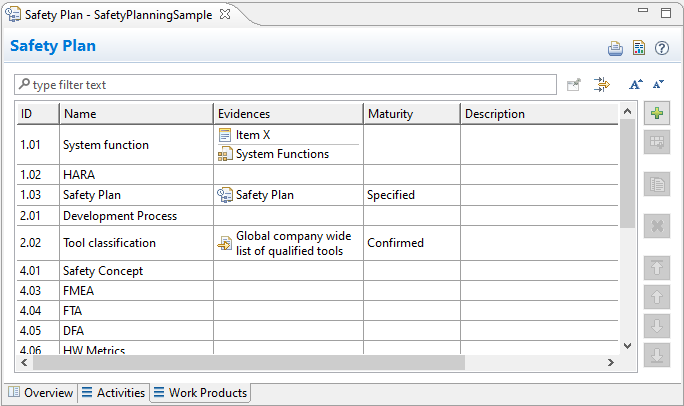
A work product is a result that is required as part of the safety case. In this Work Products tab, you can define all the work products you need to provide evidence about safety activities.
Specify each work product by defining its ID and its Name, by identifying the type of document required as evidence by the safety standard, and by defining the Maturity level to be monitored for each document. To complete the work product, you can add a Description.[KC where are these options? I only have ID, Name, Description. Also, it's not showing up in my Model Browser?]
To define a work product, complete these steps:
In the Model Browser, double-click the added Safety Plan to open the Safety Plan Editor.
Select the Work Products tab.
Use the buttons on the right to add, edit, delete, or reorder work products in the table.
To add columns such as "Evidences" and "Maturity", right-click the column header row and select .