Often a number of documents or other electronic material specifying selected aspects of a system or which just related to functional safety project (e.g. legal requirements, accident statistics) do already exist. This may include MS Office documents, pictures and many other types of documents. In order to let such information be part of the project, external documents may be included (i.e. copied) in the project or be referenced by it (i.e. leaving the documents on their original storage location).
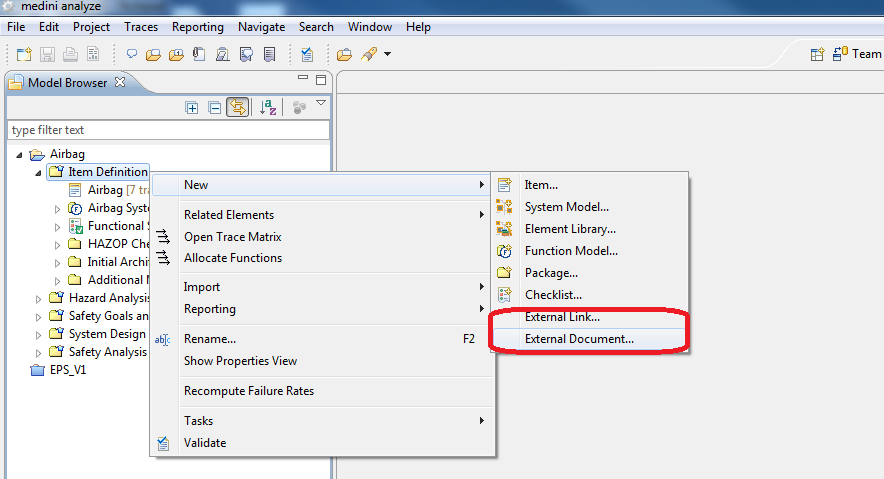
The functionality "External Document" is available in the "New" context menu of all packages. If selected, an arbitrary file can be chosen and be copied into the project. The added external documents will be shown in the package. Double-clicking on the document entry will open it in the appropriate registered editor (e.g. MS Word for Word-Documents or Adobe Acrobat for PDF-documents).
If a document shall be exchanged e.g. with a new version of the file that was created or changed outside of medini analyze, the context menu entry "Update..." can be used to select the new file.
The external document can be removed from the project using the entry "Delete" from its context menu.
If a document shall be extracted from a medini analyze project, the context menu option "Export -> To file system..." can be used.
In case referencing is required, the "Link External Resource" must be selected from the same context menu. Please provide a descriptive name and a valid URL for the external resource.
Examples for such URL's are
file://\\aServer\somedocument.doc for a document on a local server aServer
http://www.iso.org for a web based resource
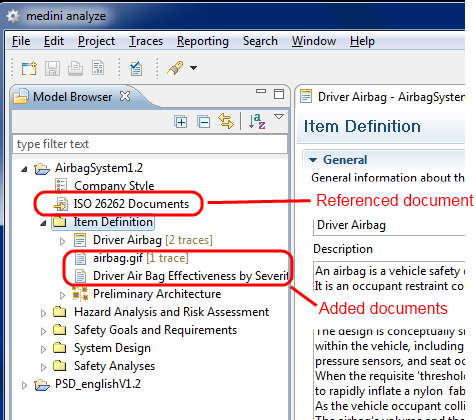
Double-clicking on such an entry in the model browser will use the system web browser to open the resource referenced by the URL. By choosing "Edit external resource" from the entries context menu the name as well as the URL of the resource can be modified; with "Delete" it can be completely removed from the project.
Drag and drop is supported for external documents as well as for links to external resources:
Drag & Drop of a file from the Windows Explorer to any package in the medini analyze Model Browser will copy that document to the selected package in the medini analyze project
If the ALT-key is pressed when dropping a file from the Windows Explorer to a medini analyze package, a link will be created instead of copying the file into the project
Documents as well as references may be moved freely between different packages within the same medini analyze project by drag&drop in the Model Browser.
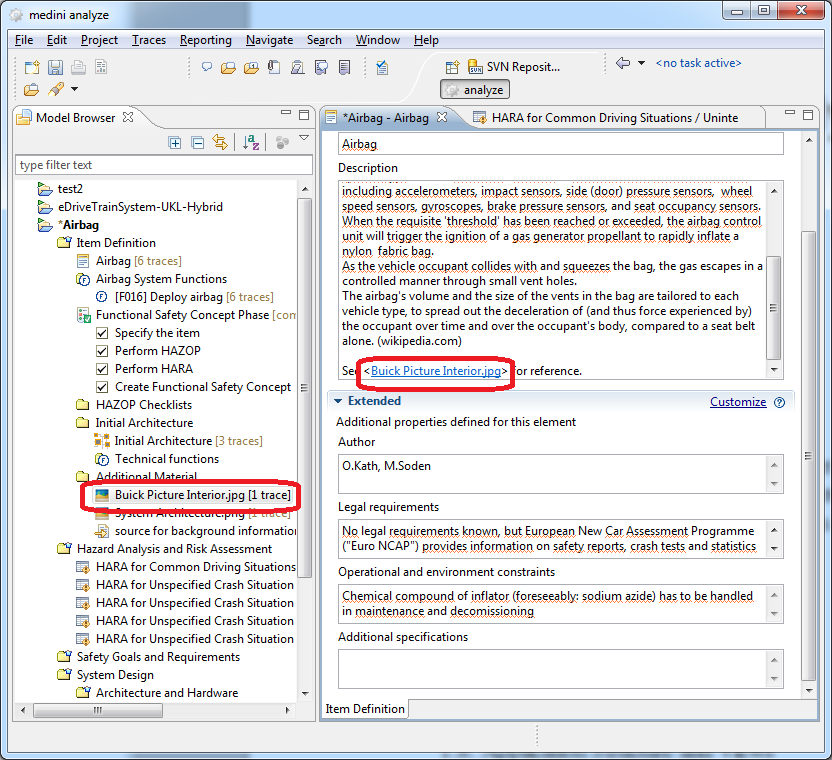
It is possible to refer to external documents from text fields in form editors. In order to create such a reference, the external document name has to be inserted into the text within brackets like depicted in the figure. If such reference is inserted, it is possible to open the external document by clicking the reference.