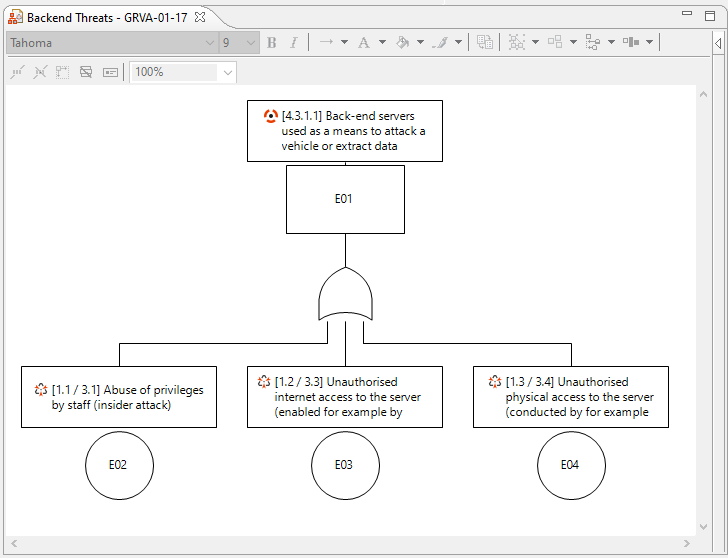
Attack Trees or Attack Dependency trees are used to combine known attacks and logical gates to complex attack scenarios, basically modeling bottom-up attack paths leading to top level threats. Attack Trees can be also used to detail attack paths and scenarios for threats, to actually find attacks (that exploit for example vulnerabilities). Attack Trees can be used to estimate likelihood levels for threats based on attack knowledge, but also to observe the most effective way to mitigate a threat.
To create attack scenarios resp. model attack dependencies:
Select a package that is designated for attack tree modeling and use "New | Attack Tree" to create a new attack tree or open an existing one by double clicking the attack tree or any of its diagrams
Drag and drop attacks from any of the attack collections available in the Model Browser to the diagram. This automatically relates the tree with the attacks in the collection. Select any of the events in the tree and open the Property View to see the relation between the event in the Attack Tree and the Attack object
Connect them by using the logical gates from the palette, for example "AND" gates and "OR" gates. Gates can be dropped onto connections as well to insert a gate between two events that are already connected
Use the "Arrange" button to layout the tree properly and automatically
To model attack trees and paths and derive new attacks:
Select a package that is designated for attack tree modeling and use "New | Attack Tree" to create a new attack tree or open an existing one by double clicking the attack tree or any of its diagrams
Create new events by dragging an Event from the palette. Give the Event an expressive name to describe either a weakness in the system or an attack method or executed attack
Select any event in the tree and use "Derive | Attack" to create a new Attack out of the Event or alternatively, link the Event to an already known Attack. You can only derive Attacks from events that do not yet represent an element.
Select an Attack Collection to create a new Attack. The Event name is used to give the new Attack a name and the Event is linked to the newly created Attack. In case there is already an Attack that matches the event in the tree, you can select it and the event will be linked to the existing attack, with the option to overwrite or keep the name of the attack