


Bodies that come into contact exert forces on each other, which can cause deformation and motion. Bodies or surfaces in contact:
Do not interpenetrate.
Can transmit compressive normal forces and tangential friction forces.
Can be bonded together (linear contact if MPC formula is used, which is the default for bonded contact).
Can separate and collide (nonlinear contact).
Can slide without friction (linear contact) or with friction (nonlinear contact).
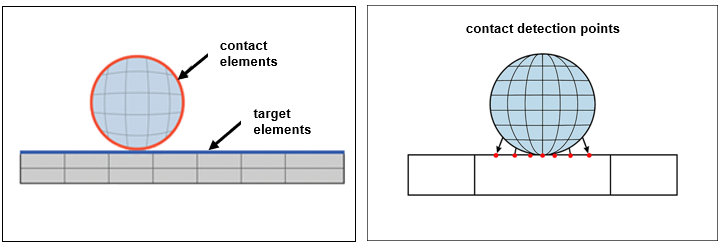
To capture the physics of this interaction, the two bodies must be assigned contact and target elements to model how forces are transferred between them. This is known as a contact pair. The following figure shows how these elements are defined. Contact elements are located on the body that moves into contact with the target body. They use detection points located at either their nodes or integration points of the mesh. Target elements are located on the body that receives contact. When contact detection points pass through the target face, it is in contact. It is open gap otherwise. You can increase the number of contact detection points by specifying a finer mesh for the contact body/surface.
Contact pairs can be created either automatically or manually:
| Automatic contact detection – Contact pairs are created automatically when you import geometry into your Mechanical project. The Mechanical application adds contact pairs based on whether the proximity of two separate bodies (solid, surface, and line bodies) is within a tolerance. You can adjust the auto-detection tolerance by using a slider or by entering a numerical value. The application generates a contact wherever a gap between bodies is smaller than the specified tolerance. By default, the contact type is bonded. |
| Manual contact definition – You can manually define contact pairs by inserting a Contact Region into your model. Define contacts manually if automatic detection does not capture all contact regions, or if you want to change the contact type, switch the contact and target surfaces, or change other contact settings from their default values. |
Tip: These free Ansys Innovation Space courses will help you get started with contact simulation:
Contact Mechanics – Overview of basic contact mechanics.
Connecting Parts Together – Discusses how to model connected parts in the Mechanical application, including contact.