


Enable Washers controls the pattern of the mesh generated around any holes in a sheet body. When Enable Washers is Yes, the mesher generates mesh with a layer of equally quadratic elements— called washers —around each hole. The default value for Enable washer is Yes.
The Enable Washers option is only available for sheet bodies when Use Adaptive Sizing, Capture Curvature, and Capture Proximity are all set to No. If the model contains both solid and sheet bodies, Enable Washers is available, but generates washers only for the sheet bodies.
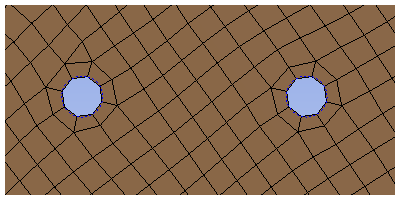
If you enable washers, you can specify the height of the washers and whether the washer element nodes should be moved for holes that are close to a boundary. You should be aware of the scenarios in which a washer might not be generated for a hole.