


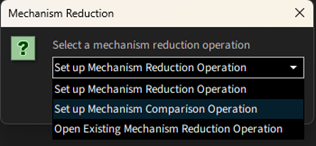
For comparing results of a reduced mechanism to a full mechanism, select the Set up Mechanism Comparison Operation option, as shown in Figure 2.22: Option to choose for comparing reduced and full mechanisms while setting up mechanism reduction operation, while starting a mechanism reduction operation. This utility can be useful for several circumstances, for example to compare a mechanism that was reduced for some operating conditions but now needs to be used for other operating conditions.
Figure 2.22: Option to choose for comparing reduced and full mechanisms while setting up mechanism reduction operation
In the Operation Setup panel, select the Method as Compare Initial vs Target Projects, as shown in Figure 2.23: Option to choose in Operation Setup panel. Subsequent panels for setting up the comparison operation are similar to setting up a mechanism reduction operation, as explained in Controlling Target Error in Skeletal Mechanisms. This includes selecting targets such as ignition times and emissions, setting their tolerances, and selecting which operating conditions to use.

Once the project is set up, it can be run from the Run Reduction panel, and the results can be viewed as shown in Figure 2.24: Viewing comparison results in the Run Reduction panel.
