The mapping.in file contains all the relevant mapping data, which are described below for the different mapping options. It is written in a standard ASCII format.
As stated above, Envyo® licenses can also be created for a specific range of users identified through IP ranges. In this case, a single machine server or a license server triad can be provided according to provided IP, MAC, and PortID(s). The provided license server systems have been tested for Linux-Linux, Windows-Linux, and Windows-Windows system environments.
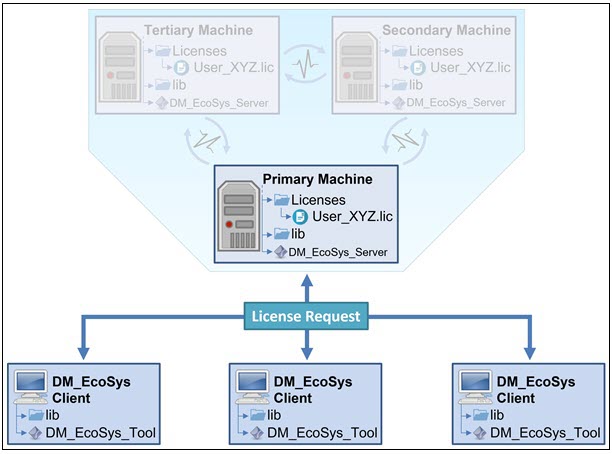
As shown in Figure 1.2: Illustration of Envyo® with a Faded Triad Setup, the single machine license server installed on machine XYZ can be accessed by Envyo® executables via TCP/IP connection. Through the provided port, Envyo® connects with the server system and checks the license availability. In addition, the license server triad checks triad heartbeat before answering client requests. Required information for availability and connection are provided on both the license server and user side within the respective Licenses folder containing the *.lic file. The license server reports back to the machine requesting the license, indicating whether it is available or not. An ASCII based *.log file is written in parallel to track status and access to the license server. If the license server is restarted, a new *.log file is created, with a different timestamp in its title to distinguish it from earlier license server start-ups.
The Envyo® license server is illustrated in Figure 1.2: Illustration of Envyo® with a Faded Triad Setup. Client machines connect to the license server using the specified environment variables and request a license. You must provide required firewall permissions to enable client-server and server-server communications through port IDs. All connections use the TCP/IP protocol and are encrypted to avoid unauthorized listening.
The license server logs the license requests without recording the requesting machine's IP or username. However, this functionality can be applied upon the user request. An example of the *.log file content is given below:
\$#------1|--------2|--------3|--------4|--------5|--------6|--------7|--------8|
\$# |
\$# DYNAmore Ecosystem License Server Log |
\$# |
\$# Date : 2022-11-14 |
\$# |
\$#------1|--------2|--------3|--------4|--------5|--------6|--------7|--------8|
\$# |
\$# Thank you for using DYNAmore ecosystem! |
\$# |
\$# Initializing license server... |
\$# |
\$# License directory |
\$# ./Licenses |
\$# not found |
\$# Please copy license file *.lic to this directory. |
\$# License Server Condition : 1 |
\$# |
\$# License file could not be found! |
\$# Search path: |
\$# ./Licenses |
\$# |
\$# License server operations could not be started! |
\$# Restarting... |
\$# |
\$# License file found in: | \$# /home/LicenseServerLocation/Licenses/FileName.lic |
\$# |
\$# License Server Condition : 0 - Server license is valid and ready |
\$# for incoming requests. |
\$# License server is ready! |
\$# |
\$# Date : 2022-11-14 13:19:15 |
\$# |
\$# License server Condition : 0 - Server license is valid and ready |
\$# for incoming requests. |
\$# |---> Waiting for license request... |