


The Coating Visibility Wizard is a complete application that runs inside Rocky and enables you to quickly and easily define the spray nozzle parameters for your coating applications.
It does so by taking the nozzles’ position and spray shape and automatically setting this information into Rocky 3D View. In the end, the wizard will provide each particle coating and coating variability analysis (refer to the Technical Details section for more information).
The coating variability analysis is evaluated using the particle visibility, which is the percentage that a particle (or particle region) occupies within the camera view (representing the spray area) in a given time and is accounted by a pixel by pixel verification (refer to the Technical Details section for more information).
Preview capabilities are available inside the wizard, which enables the visualization of the Nozzles positions and Spray Mask parameters before running the wizard. The wizard also includes embedded post-processing capabilities, which allows you to analyze the coating visibility results.
This wizard calculates the coating visibility for each output time and then automatically creates new properties based on those calculations.
The coating visibility wizard does not consider any influence of the spray flow rate on the coating analysis, nor can it be used to capture the changing of coating uniformity due to the spray flow rate. In other words, if the spray flow rate has a high velocity and this plays a role in the particles’ dynamics, this cannot be represented using this wizard. The wizard only computes the visibility percentage of the particle related to the entire 3D View (spray zone area).
This wizard provides a menu with a few options. Currently, we have options for File, Template and Help, which are shown in the figures below:
Options for File:
• Close: This button closes the wizard.
Options for Template:
• Reload: This button reloads the last wizard setup configuration if you had used the wizard previously on the same Rocky project.
Tip: This is useful if you are making tests using this wizard on the same Rocky project.
• Load: This button loads a wizard setup configuration template that you had saved previously.
• Save: This button saves the current wizard setup configuration in a file as a template.
Tip: This file can be loaded with the Load button.
Opions for Help:
• Manual: This button opens this manual.
Inside the Setup tab there is the Nozzle Injection sub-tab (Figure 7.4: Coating Visibility Wizard options for Nozzle Injection.) which is used to set nozzle injection parameters for the wizard. You also have a Nozzles Preview to visualize the positions of each nozzle.
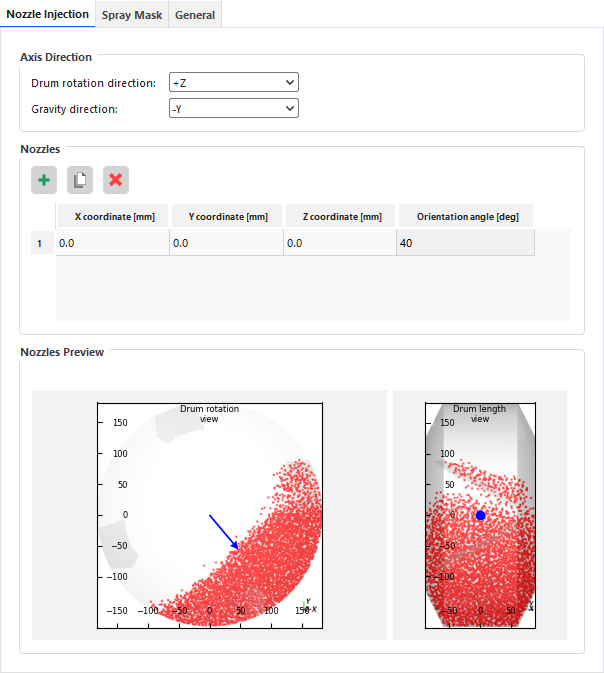
Parameters for Axis Direction:
• Drum rotation direction: This specifies the drum rotation direction of your coater used on the Rocky project setup.
Range: [+X, +Y, +Z, -X, -Y, -Z]
• Gravity direction: This specifies the gravity direction used on the Rocky project setup.
Range: [+X, +Y, +Z, -X, -Y, -Z]
Note: Make sure the Axis Direction matches with your Rocky project, this information will be used to align the nozzles position.
The wizard provides three buttons to help you define the nozzles, as shown below:
• Add row: This button creates a new entry row on the nozzles table
• Duplicate row: This button duplicates a pre-selected entry row on the nozzles table.
• Remove row: This button removes a pre-selected entry row on the nozzles table.
Parameters for Nozzles:
• X coordinate: This specifies the x-coordinate of the nozzle injection, in mm.
Range: [Any value]
• Y coordinate: This specifies the y-coordinate of the nozzle injection, in mm.
Range: [Any value]
• Z coordinate: This specifies the z-coordinate of the nozzle injection, in mm.
Range: [Any value]
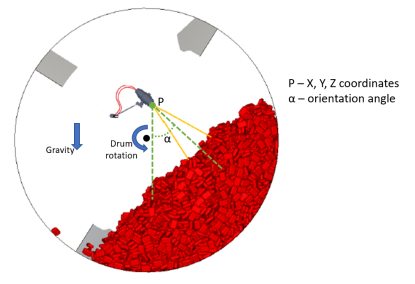
• Orientation angle: This specifies the nozzle orientation angle regarding the gravity and drum rotation direction, in deg. Figure 7.6: Definition of the orientation angle for the Coating Visibility Wizard. shows the definition of the orientation angle. It is measured in the drum rotation plane and in relation to the gravity direction.
Range: [Positive values]
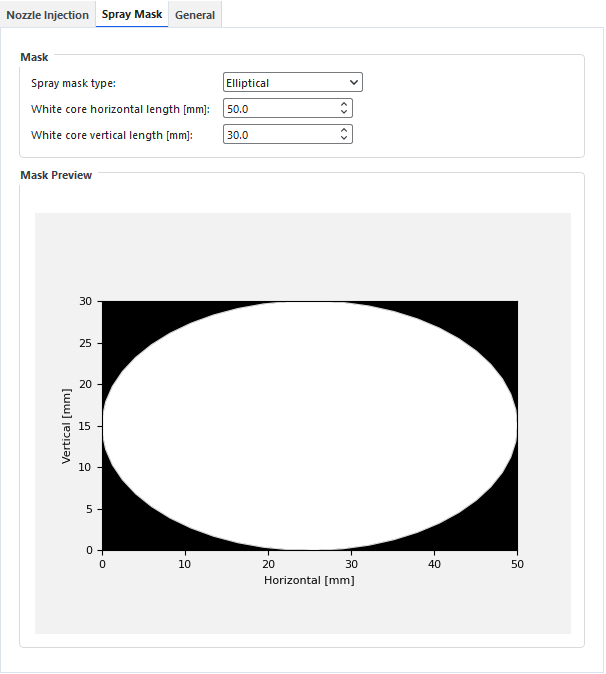
Inside the Setup tab there is the Spray Mask sub-tab (Figure 7.7: Coating Visibility Wizard options for Spray Mask.), which is used to set the spray shape for the wizard. You also have a Mask Preview to visualize the spray mask generated by the entered parameters.
Parameters for Mask:
• Spray mask type: This specifies the spray shape that will be used by the wizard.
Range: [Default (Rectangular), Elliptical, Custom]
• Rectangular horizontal length: This specifies the horizontal length of the rectangle (or window) that represents the spray mask, in mm.
Range: [positive values]
Note: This option is only available for Default (Rectangular) or Custom spray mask type.
• Rectangular vertical length: This specifies the vertical length of the rectangle (or window) that represents the spray mask, in mm.
Range: [positive values]
Note: This option is only available for Default (Rectangular) or Custom spray mask type.
• White core horizontal length: This specifies the horizontal length of the ellipse that represents the spray mask, in mm.
Range: [positive values]
Note: This option is only available for Elliptical spray mask type.
White core vertical length: This specifies the vertical length of the ellipse that represents the spray mask, in mm.
Range: [positive values]
Note: This option is only available for Elliptical spray mask type.
• Custom spray mask path: This specifies the path for the image used as a custom spray mask. This image can be generated in third-party software and needs to be a grayscale *.png image.
Range: [-]
Note: This option is only available for Custom spray mask type.
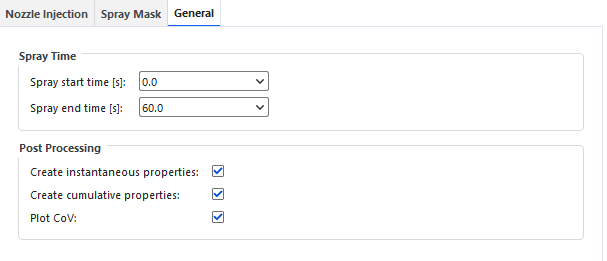
Inside the Setup tab there is the General sub-tab (Figure 7.8: Coating Visibility Wizard options for General.) which is used to set general parameters for the wizard.
Parameters for Spray Time:
• Spray start time: This specifies the initial output to be considered in the coating analysis.
Range: [available outputs]
• Spray stop time: This specifies the final output to be considered in the coating analysis.
Range: [available outputs]
Parameters for Post Processing:
• Create instantaneous properties: This specifies if the wizard will create or not the instantaneous visibility properties, which is the particle visibility obtained for each output per nozzle.
Range: [On, Off]
• Create cumulative properties: This specifies if the wizard will create or not the cumulative visibility properties, which is the cumulative sum of the instantaneous particle visibility per nozzle.
Range: [On, Off]
• Plot CoV: This specifies if the wizard will create or not the plot for the inter-tablet variability (CoV).
Range: [On, Off]
After processing, the wizard will provide an embedded analysis of inter-tablet variability (CoV) (Figure 7.9: Inter-tablet variability (CoV) created by the Coating Visibility Wizard.). Also, a Power Law Extrapolation will help you to get the time needed for a specific CoV value (refer to the Technical Details section for more information).
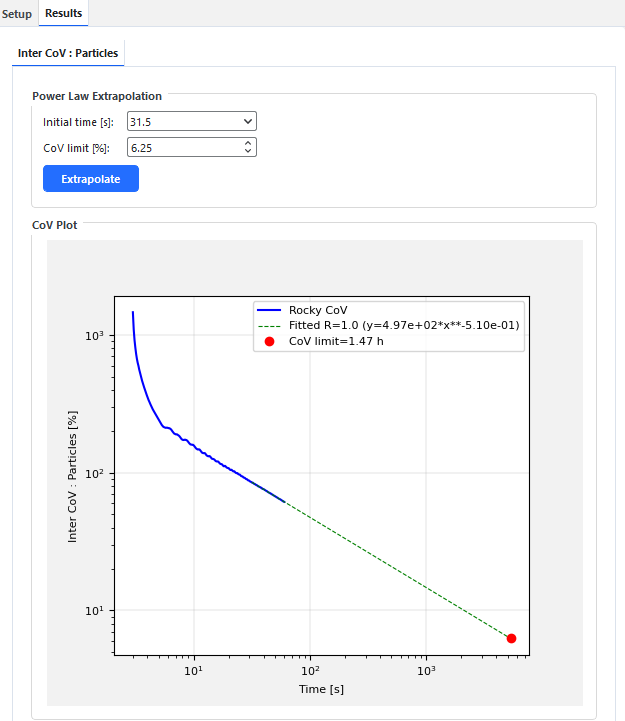
Parameters for Power Law Extrapolation:
• Initial time: This specifies the initial output to be considered in the power law fitting. The final output for the power law fitting is set as the last available output.
Range: [available outputs]
• CoV limit: This specifies the CoV desired, in %, which is considered in the power law extrapolation.
Range: [Positive values]
In addition, the wizard can create two new properties for each nozzle and two new properties for the combination of all nozzles (Figure 7.10: Particles properties created by the Coating Visibility Wizard.), depending of your inputs for Post processing options (refer to the General options section for more information).
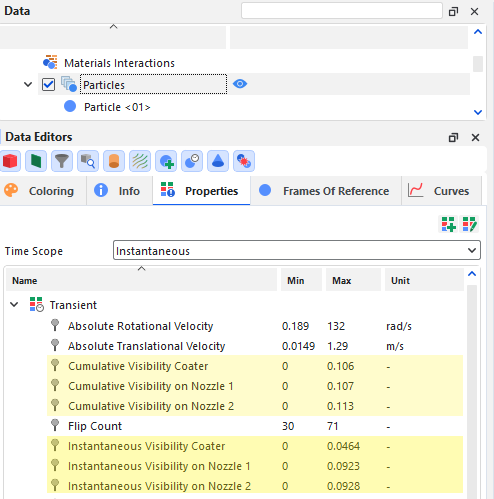
You will also have these properties for each particle group in case you have a shaped particle.
Note: For particle groups (intraparticle), these properties are related to each triangle of the particle surface.
You can visualize these new properties after closing the wizard:
• Cumulative Visibility on Nozzle X: Returns the cumulative visibility from the initial output time up to the currently selected one.
• Instantaneous Visibility on Nozzle X: Returns the fraction of the 3D View area exposed per particle at the currently selected output time.
• Cumulative Visibility Coater: Returns the arithmetic average for all nozzles of the cumulative visibility from the initial output time up to the currently selected one.
• Instantaneous Visibility Coater: Returns the arithmetic average for all nozzles of the fraction of the 3D View area exposed per particle at the currently selected output time.
Note: The Coating Visibility Wizard assumes that all nozzles inside the coater have the same mass flow. Thus, the global value Cumulative Visibility Coater would receive the total coater mass-flow, while the Cumulative Visibility on Nozzle would receive the nozzle mass-flow (total mass / number of nozzles). For this reason, there is no need to multiply it by the number of nozzles, as the Cumulative Visibility Coater is the arithmetic average value calculated from every Cumulative Visibility on Nozzle upon every particle and this value should be related to the total mass-flow deposited by the entire coater. For instance, Instantaneous Visibility Coater has the same principle, however, it shows an instantaneous value of the particle visibility.
From the PrePost script panel, launch the Coating Visibility Wizard by clicking its Play script button.
Define the Axis Direction and Nozzles according to your project (refer to the Nozzle Injection options section for more information).
Note: Make sure the Axis Direction matches with your Rocky project, this information will be used to align the nozzles position.
Define the Mask and the Spray Time parameters (refer to the Spray Mask options section and General options section for more information).
Important: You can set Off for Create instantaneous properties post processing in case you have a lack of memory.
Note: To be able to calculate the CoV is needed to set On for Create cumulative properties.
Click on Calculate button.
Note: The wizard calculates the visibility at each separate output. Because of that, it might take some time to complete the calculations and you will not be able to interact with the Rocky UI in the meantime.
After the wizard is finished calculating, a new Results tab will appear. You can now make the inter-tablet variability analysis (refer to the Post-processing abilities section for more information).
Note: The wizard has created new properties for Particles and Particle Groups entities, you can visualize them after closing the wizard.