


The text panes in the Mechanical Scripting Editor, Snippet Editor, and Shell all provide autocompletion.
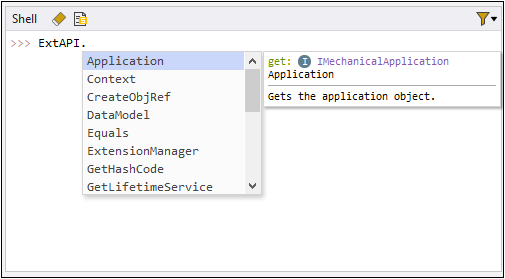
Autocomplete Tooltips
When you place the mouse cursor over any property or method in the list of suggestions
provided, the tooltip displays information about this item. The following image shows
the tooltip for the property Models.
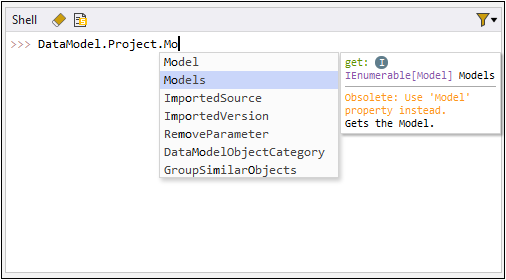
Tooltips use color-coding to indicate the syntax:
| Color | Syntax |
|---|---|
| Green | Accessibility |
| Purple | Type |
| Orange | Warning |
| Blue | Argument |
Autocompleting Properties
General formatting for autocompleted properties follow:
get/set mode:
ReturnTypePropertyNameDescription of the property
Returns: Description of what is returned (if any)
Remarks: Additional information (if any)
Example: Sample entry (if any)
Autocompleting Methods
General formatting for autocompleted methods follow:
ReturnTypeMethodName(Argument TypeArgument Name)Argument NameReturns: Description of what is returned (if any)
Remarks: Additional information (if any)
Example: Sample entry (if any)
Additional Autocomplete Information
Tootltips can also provide:
.NET properties where applicable
Warning messages when special attention is needed
Prototype information for methods when cursor is inside brackets and indexers when cursor is inside square brackets
Overloaded methods, including the following details:
Number of overloaded methods
Prototypes for overloaded methods (accessed by pressing the arrows in the prototype tooltip)
Members for overloaded methods
The tooltip for an overloaded method is a list of all members from all overloaded methods.
Examples of Autocomplete Tooltips
The following images show two different tooltip examples for the method
Equals in two different stages of using autocompletion:


Keyboard Shortcuts for Autocomplete
The autocompletion tooltip provides these keyboard shortcuts:
Enter: Inserts the suggestion.
Esc: Closes autocompletion tooltip.
Ctl + Space: Forces autocompletion to reopen.