


Ansys SimAI is a cloud-enabled generative artificial intelligence platform that increases simulation speed. It allows you to train the AI models to accurately predict fields in minutes. This can be achieved now from optiSLang using connector plugins Ansys SimAI-Upload and Ansys SimAI-Training nodes.
Ansys SimAI-Upload node can be used to upload the training data generated from existing optiSLang workflows to SimAI platform. See the SimAI documentation for more information on the Training data preparation.
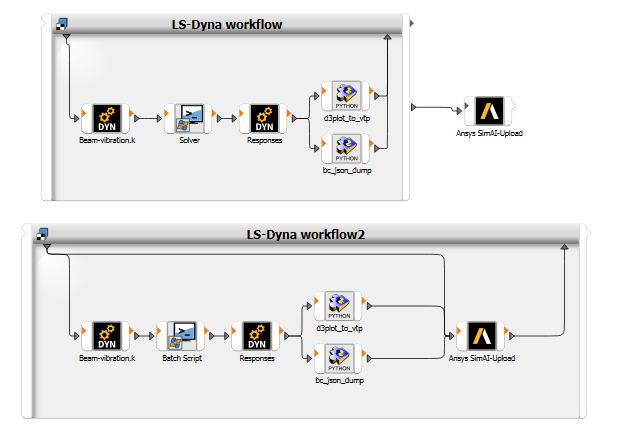
This node can be added as an upstream to an existing workflow where the training data for all Designs will be uploaded at once, or the node can be added into the System such that training data is uploaded per Design. Both these use cases can be achieved by connecting appropriate slots. More information on slots can be found in the section Additional or special slots below.
The images show how Ansys SimAI-Upload node is used with an LS-Dyna workflow.
Requirements
Training data conversion should be done prior to using Ansys SimAI-Upload (Beta) node. surface.vtp and boundary_condition.json should be generated from the output files of the workflow of interest.
Settings
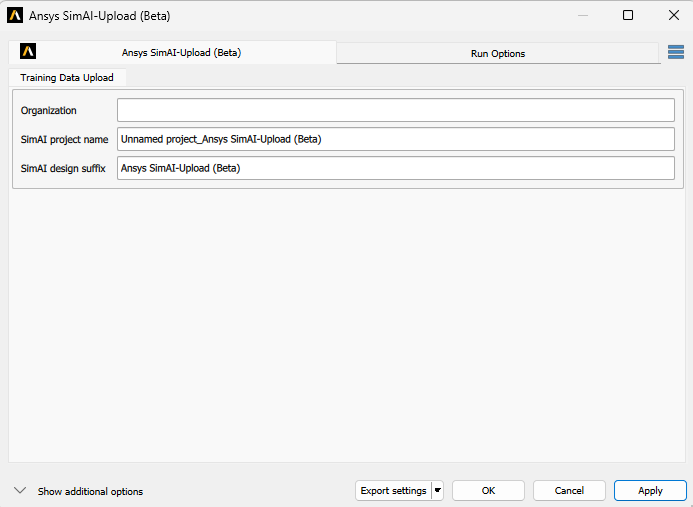
| Setting | Description | Default |
|---|---|---|
| Organization | Name of the organization which the user can use to access the SimAI portal | - |
| SimAI project name | Name of the project to be created to add training data | {optiSLang project name}_{node name} |
| SimAI design suffix | Each training data uploaded should be unique and hence a suffix would be added to optiSLang design folder name, for example "Design000x" | node name |
Additional or special slots
| Slot Name | Slot Type | Data Type | Description |
|---|---|---|---|
| IWorkingDirectories | input | DesignPoint | When wanting to upload all the designs at once, connect this slot
to OWorkingDirectories slot from the system |
| IWorkingDir | Input | Path | When wanting to upload training data per design, connect
IWokingDir to IOWorkingDir slot from
the system |
Run Options
This node has general Run Options. The number of supported options is individual for each node.
Limitations
On first login to the SimAI portal, a web browser page will be opened where you need to authenticate with credentials.