


This license model is edition-based. Some features require an additional AI+ license while others show advanced functionality if an AI+ license is available.
|
Capabilities | DesignXploration-Base | Pro | Premium | Enterprise | AI+ |
|---|---|---|---|---|---|
| Design Studies | |||||
| Number of Parameters, Constraints, Objectives | ≤10, ≤5, ≤2 | unlimited | |||
| Basic deterministic DOE | ✓ | ✓ | ✓ | ✓ | |
| Basic Optimizer (NLPQL, EA) | ✓ | ✓ | ✓ | ✓ | |
| Basic Response Surface Methods | ✓ | ✓ | ✓ | ✓ | |
| Advanced Optimizers | ✓ | ✓ | ✓ | + | |
| Advanced DOE & Metamodeling | ✓ | ✓ | ✓ | + | |
| Signal Evaluation | ✓ | ✓ | ✓ | ||
| Robust Design Optimization | ✓ | ✓ | ✓ | ||
| Reliabilty Analysis | ✓ | ✓ | |||
| Uncertainty Qualification for 2D & 3D fields | ✓ | ||||
| Field meta-modeling (signals, 2D/3D) | ✓ | ✓1 | |||
| Process Integration and Workflow Orchestration | |||||
| Embedded in Ansys2 | ✓ | ✓ | ✓ | ✓ | |
| Build and automate workflows | ✓ | ✓ | |||
| Integrate 3rd party tools | ✓ | ✓ | |||
| App generation | ✓ | ||||
| Concurrent Solver Variant Licensing | +3 | +7 | |||
| Postprocessing3 | |||||
| Scalar MOP (optiSLang postprocessing) | ✓ | ✓ | ✓ | ||
| Signal MOP (optiSLang postprocessing) | ✓ | ✓ | ✓ | ||
| Field meta-modeling 2D/3D (optiSLang 3D postprocessing) | ✓ | ||||
+ Shows advanced features if an AI+ license is available.
1 Requires an additional AI+ license.
2 optiSLang inside Workbench, Electronics Desktop, and Fluent. LS-OPT is enabled with optiSLang Pro.
3 The execution of optiSLang Post Processor requires a license according to the methods listed in optiSLang 3D Post-Processing Licensing.
optiSLang License Features
Pro has the dedicated license feature optislang_level1.
Premium has the dedicated license feature optislang_level2. A cascade of optislang_level2 and optislang_level1 is consumed on the server side. It enables even more concurrent parametric design point variations which support HPC. Additionally, a dynardo_osl can be consumed to provide backwards compatibility for legacy customers.
Premium can also be served by the dynardo_osl feature for backward compatibility, but in this case, level-based licenses must not exist on the server.
Enterprise has the dedicated license feature optislang_level3. A cascade of optislang_level3, optislang_level2, optislang_level1, and dynardo_osl is consumed on the server side. It enables concurrent parametric design point variations.
AI+ has the dedicated license feature optiSLang_ai_plus. AI+ is a complementary license which enables advanced methods of metamodeling and optimization for more efficient parametric analysis.
Note: Support of Dynardo licensing was discontinued with version 21R2.
optiSLang Embedded Functionality
optiSLang functionality is available embedded in the parametric modeling environment of the following products to access optiSLang features within the product.
LS-OPT 2022 R2 and later
Workbench 2022 R2 and later
Electronics Desktop 2022 R2 and later
Ansys Fluent 2023 R1 and later
Concurrent Parametric Design Point Variations
This license model introduces optiSLang concurrent parametric design point variations.
One Premium license allows you to run four concurrent parametric design point variations. One Enterprise license allows you to run eight concurrent parametric design point variations.
For a table that lists Ansys solvers that support optiSLang concurrent parametric design point variations and the number of cores included with each solver, see Ansys HPC Pack Licenses in the Ansys, Inc. Licensing Guide.
You can use multiple optiSLang licenses for parametric design point variations. For example:
3x Premium = 1 base solver + 3 + 3 + 3 = 10 concurrent parametric design point variations
3x Enterprise = 1 base solver + 7 +7 +7 = 22 concurrent parametric design point variations
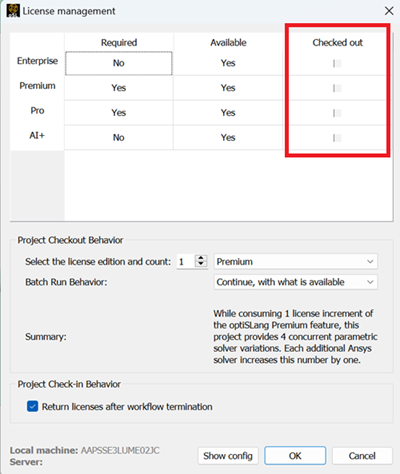
To adjust the number of licenses used, open the License Management dialog box. To do so, from the optiSLang menu bar, select > .

Using optiSLang Design Point Variation with HPC-based Design Point Variation and Multiple Solver Licenses
You can combine optiSLang inbuild parametric design point variations with available HPC based licensing for concurrent simulation of parametric design point variations, requiring one HPC Pack per additional parametric design point variation.
You can also combine optiSLang inbuild parametric design point variations with available additional solver licenses for parametric design point studies.
License Checkout Behavior
An Enterprise feature locks a Premium as well, to avoid using multiple instances of optiSLang with a single licenses. It works the same for the dynardo_osl feature.
The HPC Pack increments change dynamically according to use.
Licenses will be checked out and reserved until the study has finished. All licenses that are consumed during a concurrent parametric design point variation are held for the duration of the design point study, based on the maximum count of each license required for a given design point study.
Checkout fails, when not enough licenses are available.
optiSLang design point variants
Setting exists to bypass abort and to continue with the existing amount
HPC based parametric design point variations
Grab from the HPC increments beyond the optiSLang design point variants
Consume additional solver licenses if available, otherwise abort
Solver
Consume additional solver licenses if available, otherwise abort
optiSLang Parametric Design Point Variation Forwarding
The forwarding shares a context created by optiSLang with the supporting Ansys products used in the workflow. It requires all involved applications to use the same license server or triad and to run in the same version. All involved components must be version 2021 R2 or later.
Forwarding is available for process-based nodes in general, and for plugins if individually supported.
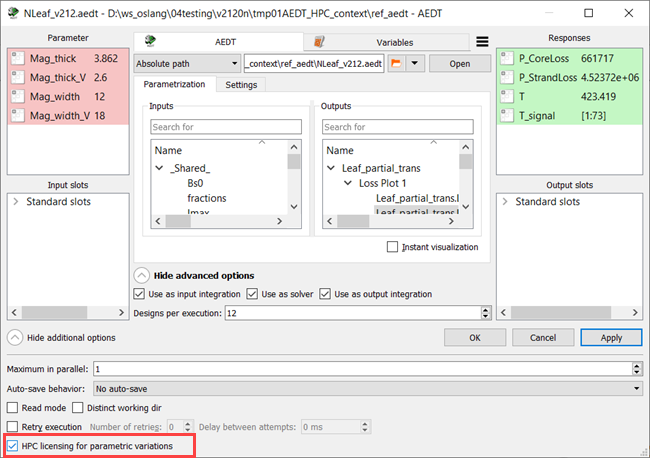
Forwarding is available for these built-in integration nodes:
Electronics Desktop
Workbench
RSM (local) setup required
DCS
Note: To use the forwarding context, you must expose it to the application running under
the context. For this purpose, the context-generating application creates an
environment variable named ANSYS_LICENSING_CONTEXT_DATA that contains
all information about the available context instance.
The consuming application, for example Ansys Mechanical, Fluent, CFX, and so on, expects this environment variable, so you must make sure that it is available in the corresponding starting environment of the process.
With indirect connections, like the use of queuing systems, you may need to explicitly pick up the variable from the optiSLang node environment and inject it into the target environment, for example the script that initiates the solver call directly.
optiSLang 3D Post-Processing Licensing
optiSLang 3D Post-Processing (oSP3D) Python module functions require optiSLang licenses. When using the module inside optiSLang, it shares the optiSLang licenses.
Field metamodeling including signals (sensor) and 2D/3D fields functionality requires optiSLang Pro and AI+ licenses.
Modeling of imperfect structures for UQ (Random Fields) functionality requires an optiSLang Enterprise license.
The licenses remain locked for the lifetime of the Python program. There is no method for releasing them earlier.
When running optiSLang workflows with oSP3D Python Package API calls, the appropriate licenses must be checked out in the optiSLang License Management dialog so licenses are shared with optiSLang.
Excel Add-In Licensing
Licenses are not consumed when using the Excel add-in. A postprocessing license (optislang_level1) is required to open a file with optiSLang postprocessing in the MOP Solver function