


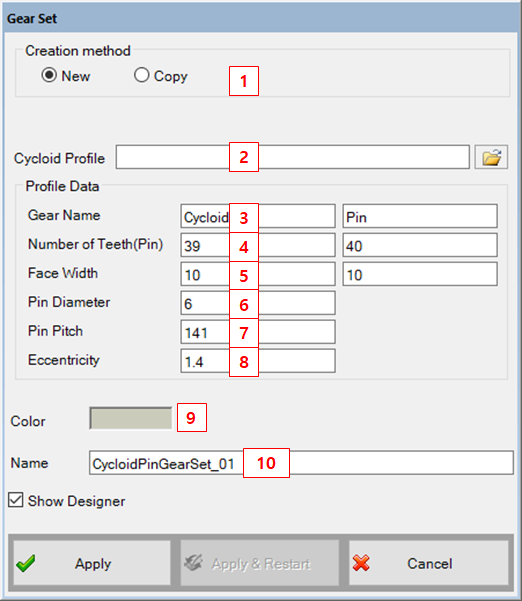
| Parameter | Description |
Dimension (Range) |
| 1. Creation Method | Use to set the creation type. When the "Copy" option is selected, the parameters of created gear set can be defined from the parameters of pre-defined gear set. | N/A |
| 2. Cycloid Profile |
Use to set the file for cycloid profile. Cycloid profile should be defined in origin position. Ex) 68.9, 0 68.8995014, -0.062567533 68.8980063, -0.125090984 68.8955174, -0.187526337 68.8920387, -0.249829717 And the file extension is "txt". | N/A |
| 3. Gear Name | Use to set the names of gears. | N/A |
| 4. Number of Teeth(z1,z2) | Use to set the number of tooth for each gear. If the gear type is the internal gear, the value must be negative. |
N/A (Integer≠0) |
| 5. Face Width(w1, w2) | Use to set the face width. |
Length (Real>0) |
| 6. Pin Diameter | Use to set the diameter of pin. |
Length (Real>0) |
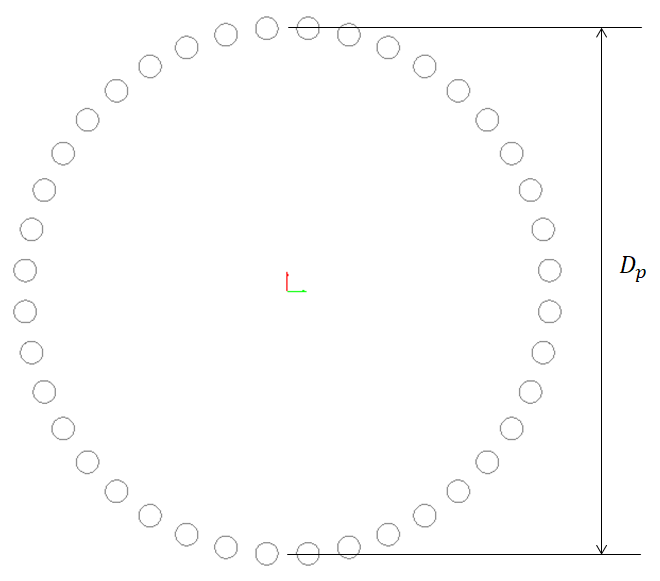
| 7. Pin Pitch |
Use to set the diameter of pin pitch.
|
Length (Real>0) |
| 8. Eccentricity | Use to set the eccentricity between the center of pin set and center of cycloid gear. |
Length (Real>0) |
| 9. Color | Use to set the color. | N/A |
| 10. Name | Use to set the name of gear set. | N/A |