


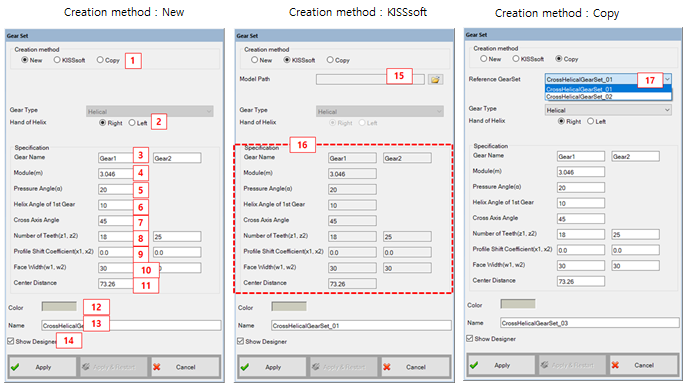
Figure 14.122: Parameters in the Cross Helical Gear Set creation dialog
| Parameter | Description |
Dimension (Range) |
| 1. Creation Method | Use to set the creation type. When the "Copy" option is selected, the parameters of created gear set can be defined from the parameters of pre-defined gear set. | N/A |
| 2. Hand of Helix | Use to select the hand of helix. This parameter set a helical direction of gear. | N/A |
| 3. Gear Name | Use to set the names of gears. | N/A |
| 4. Module(m) | Use to set the normal module. | N/A |
| 5. Pressure Angle(α) | Use to set the normal pressure angle. |
Degree (Real) |
| 6. Helix Angle of 1st gear(driving) | Use to set the helix angle of driving gear. |
Degree (Real) |
| 7. Cross Axis Angle | Use to set the cross axis angle of the pair. This parameter set a meshing condition. |
Degree (Real) |
| 8. Number of Teeth(z1, z2) | Use to set the number of tooth for each gear. If the gear type is the internal gear, the value must be negative. |
N/A (Integer≠0) |
| 9. Profile Shift Coefficient(x1, x2) | Use to set the profile shift coefficient. |
Length (Real) |
| 10. Face Width(w1, w2) | Use to set the face width. |
Length (Real>0) |
| 11. Center distance | Use to set the center distance between each gear. This parameter is used only for 2D graphics in designer. |
Length (Real>0) |
| 12. Color | Use to set the color. | N/A |
| 13. Name | Use to set the name of gear set. | N/A |
| 14. Show designer | Use to open the designer automatically. | N/A |
| 15. Model Path | Select KISSsoft model file. | |
| 16. Specifications | When user create a gear set by using KISSsoft model, specifications are shown as read-only | N/A |
| 17. Reference Gear set | Select the gear set that has already been created. |