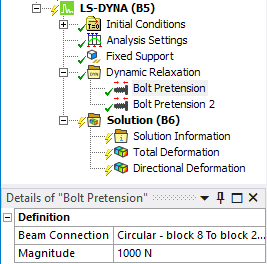
The dynamic relaxation feature (available by clicking  on the LSDYNA Pre tab, or by
right-clicking the LS-DYNA system and selecting Dynamic Relaxing from the Insert menu)
provides preloading for explicit dynamics solutions in LS-DYNA. True dynamic relaxation
(Relaxation Type: Explicit) allows an explicit solver to conduct a
static analysis by increasing the damping until the kinetic energy drops to zero.
on the LSDYNA Pre tab, or by
right-clicking the LS-DYNA system and selecting Dynamic Relaxing from the Insert menu)
provides preloading for explicit dynamics solutions in LS-DYNA. True dynamic relaxation
(Relaxation Type: Explicit) allows an explicit solver to conduct a
static analysis by increasing the damping until the kinetic energy drops to zero.
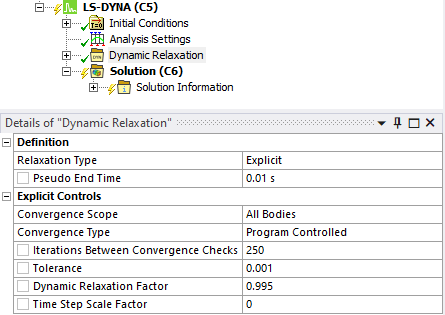
The damping works by scaling nodal velocities by the Dynamic Relaxation Factor each time step until the ratio of current distortional kinetic energy to peak distortional kinetic energy (the convergence factor) falls below the convergence tolerance (Tolerance).
By default, the convergence is checked on the whole model. It can be restricted to a set of bodies by setting the Convergence Scope to Geometry Selection.
When the Ansys Implicit solver is used to provide the preload (Relaxation Type: Explicit After Ansys Solution), a slightly different approach is taken in that the stress initialization is based on a prescribed geometry (in other words, the nodal displacement results from the Implicit solution). In this case, the explicit solver only uses 101 time steps to apply the preload. In the former case, the solver will check the kinetic energy every 250 cycles (by default) until the kinetic energy from the applied preload is dissipated.
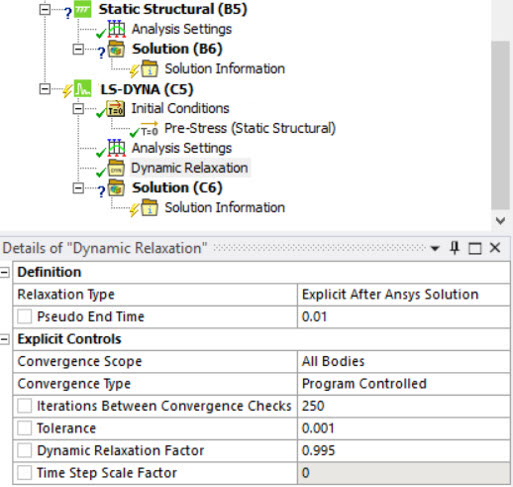
If the Convergence Type is set to Termination occurs at Pseudo End Time instead of Program Controlled, the termination of the dynamic relaxation occurs at the pseudo end time.
The Time Step Scale Factor enables you to scale the computed time step during dynamic relaxation.
Alternatively, the LS-DYNA Implicit solver can be used to conduct a dynamic analysis to calculate the preloading.
An initial time step must be provided to start the nonlinear implicit transient analysis. The convergence of this Newton-Raphson analysis is controlled by the Line Search convergence tolerance and a Displacement Convergence tolerance.
LS-DYNA supports all these methods, which occur in pseudo time before the transient portion of the analysis begins at time zero.
Preloading
Preloading works by specifying that a given load will be active during the dynamic relaxation, when the relaxation type is set to Explicit or Implicit.
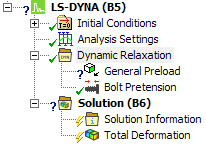
Currently, Acceleration, Standard Earth Gravity, Rotational Acceleration and Rotational Velocity can be specified as a Load in the General Preload object for dynamic relaxation.
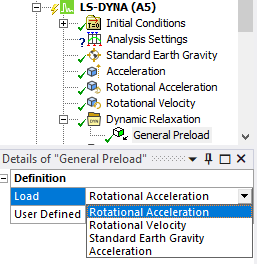
Other Loads and Supports can be applied during dynamic relaxation through the use of an option on the Load/Support.
Preloading using General Preload
When the User Defined field is set to No, the load used during the dynamic relaxation phase is represented by the following curve:
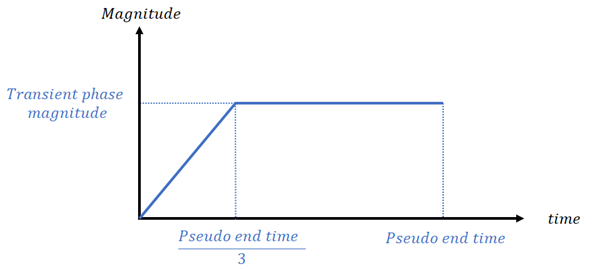
For the boundary condition undergoing dynamic relaxation, an additional curve (*DEFINE_CURVE) is written defining the load magnitude during the dynamic relaxation phase. The standard curve shown above is applied only during the dynamic relaxation phase (preloading) as SIDR=1 in the *DEFINE_CURVE.
When the User Defined field is set to Yes, you can enter a customized curve for the dynamic relaxation phase by filling a data table.
When the load is user defined, the card *DEFINE_CURVE with the SIDR parameter set to 1 will be written to the input file. This curve is then used by the card representing the boundary condition to which the dynamic relaxation is applied.
Note: Unlike other Dynamic Relaxation loads compatible with the General Preload object, both Rotational Velocity and Rotational Acceleration do not use any directional General Preload Scale Factor. This is related to limitations from the LS-DYNA card *LOAD_BODY_GENERALIZED that is used. It is still possible to apply these loads in specific directions, through the definition of the Coordinate System property in the Rotational Velocity or Rotational Acceleration objects themselves. Be mindful that the same preload curve will be applied to any loaded direction in these objects.
Preloading using a Load/Support Option
Dynamic relaxation can be defined in a simpler way for several loads (including Pressure, Force, Nodal Force, and Rigid Body Angular Velocity), and Supports that are defined so that they are not fixed. For these boundary conditions, the Dynamic Relaxation Behavior field is added to their Details panel. This field has three options:
Normal Phase Only - The boundary condition is applied during the explicit solution only
Dynamic Relaxation Only - The boundary condition is applied during preloading only
Both - The boundary condition is applied in both phases
Preloading using Bolt Pretension
LS-DYNA also enables preloading of Beam Connections through the Bolt Pretension.