


The goal of the Particle Freeze when Settled module is to reduce the simulation pace in cases with large amounts of particles that settle down and do not move anymore. In simulations involving static beds or piles that grow over time, this module enables you to avoid spending calculation resources where they are not needed and drastically speed up processing as a result by freezing and then disabling the contact detection calculations for the particles that are not actively involved in the simulation.
Figure 35.1: Filling of a silo using the Particle Freeze when Settled module. Grey particles are frozen whereas blue particles are active.
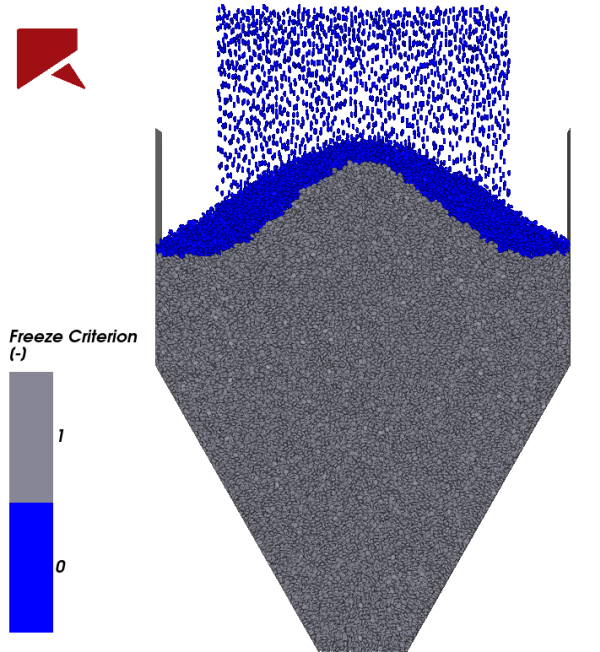
Figure 35.1: Filling of a silo using the Particle Freeze when Settled module. Grey particles are frozen whereas blue particles are active. shows an example of how this module can be applied to a silo filling simulation that uses non-spherical particles. As particles fill the silo and settle to the bottom, more and more particles become non-moving. The main idea of this module is to keep the number of active particles (dark blue particles) to a minimum, which reduces the computational cost of the simulation.
The Particle Freeze when Settled module works by first determining which particles in the simulation have settled by checking the particles and their neighbors velocities. Then, all particles defined as settled are frozen (grey particles), which prevents them from moving, and disabled, which removes them from the contact evaluation step performed by the DEM solver. This way, although the number of particles increases continuously as more particles are injected, the number of particles that are actually involved in the collision detection and calculation steps is relative small, keeping the simulation pace to a reasonable value.
In this module, a particle is considered frozen once its velocity and the average relative velocity of its neighbors are below the magnitude, given by the user input. If a particle is frozen, it is also disabled from contact detection calculations, eliminating the particle from the computation of contacts.
The criterion for freezing a particle is based on the Freezing Velocity, which is an user input. The particle is assumed as settled if its velocity and the average relative velocity of its neighbors are below the Freezing Velocity magnitude. Consequently, reducing the Freezing Velocity will tighten the criterion for considering a particle ready to be frozen.
In this velocity checking step, all particles/triangles that are in contact with the particle i are considered neighbors. For simulations that do not have adhesive models, these are the frictional contacts. For simulations that involve the addition of an adhesion model, the neighbors are both the frictional and adhesive contacts. Therefore, the number of neighbors is expected to be higher is an adhesive model is used.
Once a particle is frozen, it cannot move anymore during the remaining simulation. Therefore the Particle Freeze when Settled module should be used only for simulations in which it is expected that particles remain steady after settling down.
The contact detection is disabled for a pair of frozen particles, but will continue to be performed for a frozen-unfrozen pair of particles. This avoids issues for moving particles that reach frozen particles in this situation, the contact is detected, the collision is solved, and the moving particle trajectory will account for the contact forces due to this collision. However, as the moving step is disabled for a frozen particle, the previously frozen particle will not move after the collision.
After enabling the Particle Freeze when Settled module, there are two parameters you will need to define. These parameters are explained below and are shown in Figure 35.2: Particle Freeze when Settled module options..
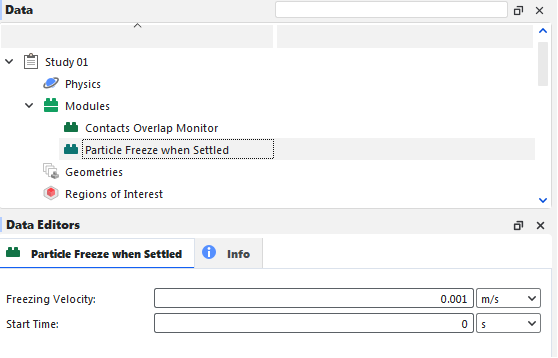
Freezing Velocity: Defines the critical velocity that is used to determine which particles should be frozen.
Range: [Positive values.]
Start Time: Defines the simulation time at which the module can begin freezing/disabling particles. Note: It is important to set a value above zero when Volume Fill is used as the input method. Otherwise, particles may be frozen as soon as they enter the simulation since Volume Fill particles have an initial momentum equal to zero.
Range: [Positive values.]
After processing your simulation, you can analyze your results using the same particle-related properties that are available by default in Rocky.
In addition, three additional particle properties are available as shown in Figure 35.3: Additional Particle Properties created by the Particle Freeze when Settled module. and explained below.
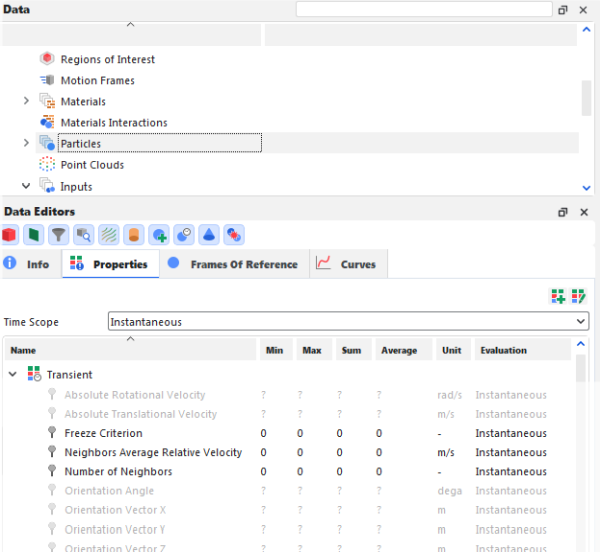
Note: Properties generated by this module will only appear if the Upscaling is disabled.Refer to Rocky User Manual (5.1.7. About Meshed Particles Upscaling) for more details.
Freeze Criterion: Criterion that classifies whether the particle is frozen. If it is equal to 0.0, the particle is not frozen (can move as usual) and is included in contact calculations performed by the DEM solver. If is equal to 1.0, the particle is frozen and cannot move, and is excluded from contact calculations.
Number of Neighbors: Provides the total number of neighboring particles and triangles surrounding this particle.
Neighbors Average Relative Velocity: Provides the average relative velocity between the particle and its neighbors.
Ensure that the module is enabled. (From the Data panel, select Modules and then from the Data Editors panel, ensure the Particle Freeze when Settled checkbox is enabled.)
Define the module parameters. (From the Data panel, select Particle Freeze when Settled, and then from the Data Editors panel, input the required values.)
Set up and process the simulation as you normally would.
When you are ready to analyze your simulation results, you may choose to make use of any particle-related Property and may also make use of the additional module-related properties.
The Particle Freeze when Settled module reduces the simulation computational cost by checking which particles are settled. For the settled particles, the Particle Freeze when Settled module freezes (prevents them from moving), and disables them (removes them from the contact evaluation steps performed by the DEM solver).
The crucial step of the Particle Freeze when Settled module is to decide whether one particle can be considered settled or not. For this purpose, the Particle Freeze when Settled module checks not only the particle translational velocity but also its neighbors velocities. In this velocity checking, all particles/triangles that are in contact with the particle i are considered neighbors. For simulations that do not have adhesive models, these are the frictional contacts. For simulations that involve the addition of an adhesion model, the neighbors are both the frictional and adhesive contacts.
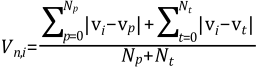
For every particle i, the magnitude of the average relative velocity between this
particle and its neighbors,  , is computed as follows:
 | (35–1) |
where:
Np is the number of neighbor particles of the particle, i.
Nt is the number of neighbor triangles of the particle, i.
vi is the velocity of the particle i.
vp is the velocity of a neighbor particle.
vt is the velocity of a neighbor triangle.
When using this module, the particle is assumed as settled if its velocity magnitude Vi and the average relative velocity of its neighbors are both smaller than the Freezing Velocity magnitude, Vc. Once a particle is settled, it is frozen and its Freeze criterion, (Fi) receives a value of 1.0:
 | (35–2) |
If a particle is frozen  , the particle is also eliminated from the computation of contacts.