


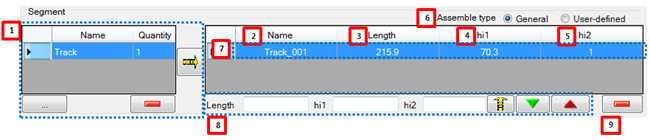
Figure 12.122: Segment Data in the Placing tab
| Parameter | Description |
| 1. list of Segment file | This represents files of Segment in work navigator. "Name" is a file name. "Quantity" is the number that adds to grid data of
Segment. is used to add file from other
folder. is used to add file from other
folder. is used to delete file information in the
group. is used to delete file information in the
group. is used to add selected file information to grid data of
Segment. is used to add selected file information to grid data of
Segment. |
| 2. Name | This represents the name of Segment. User can change the name. |
| 3. Length | This represents the length of Segment. This is a loaded data in the property of Segment. User can modify value. |
| 4. Height1 | This represents the height1 of Segment. This is a loaded data in the property of Segment. User can modify value. |
| 5. Height2 | This represents the height2 of Segment. This is a loaded data in the property of Segment. User can modify value. |
| 6. Assemble type | This represents an arrangement method of Segment. If "General" is selected, the Segment is arranged in sequence. In this case, number of Segment is calculated automatically. If "User-defined" is selected, Segment is arranged by user-defined order. In this case, number of Segment is fixed. Refer to Placing Tab for more information. |
| 7. Grid data | This represents the property of Segment. |
| 8. Multi editable control | This is used when many properties of Segment modify in a lump. |
| 9. Modification controls of segment | This is used to delete a grid data of Segment. |