


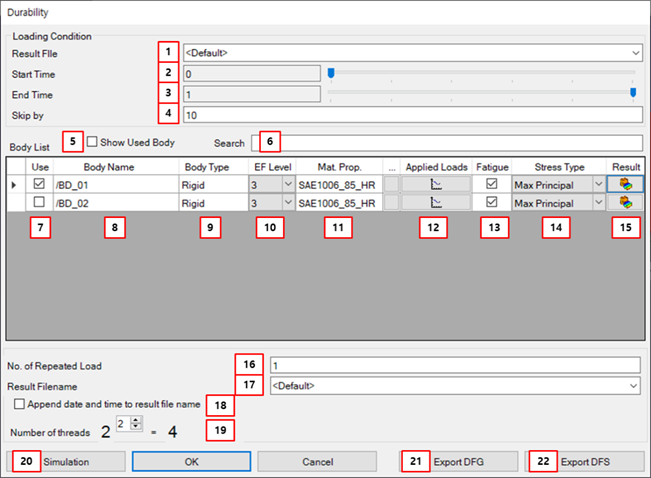
Figure 9.48: Description of parameters for Durability Analysis
| Parameter | Description | Dimension (Range) |
| 1. Read File | Use to set the dynamics analysis result file to set the applied loads. | N/A |
| 2. Start Time | Use to set the starting point of time to read the loads from the imported analysis result file. | N/A |
| 3. End Time | Use to set the ending point of time to read the load from the imported analysis result file. | N/A |
| 4. Skip by | Use to set the interval of frames to be loaded. | N/A |
| 5. Show Used Body | Use to show the bodies you have chosen to use. | N/A |
| 6. Search | Use to find the body. | N/A |
| 7. Use | Use to set that the body will be analyzed. | N/A |
| 8. Body Name | Use to show the body name. | N/A |
| 9. Body Type | Use to show the body type in dynamics analysis. | N/A |
| 10. EF Level | Use to set the EasyFlex level to do the EasyFlex analysis. The selectable levels are from 1 to 5. | N/A |
| 11. Mat. Prop. (Material Property) | Use to set the material property. | N/A |
| 12. Applied Loads | Use to show the loads applied to the body in dynamics analysis. Only connector forces can be shown in this way, not contact forces. | N/A |
| 13. Fatigue | Use to set whether to perform Fatigue analysis. | N/A |
| 14. Stress Type |
Use to set the stress type. The list you can choose from is as follows. - VonMises - Signed VonMises - Max Principal - Min Principal - Max ABS Principal - Max Shear - Signed Max Shear - Average Principal If it is set not to perform Fatigue analysis, this parameter cannot be modified and is not used. | N/A |
| 15. Result | Use to open the postprocessor. | N/A |
| 16. Number of Repeated Loads | Use to set the number of repeated loads for fatigue analysis. | N/A |
| 17. Result Filename | Use to define the file name and path for the simulation output files. | N/A |
| 18. Append… | Use to append the data and time to the result file name. For more information, see this content of the simulation parameters. | N/A |
| 19. Number of threads | Use to define the power to calculate the number of threads for the shared memory parallel processing. The number of threads is calculated as 2^n. |
N/A (Integer>0) |
| 20. Simulation | Run the statics analysis. | N/A |
| 21. Export DFG | Use to export the dfg, dfr, and dfm files. | N/A |
| 22. Export DFS | Use to export the dfs and ssc files. | N/A |
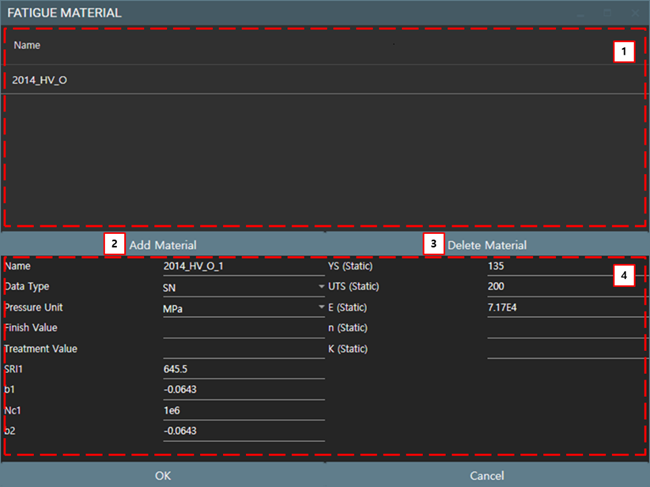
Figure 9.50: Description of material parameters for Durability Analysis
| Parameter | Description | Dimension (Range) |
| 1. Material List | Use to show and select the materials. | N/A |
| 2. Add Material | Use to add a material in library. | N/A |
| 3. Delete Material | Use to delete a material in material list. | N/A |
| 4. Material Properties | Use to set the material properties. | N/A |
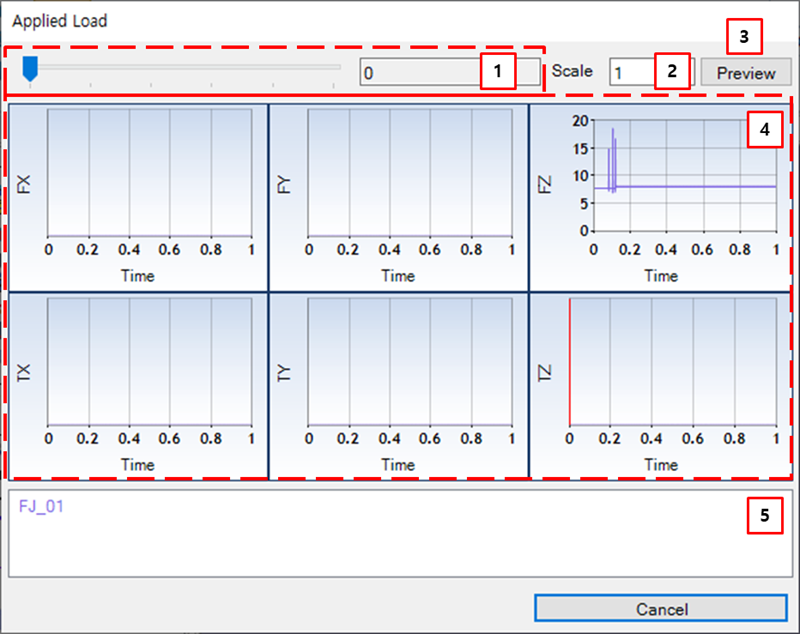
Figure 9.52: Description of applied load for Durability Analysis
| Parameter | Description | Dimension (Range) |
| 1. Time Bar | Use to set the time such as starting, current, and ending by picking and dragging the time bar. | N/A |
| 2. Scale | Use to set the scale. | N/A |
| 3. Preview | Use to update plot window. | N/A |
| 4. Plot Window | Use to show the applied load. | N/A |
| 5. Legend | Use to show the applied load's name and color. | N/A |