30.6. Weld Penetration Result Object

The Weld Penetration result object is used to visualize the effect of welding process on the temperature profile around the weld regions.

30.6.1. Adding a Weld Penetration Result Object

To insert a Weld Penetration result object, click the Weld Penetration icon under the Welding Toolbox Extension. This option is available only for transient thermal analyses.

30.6.2. Setting up a Weld Penetration Result Object

Specify the following information for the Weld Penetration result object.
CategoryProperty Name and Description
Geometry

Scoping Method

Select the bodies where you want to visualize the depth of the welding process. Valid scoping methods are:

Geometry Selection

The object is applied to a body or bodies that you choose using graphical selection tools.

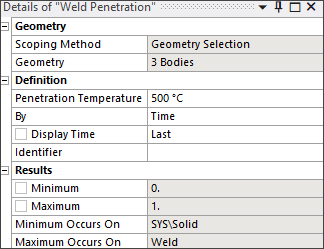
Select the desired geometry, then click Apply in the Geometry field below the Scoping Method. This field then displays the type of geometry (for example: Body) and the number of geometric entities (for example: 1 Body) to which the probe object is scoped.

Named Selection

Scopes the object to a geometry-based named selection.

Material ID

Scopes the object to a specific material.

Definition
Penetration Temperature

The filtering temperature for assessing the depth for visuaulizing the effect of the welding process.

By

Select the input for your results display.

  • Time

  • Result Set

  • Maximum Over Time

  • Time of Maximum

  • Minumum Over Time

  • Time of Minimum

Display Time

If you are displaying results by time, enter the display time for your results. Penetration Temperature by Time indicates how much of the model has reached the specified Penetration Temperature value by the given Display Time. Last is the most recent display time for which there is a solution.

Result Set

If you are displaying results by result set, enter the desired result set number. Penetration Temperature by Result Set indicates how much of the model has reached the specified Penetration Temperature value by the given Result Set. Last is the most recent result set number for which there is a solution.

ResultsThis category displays the following read-only properties for the Weld Penetration object:
Minimum

The minimum plotted value of the penetration temperature, represented by 0.

Maximum

The maximum plotted value of the penetration temperature, represented by 1.

Minimum Occurs On

The location of the minimum temperature value.

Maximum Occurs On

The location of the maximum temperature value.

30.6.3. Viewing the Weld Penetration Plot

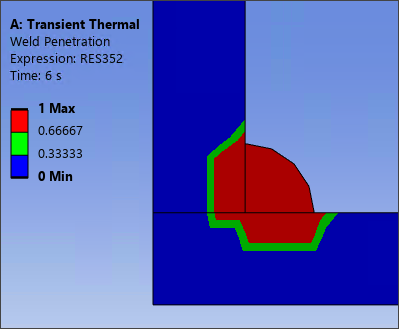
The weld penetration plot shows the depth to which the effect of the welding process is seen, as filtered by the Penetration Temperature. The plot's contours are defined by the Status field. A value of 1 indicates the elements that reached a higher temperature than the Renetration Temperature (shown in red on the plot).