


Products Overview
This page provides an overview of the Ansys AVxcelerate Sensors, AVxcelerate Sensors Library for CarMaker and AVxcelerate Sensors Library for SCANeR products.
Ansys AVxcelerate Sensors Product Overview
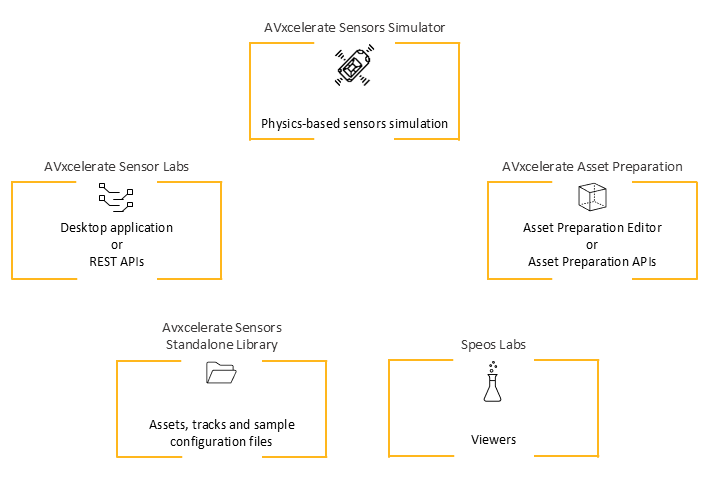
The Ansys AVxcelerate Sensors product includes the following software applications, library and API:
- AVxcelerate Sensors Simulator: key component of a comprehensive solution for ADAS closed loop simulation. For more information, consult AVxcelerate Sensors Simulator User's Guide.
- AVxcelerate Sensor Labs desktop applications -Windows only- and REST APIs. For more information, consult the Sensors chapter in the AVxcelerate Sensors Simulator User's Guide.
- AVxcelerate Asset Preparation:
- software used for data preparation -Windows only, for more details consult AVxcelerate Asset Preparation User's Guide for more information
- AVxcelerate Asset Preparation APIs, for more details consult the API documentation provided in the installation directory
- AVxcelerate Sensors Standalone Library, which provides AVX tracks and assets as well as AVxcelerate Sensors Simulator sample configuration files: sensor models, sensor layouts, and simulation parameters.
- Speos Labs -Windows only-Note: All the Speos Labs Viewers and Editors are installed, however only some of them are accessible with an AVxcelerate License:For information about Speos Labs, refer to the Speos Labs User's Guide.
- Advanced Scattering Surface Editor
- BSDF BRDF Anisotropic Surface Viewer
- IESNA LM-63 Viewer
- Photometric Calc
- Retro Reflecting Surface Editor
- Simple Scattering Surface Editor
- Spectrum Editor
- Virtual Photometric Lab
AVxcelerate Sensors Library for SCANeR
The AVxcelerate Sensors Library for SCANeR product includes resources useful to perform co-simulation between AVSimulation SCANeR™ driving simulator version 2021.1 and AVxcelerate Sensors Simulator, especially the co-simulation bridge which is the AVX_SENSORS module (VRXPERIENCE_SENSORS.exe).
AVxcelerate Sensors Library for CarMaker
The AVxcelerate Sensors Library for CarMaker product includes resources useful to perform co-simulation between CarMaker and CarMaker HIL driving simulator versions 11.0, 11.1, 12.0, 12.0.1, 12.0.2, 13.0 and AVxcelerate Sensors Simulator, especially the co-simulation bridge, which is the AVXConnector, and well as the sources to build a custom co-simulation bridge for CarMaker.
License Capabilities
The Ansys AVxcelerate PrepPost (or Ansys AVxcelerate PrepPost workgroup) license gives access to the Sensor Data Preparation within the AVxcelerate Asset Preparation license.
In addition to the Ansys AVxcelerate Solve (or Ansys AVxcelerate Solve workgroup) license required to start AVxcelerate Sensors Simulator, you need either:
- one license add-on for each sensor to simulate:
- Ansys AVxcelerate Optical Camera add-on to simulate a camera sensor,
- Ansys AVxcelerate Thermal Camera add-on to simulate FLIR thermal camera,
- Ansys AVxcelerate Lidar add-on to simulate a LiDAR sensor,
- Ansys AVxcelerate Radar add-on to simulate a Radar
sensor. Note: One sensor can be simulated per purchased add-on. For instance, if you want to simulate multiple LiDAR sensors in one simulation, you need multiple Lidar add-ons.
- an Ansys AVxcelerate Sensor add-on Workgroup license defining the total number of sensors that can be simulated.
License Usage
The licenses required to use the products in Ansys AVxcelerate Sensors, can either be run locally, or remotely through distant licensing. A single license file is used to group capabilities. Whether you use local or distant licenses, there are two ways in which the licenses can be obtained:
- License Server via FlexNet Publisher
- Shared Web Licensing.
You can use the Ansys Licensing Settings Utility to set your preferences for license service priority.
FlexNet Publisher
| Local License | Distant License |
 |
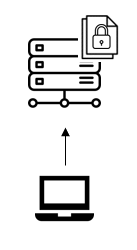 |
- a local license (running on the client computer) which allows you to own a complete standalone installation. With this license type, the ANSYS License Manager is installed on every workstation where AVxcelerate Sensors Simulator is installed.
- a distant license (running on the server machine) which allows you to
share licenses among several users thanks to an on-premises licensing setup.
With this license type, the ANSYS License Manager is installed on a machine
acting as server. Then, client computers only point to it. To point from the
client computer to the licensing server you can either:
- define the environment variable ANSYSLMD_LICENSE_FILE, see Client Environment Variable Settings, in the Licensing Guide,
- use the Ansys Licensing Settings Utility, see Using the Ansys Licensing Settings Utility in the Licensing Guide.
Shared Web Licensing
| Local License | Distant License |
 |
 |
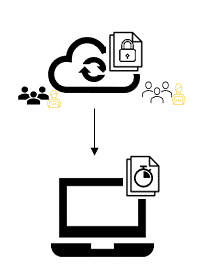
- a roaming license, valid for a limited duration, which is run locally by checking out the required token(s) from the cloud where licenses are hosted and according to license availabilities among the defined user groups to which you belong. With this local license, users can continue to use Ansys AVxcelerate Sensors products while offline using the Roaming capability.
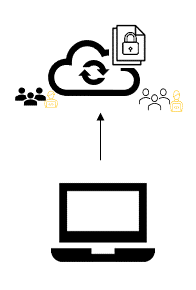
a distant license or on-demand license (stored on the cloud) which allows you to share licenses among users according to license availabilities among the defined user groups to which you belong.
For more information on Shared Web Licensing, see Ansys Shared Web Licensing User's Guide.