


The following appendix topics are available:
- 14.2.6.1. Appendix A: Sign Convention for Angles and Velocities in Vista TF
- 14.2.6.2. Appendix B: Troubleshooting
- 14.2.6.3. Appendix C: Example of a Control Data File (*.con)
- 14.2.6.4. Appendix D: Example of a Geometry Data File (*.geo) for a Radial Impeller
- 14.2.6.5. Appendix E: Example of an Aerodynamic Data File (*.aer)
- 14.2.6.6. Appendix F: Examples of Correlations Data Files (*.cor)
- 14.2.6.7. Appendix G: The RTZTtoGEO Program
- 14.2.6.8. Appendix H: Example of a Real Gas Property Data File (*.rgp)
When looking along the axis of the machine in the direction of flow we have a cylindrical coordinate system (r, θ, z). The positive θ direction is the clockwise direction when viewed along the meridional direction from the inlet. The angular coordinate (theta) is taken as positive in the clockwise direction and negative in the counterclockwise direction. The normal case considered by Vista TF if the speed of rotation is specified as a positive value is clockwise rotation when looking along the axis in the direction of the flow so that the angular coordinate increases in the rotational direction. See Figure 14.4: Coordinate System used by Vista TF below.
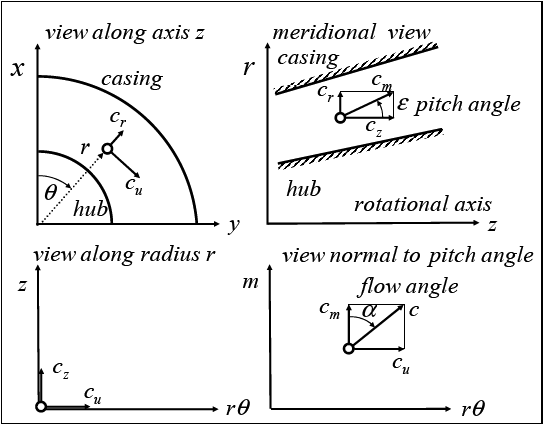
Blade angles are then defined from the axial and radial directions in a similar way using the positive theta direction as a basis. The rate of change of the angular coordinate with the meridional direction then defines the sign of the blade angle, and this applies for the blade angles, flow angles and also applies to the blade lean angles; see below. As you move along an axial rotor blade in the axial direction of a clockwise rotating machine then the blade wrap angle (theta) steadily decreases as the blade is sloped backwards against the rotational direction, and so the rotor blade angles are negative. This also applies for radial impeller outlet angles, which are generally also backswept. In fact, at the outlets of both compressor and turbine rotors, a negative blade angle is expected for a machine rotating in the clockwise direction. In stator vanes, the angular coordinate generally increases along the blade in the meridional direction so that the blade angles are generally positive.
This rule works for axial, radial, and mixed flow compressors, provided that the meridional direction is used as a basis. In a turbine stator, theta also increases positively from LE to TE and, in a turbine rotor, theta decreases from LE to TE. There are some exceptions to this rule, related to high camber at leading edges to adapt the flow to the incoming flow direction, as shown in Figure 14.5: Sign Convention for Blade Angles in Vista TF for a highly cambered turbine stator. This situation can also occur in blades with leading edge recamber in ventilator blades in channels of high curvature.
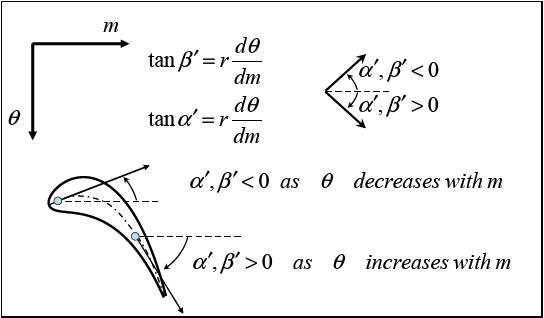
Figure 14.6: Sign Convention for Angles in Vista TF shows the angle definitions used in Vista TF; these are consistent with the blade angle definitions. The sign convention for velocity values is that an axial velocity component in the positive axial direction is positive, a radial component in the positive radial direction is positive, and a circumferential component in the positive angular direction (theta) is positive. Note that the rotational speed has an associated sign, so that clockwise rotation corresponds with positive rotational speed and counterclockwise rotation corresponds with negative rotational speed.
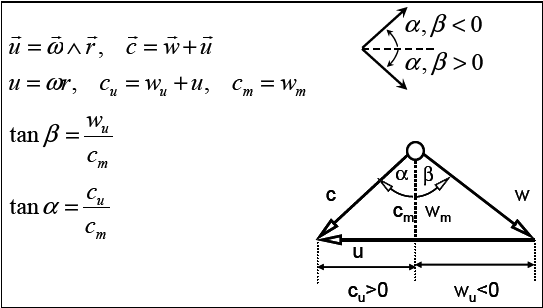
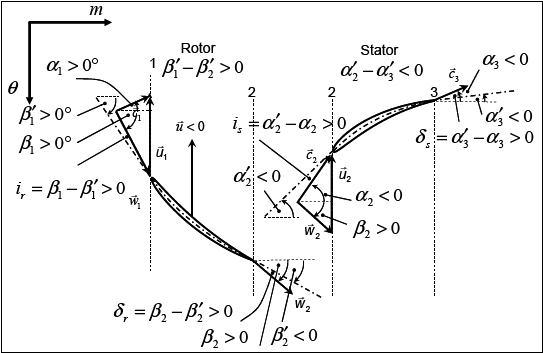
As examples of this notation, Figure 14.7: Sign Convention for Blade and Flow Angles in Vista TF for a Clockwise Turbine and Figure 14.8: Sign Convention for Blade and Flow Angles in Vista TF for a Clockwise Compressor show the velocity triangles with blade angles and flow angles for typical axial compressors and turbines rotating in the clockwise rotational sense.
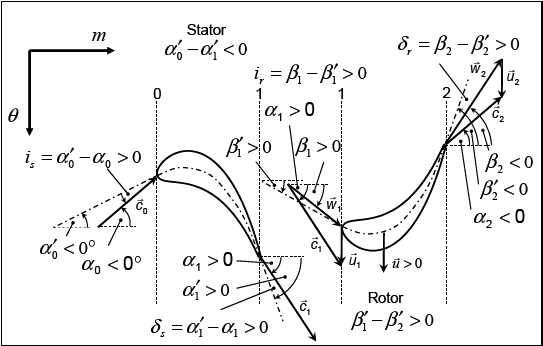
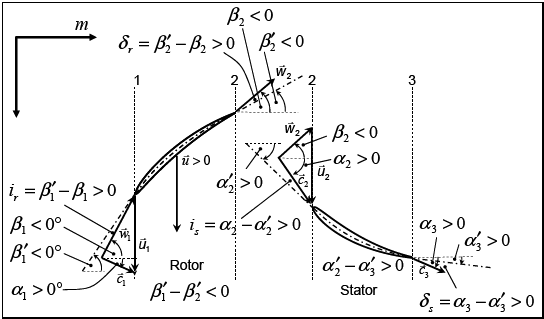
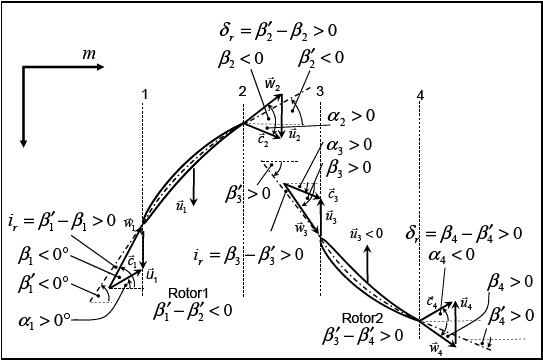
To demonstrate that this notation can be used for counterclockwise rotation and for counter-rotating blade rows, Figure 14.9: Sign Convention for Blade and Flow Angles in Vista TF for a Counterclockwise Turbine, Figure 14.10: Sign Convention for Blade and Flow Angles in Vista TF for a Counterclockwise Compressor, and Figure 14.11: Sign Convention for Blade and Flow Angles in Vista TF for a Counter-rotating Compressor show these cases.
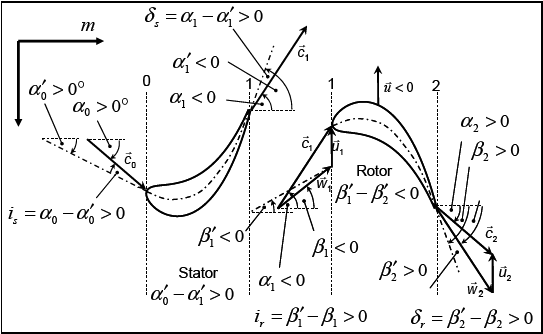
Figure 14.10: Sign Convention for Blade and Flow Angles in Vista TF for a Counterclockwise Compressor
Note that the rule given above for blade angles is applied independently of the rotational direction of the blade rows. For example, if the blade rotational speed is defined as negative then the blade angles of a compressor rotor would typically be positive as the angle theta then increases in the flow direction, as shown in Figure 14.10: Sign Convention for Blade and Flow Angles in Vista TF for a Counterclockwise Compressor.
Figure 14.11: Sign Convention for Blade and Flow Angles in Vista TF for a Counter-rotating Compressor shows an example of a counter-rotating compressor with two rotors, the second rotating in the reverse direction. In this case the first rotor blade row has negative blade angles and the second rotor with reverse rotation has positive angles.
Note: Vista TF uses the rules outlined above to identify the type of machine from the geometrical data of the blade angles in the geometry input file, so you do not have to specify this in the input data. The knowledge of the blade angles and the rotational direction is sufficient to identify the type of machine.
Figure 14.11: Sign Convention for Blade and Flow Angles in Vista TF for a Counter-rotating Compressor
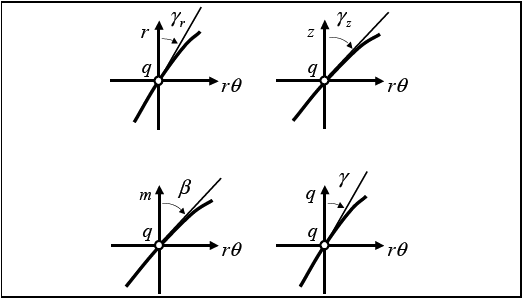
Consider a point q on a radial impeller blade camber surface,
as shown in Figure 14.12: Definition of Angles. We can define the blade lean
angles,  and
and  as the angle made by the blade fibers
with a radial line and the angle made with an axial line, as follows:
as the angle made by the blade fibers
with a radial line and the angle made with an axial line, as follows:

In order to assist the understanding of the angles, , , and ε, the analogy to the
angles known as yaw, roll, and pitch of a sailing boat might be useful.
Notes on :
This is the blade lean to the radial direction.
This angle is zero for a blade consisting of purely radial blade elements, so is generally close to zero for axial blade rotor rows (which tend to have no lean) and centrifugal impeller leading edges or radial turbine trailing edges.
It is non-zero for blades with lean. If, when moving along the blade in the radial direction, the lean is against the direction of rotation then it is negative and lean in the direction of rotation is positive.
A radial compressor impeller with a purely radial blade at impeller outlet (no backsweep) would have
=0° and corresponds to the back-sweep angle
in a typical back-swept radial impeller. For an impeller with 30°
of back-sweep, would
be negative (-30°) at the trailing edge. Note that, in some sign
conventions, the back-sweep angle would be given a positive value,
but in Vista TF, it is negative.In the diffuser of a radial pump or compressor stage, this angle corresponds to the diffuser blade angle and would be typically between 60° and 70° at the leading edge, and would decrease through the blade row.
Notes on :
This is the blade angle measured from the axial direction in the direction of rotation.
In an axial blade element (or close to the leading edge of a typical radial impeller or the trailing edge of a radial turbine impeller), this is the blade camber angle. At the inlet to an axial blade row, this is the blade inlet angle; at the outlet, it is the blade outlet angle.
In a typical rotor blade, it is negative and, in a typical stator, it is positive. Note that the common exceptions would be turbine rotors with a low degree of reaction and compressor rotor roots with very high turning.
In a compressor where the flow is turned by the blade rows towards the axial direction, the absolute values decrease from the leading edge to the trailing edge whereas in a turbine where more swirl is added to the flow, the absolute values increase from the leading edge to the trailing edge.
For a blade with purely axial blade elements (as in a typical 2D diffuser and at a radial impeller outlet with no rake angle), this angle is zero.
The angle  is the
inclination of a meridional streamline to the axial direction:
is the
inclination of a meridional streamline to the axial direction:
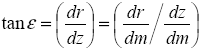
which on the hub and casing walls becomes the meridional slope angle of the walls.
Internally the program uses the angles and to calculate  , which is the effective blade angle measured
from the meridional direction. is defined as:
, which is the effective blade angle measured
from the meridional direction. is defined as:
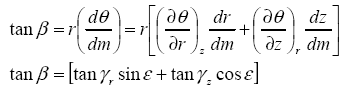
Notes on :
The wrap angle is taken as positive in the direction of rotation. This is consistent with the flow angle definition used by the program.
This angle is zero for a blade in which the wrap angle does not change in the meridional direction, such as an axial strut in an axial channel or a radial strut in a radial channel, where
 .
.If the wrap angle increases in the meridional direction then the blade angle is positive. If the wrap angle decreases in the meridional direction then the blade angle is negative.
Note that the actual value of the blade angle as seen by the flow is dependent on the lean angle of the meridional streamline, and is not an absolute fixed value for a certain blade. Thus a change in the meridional direction of the flow at an impeller outlet with lean changes the value of the blade angle.
The Vista TF program and numerical method is extremely robust, especially in unchoked flows and when running from an existing restart file and there should generally be no numerical problems with sensible geometries. Nevertheless convergence problems and unexpected program errors can still occur.
The most common problems are format errors in the input data format. In addition, numerical problems inherent to the streamline curvature method or associated with choking may occur. The numerical errors can sometimes result in a failure of the solution to converge or even a complete breakdown as the compiled program encounters a FORTRAN error, such as the square root of a negative number, or a floating point overflow. The most common of these possible errors are trapped and reported by the program. The compiler will report these errors. The most likely cause of such errors is an input data error. The sections below outline typical problems and suggest solutions for these with some advice on how to deal with input format and data errors.
If the solution converges to the user-specified level of convergence then the program exits normally with a value of 0 in the command line (CALL EXIT(0)). If the solution has not converged but the maximum number of iterations has been reached, then a value of 1 is returned. If the program has identified some serious difficulty which has an appropriate trap, then the program exits with a negative return value and prints an appropriate error message. Only the most common errors have been supplied with a trap against such errors. If the program identifies a feature of the input data which it determines may lead to some difficulties (rotational direction, grid aspect ratio, inconsistent flow and speed data) it prints a warning to the screen and the output file. This information may help to correct the data errors.
Some examples of warnings and error messages are as follows:
WARNING: Anti-clockwise rotation

Vista TF suspects that the first rotor blade is counter-rotating

Possible cures:

(a)
Change value of i_flow to be negative
(b)
Change geometry from left-handed to right-handed or vice versa


WARNING: Wilkinson damping factor used
Damping factor damp_sc reduced by Vista TF to value suggested by Wilkinson

WARNING: error increasing -relaxation factors reduced 5%

ERROR: Error noted in subroutine throughflow_manager

ERROR TYPE: error_max > 400%

ERROR PARAMETERS: -10 10 17 139 0 0

0.2100E+16 0.5600E+00 0.7250E+00 0.2905E+01 0.0000E+00

Problem: Near to choke on quasi-orthogonal: 17 on iteration: 139
Inlet mass flow: 0.56000
Local estimated choke mass flow: 0.72497
Local effective relative Mach number: 2.90494
Possible cures:


(a)
Remove this q-o from domain
(b)
Check consistency of flow and speed
If the program fails to run at all, then this is usually a sign that some of the formatted input data is not correct (no empty lines where these were expected, or an empty line where data was expected, or similar formatting problems). The screen monitor information then says that the file has broken down in a particular input subroutine; this provides a clue for identifying which file has an incorrect format. Most straightforward errors caused by new users or new cases are related to the data input files, which are absolutely rigid with regards to the lines of data and which do not accept an empty line where a line of data should be. No built-in consistency checks of the input data are made, so errors of this nature can easily occur, especially at the beginning of a completely new calculation. To help avoid this type of error, you can copy lines from similar existing input files.
The program might report the name of the input file that contains
an error. Should such errors happen, you should examine the .hst file where the input data is recorded. From this,
you can determine which file has not been correctly read or might
have errors, and also which part of that file has been successfully
read.
If the program reads all the input files, starts successfully but then fails before the iterations begin, then this is often a problem related to the specified flow and speed conditions in the input data or the geometry specification, and these should be checked. These errors are usually related to errors in the units of the specified data (flow conditions, boundary conditions, geometry, empirical data, and so on). A typical user error of this type is that the diameter in meters is needed as a reference value for the size in the flow information (.aer), but the user specifies a radius because the coordinates in the geometry file (.geo) are radius values in meters. Another common error with users is to specify the geometry in inches rather than meters. Another typical user error of this type is that the pressure is specified in bars whereas it is expected to be in N/m2. Other errors may be related to the fact that the specified flow conditions imply choked flow or reverse flow. A useful consistency check of the flow data is made where the following information is printed:
Vista TF: Axial compressor calculation
--------------------------------------
Estimated mean flow coefficient cm/u at first rotor inlet = 0.4567
Estimated mean Mach number cm/a at first rotor inlet      = 0.4426
These values may be used to determine whether the mass flow, speed, and other data, have been specified sensibly, by comparing them with typical values of these parameters for the applicable machine type.
If the program runs, but breaks down after only a few iterations,
then this can often be a sign that some of the input data is still
not correct because the program is generally very reliable. Here the
strategy is to reduce the value of the maximum number of iterations
to a lower value than that at which the flow breaks down (reduce the
value of the parameter max_it_main in file .con), to rerun the case, and then to examine the results
in the .hst and .out files. The errors are usually related to mistakes in the specified
data (such as flow conditions, boundary conditions, geometry, and
empirical data) rather than mistakes in the numerical method, and
these data problems can then often be identified from un-converged
results or values provided in the .hst, .txt and .out files. It can
also be useful at this stage to examine the plot files of the initial
geometry set up by the program, which is named test_prefix.txt or test_prefix.csv. This can often identify
aspects of the geometry or flow data that are inconsistent.
If the program runs, but the results are extremely unexpected,
such that a pump impeller or a compressor stator blade row has been
interpreted by the program as a turbine row, then the blade angle
definition should be checked. The program attempts to identify the
type of blade row from the geometry specified, but in some cases the
rules that have been programmed may fail. For example, a compressor
stator is identified as a stator blade row which turns the absolute
flow towards the meridional direction, so that the blade angle decreases
from the leading edge to the trailing edge through the blade row.
In some special cases, such as an axial compressor stator with a degree
of reaction above 100% or rotor blades with extensive local leading
edge recamber, the blade may have other blade forms. In these cases
it is possible to specify additional data in the geometry file (see
parameter i_row below) to overwrite the program’s
own attempts at blade type identification. Geometry produced by BladeEditor contains
blade type information provided that, in the blade feature within BladeEditor,
a blade type (rotor or stator) is specified.
The program has several different internal convergence checks, but a converged solution can be achieved only if all of the internal loops also converge, so only one convergence criterion really needs to be checked, which is the convergence of the meridional velocity.
The most important convergence check is the maximum error of
the local meridional velocity anywhere in the flow field, expressed
as a percentage of the local meridional velocity and denoted as error_cm (%) on the screen and in the output files. During
the iteration process, the maximum value of the change in the meridional
velocity in the whole flowfield between one iteration and the next
(delta_cm%) and the location of the maximum error
is printed onto the screen every 10 iterations and into the history
file for each iteration. The local value of this error is also printed
in the output file and into the .csv and .txt plot files. To achieve convergence near machine
accuracy, use a maximum value of 0.01% as a convergence criterion.
Note that this corresponds with a maximum residual
error of 0.0001, which is a much more stringent criterion than an RMS residual error of 0.0001, which is a criterion often
used in CFD programs. The value of the local error is output for examination
with plot software. For cases that have not converged, it is worthwhile
to examine the location of the maximum; this might be the location
of the problem.
It is important to remember, however, that numerical methods have many sources of error. In a throughflow calculation, the so-called model errors, related to the fact that the equations we are solving do not really describe the real flow particularly adequately (in this case we solve for inviscid, circumferentially-averaged mean values on widely spaced grid lines) probably outweigh all other sources of error. A solution that is converged to a maximum error in meridional velocity of 0.5% is likely no worse in terms of its agreement with reality than a solution that converges to 0.01% or lower. So calculations that converge to 0.5% can also be considered to be converged for practical engineering purposes.
The second convergence check occurs in the innermost mass-flow
iteration loop where the program monitors the number of loops required
to solve the continuity and radial equilibrium equations on each calculating
station. The maximum value of the number of mass flow iterations and
the location of the quasi-orthogonal where this occurred is also printed
onto the screen and into the .hst file. You
can specify the maximum number of loops for the internal mass-flow
iteration loop with the max_it_mass parameter
in the control file. The recommended value for this parameter is 10.
Early in the run, the program usually stops the internal loops when
the value of max_it_mass is reached. Later, as
convergence is approached, less then 10 internal loops are generally
required. A typical converged solution may require only 1 or 2 internal
loops. The error in the mass flow should be tighter than that for
the meridional velocity; a value of 0.001% is currently recommended.
The third convergence check occurs in iteration to a specified
pressure ratio and is related to the convergence of the inlet mass
flow to a final value and the convergence of the specified target
pressures at the trailing edges to a fixed value. These are written
onto the output file as error_p and error_mass respectively. The same limit for the mass flow
convergence is used as given above and the target pressure convergence
is set internally within the program to be tighter than this. Experience
shows that it is important in simulations to a specified pressure
ratio to ensure that tight tolerances on these parameters are given,
otherwise the program modifies the target pressures on the basis of
inadequately converged data and divergence may result.
In calculations with real gas equations (release 13.0 onwards)
an additional convergence criterion is included related to the change
in the real gas factor of the gas. The maximum error in the real gas
factor is written to the .out file.
The program reaches convergence using a relaxation procedure
in which the changes in meridional velocity are damped from one iteration
to the next. In some cases with closely spaced calculating stations
(high aspect ratio grid) it has been identified that, although the
simulation converges to a relatively low level of the maximum error
in the meridional velocity of 0.1% relatively quickly, it does not
always continue to converge below this level of error. In these cases
you have several options. Firstly, it might be sensible to accept
this level of convergence and continue to optimize the geometry of
the machine. In some cases, the simulation that is not perfectly converged
may indicate the existence of an unwanted flow feature as a cause
of the poor convergence. Such features include: anything that creates
a tendency for the flow to reverse direction; an extremely high curvature
in the meridional channel; a poor grid. A second approach is to make
use of other models that are built-in for the damping factors within
the program, by reducing the value of the streamline curvature damping
factor damp_sc and the velocity level damping
factor damp_vl. Several different schemes for
the damping are applied. In some cases it may be helpful to reduce
both the value of damp_sc and damp_vl to smaller values than the standard values of 0.25 and 0.50. All
of the parameters related to the relaxation procedure are set internally
by the program.
The most common failure for the program to converge is related to difficulties in the streamline curvature calculation causing divergence of the maximum error in the meridional velocity distribution. If the program identifies a trend for the results to start to diverge then it automatically decreases the damping factors to avoid divergence by causing more damping of the solution. If the errors continue to increase, then further reduction of the relaxation factors tends to freeze the unconverged iteration at the state where the problem was identified so that there is at least no unexpected exit from the program even if the simulation does not converge. Because of this feature it is not advisable simply to increase the number of iterations in the hope that the simulation will converge. A better strategy is to calculate with a large number, say 2000 iterations, and if the simulation does not converge, restart the calculation from the restart file to reset the damping factors to sensible values. This strategy often works in difficult cases.
The program's internal numerical fix of reducing the damping
factors when the error diverges is reported in the history file. If
this fix does not work, then the calculation of the streamline curvatures
may ultimately fail, although this only occurs in simulations that
have otherwise started to have serious numerical problems. The ultimate
failure here tends to be an error in the subroutine pero, called from subroutine curvature, or in subroutine parabola, called from subroutine streamlines. Both are, in themselves, generally robust. Subroutine pero is a modified interpolation routine along the lines
of the so-called AKIMA splines. The breakdown is related to the numerical
difficulty of calculating curvatures in a flow when the streamlines
are no longer smooth and the spacing of the calculating planes is
small. Subroutine "parabola" attempts to fit a parabola through internal
data in the program and is also robust until serious problems occur.
These errors have mostly been trapped such that an error message is
printed and the program exits the calculation without breaking down.
This error is trapped to avoid a catastrophic breakdown, but the program
stops and reports that the streamlines are too close together.
In cases where such problems occur, it is often worthwhile simply
to run the simulation again from the restart file generated from an
earlier unconverged simulation or with a different initial estimate
of the flowfield (which is controlled through the initial value of cm_start in the control file), because starting from better
initial conditions may clear the problem found in the initial calculation.
In choked flows it is generally better to start with a lower value
of cm_start, as this will not be choked. In some
cases it may be worthwhile for you to decrease the relaxation factors
(increase the damping) rather than to let the program try to do this
automatically. If this does not work then again a useful strategy
is to reduce the maximum number of iterations to a lower value, say
50 to 100 (parameter max_it_main in .con file), and recalculate and examine the unconverged
results. It may also help to run the simulation repeatedly with such
a low limit on the maximum number of iterations because each successive
run tends to get to a lower value of the maximum error. If this fails
then it is useful to examine the .hst and .out files and plots of the unconverged results. These
files and plots can be used to identify aspects of the design that,
when improved, enable convergence to be achieved.
The program also writes the values of the local error and the
local choke ratio into the .txt file so it
is possible to examine this and quickly locate the location where
the problems are occurring. A value of unity for the choke ratio implies
that the flow is choked and a value above unity indicates that the
local mass flow is above the choking mass flow of the streamtube.
It may be necessary to have some fundamental understanding of how
the turbomachine operates in order to identify how to remove these
problems. Further comments on choking are given in Choking.
The program prints an error message if it reaches a state where the maximum change in meridional velocity from one iteration to the next is more than 400% and then it closes down the calculation. This prevents a breakdown caused by dividing by zero or taking the square root of a negative number. Should this occur it is then recommended that you repeat the calculation with the maximum number of iterations set at a value lower than that where the program stopped (see the history of iterations in the output file) and then examine the results for this unconverged point. This can help you to identify the problem.
Another common failure mode for the program where it has difficulties converging is related to difficulties in calculating reverse flow in the meridional plane; such flow is not possible with the streamline curvature method. If the program observes signs that reverse flow may occur in the meridional plane, then it attempts to apply temporary fixes to enable the iterations to proceed in the hope that the problem will be cleared. One particularly important fix (that is not reported) is to avoid negative values of the meridional velocity by setting any negative values to 5% of the mid-span value. This may be used in early iterations and later no longer be needed, but if the final "converged" result contains such values, it is not really a valid solution. This can often be identified by a difficulty in convergence at a particular location in the grid. The background to this problem is a fundamental difficulty related to the physics, whereby a strongly swirling flow in an annular duct may separate at the hub or shroud, and the streamline curvature method is inherently unable to calculate such a reverse flow. This problem becomes more serious with calculations of low hub-to-tip ratio. The use of a limit on the meridional velocity on any streamline is reported in the output.
It should be mentioned that the throughflow method is not particularly suitable for choked blade rows because the mean stream surface equations average out the flow in the circumferential direction and are therefore not aware of high Mach numbers on the suction surface of blades. In addition, any shocks that may be present in turbomachinery flows are generally not oriented in the circumferential direction so are smeared out in the circumferential averaging of the flow to determine the mean stream surface. Furthermore, the basic method is inviscid and this precludes the existence of strong shocks.
Nevertheless, despite these serious limitations, an attempt has been made to model choking in the blade rows so that, in combination with correlations, the maximum flow and the additional losses related to shocks are taken into account in the overall predicted performance. In this way, the program includes aspects of choking that are compatible with the level of empiricism of typical 1D calculation methods, and may even be more successful than these because the variation of Mach number over the span is taken into account. This is useful in a program intended for design purposes because it helps choking problems to be identified at a relatively early stage in the design process, and aids the understanding of the axial and radial matching of the blade rows as the rotational speed varies.
All aspects of special calculations for choking flows are hidden.
Setting the parameter i_expert = 0 causes the
program to examine choking but not limit the mass flow if choking
is found to occur. This is the most robust way to run the program
and is recommended for beginners. Expert users can use i_expert
= 1, which limits the mass flow according to various choke
models. If i_expert = 3, this parameter switches off the choke calculation
for cases that may otherwise be not robust.
Choking is strongly related to the throat areas between two blade rows, so any real estimate of the choking flow should make use of accurate estimates of the throat areas. In Vista TF the shortest straight-line distance between two blade rows can be specified in the geometry file for each of the input sections, and if the values are not specified (that is, a value of zero is given) then Vista TF makes its own crude estimate of the throat areas based on its limited knowledge of the blade geometry. This estimate is, at the moment, too crude to be used accurately in the calculation of choked blade rows, and may lead to a value for the choked mass flow that is incorrect. It may be worthwhile, in some situations, to run Vista TF with no values specified for the throat and then examine the program´s own estimate of the throat areas, which are in the output file, and then run with slightly larger or smaller values specified in the geometry file, depending on the real throat areas or the choking mass flow if the latter is known.
One method that tends to work in the most difficult cases is to remove any calculating planes in the neighborhood of the throat, as suggested by Denton (1978). For turbines, no planes should be present downstream of the throat, and for compressors, no planes should be upstream of the throat. Local details of the flow calculation are lost, but the calculation can then be made to converge up to the limiting mass flow.
The key issue remaining to be solved appears to be the fact that the location of the throat is not properly taken into account, which in fact may be a fundamental limitation of a throughflow method because the throat is smeared across several planes. In the current model, it is assumed to be the leading edge plane in a compressor or the trailing edge plane in a turbine. The limit on the meridional velocity applied at the leading edge plane successfully stops additional flow from entering the choked streamtubes of the compressor, but downstream planes can still breakdown if the flow accelerates downstream of the leading edge. In turbines, no limit on the meridional velocity is applied at the trailing edge because this would otherwise cause the supersonic expansion to not take place, so that the mass flow in certain streamtubes can rise to be above the theoretically possible maximum mass flow at some calculating planes near the throat upstream of the trailing edge.
When you specify a mass flow rate, you must ensure that it is not greater than the choking value. The program may generate warning messages if the specified mass flow rate exceeds the choking value.
The output parameter choke_ratio is the
ratio of the local mass flux to the maximum possible at that location.
A value above unity is not a realistic solution but if the choke parameter i_expert is set to zero then such solutions can be generated.
This option is available because the program is sometimes more robust
under this operating mode than when i_choke is
set to 1 and the full choking models are used. Note that in some multistage
computations the actual specified mass flow may be below that required
to actually choke the machine, but during the iterations, individual
blade rows may still become choked. The program becomes less robust
as choking is approached.
In some high-speed situations where it is difficult to obtain convergence with a specified mass flow, the restart file can be used to store results for a converged operating point at a lower speed and lower flow, and then the required operating condition can be obtained by starting from the restart file with new flow conditions slowly stepping to the required operating point. In a similar way, it is advisable to first set up a simulation close to the design flow, before attempting to move towards a higher flow with a higher risk of choking.
You can run a simulation with a specified pressure ratio. For a choked blade row, the shift to a specified pressure ratio is a more physical approach than specifying the mass flow because, in this case, the solution is indeterminate. In turbines with steep characteristics (little variation in mass flow with pressure ratio) this is reliable. In compressors with flat operating characteristics (large variation in mass flow with pressure ratio) this approach may be more unstable so it is not recommended for calculations close to the expected surge line.
Iteration to a defined pressure ratio makes use of the so-called "target
pressure" ratio method of Denton (1978). This requires the program
to make a first guess of the pressure at each trailing edge of the
machine. The algorithm currently incorporated makes a crude estimate
of this but it has been found that this may not be sufficient to secure
convergence, especially for compressors. For this reason, you have
the option to define the first guess of the pressure at each trailing
edge (set i_flow = 6 instead of i_flow
= 5). Even when using this option, the iteration to pressure
ratio for multistage compressors is still very sensitive, and convergence
is not guaranteed. If iteration to pressure ratio is used for choked
blade rows, then an accurate estimate of the throat widths needs to
be provided in the geometry file and the value of i_expert should
be set to 1 so that the limits to the mass flow at choke are imposed.
If the throat area feature is calculated by BladeEditor then the throat
widths will be calculated and added to the geometry file.
As in most numerical methods, a finer grid leading to a closer spacing of the quasi-orthogonal lines and streamlines will lead to a higher numerical accuracy of the simulation. Closer spacing of the quasi-orthogonal lines for streamline curvature calculations can, however, cause instabilities in the convergence process. This can be overcome by increasing the numerical damping (lowering the relaxation factors) but this causes an increase in computational time, so a compromise is generally needed.
An aspect of the grid that affects robustness is the location of the inlet and outlet boundaries of the domain. If possible, these should be placed in regions with low flow gradients because the program has to calculate flow gradients from within the domain on the inlet and outlet planes, and it is best if these gradients are low on the boundaries. In addition, there should be at least two q-o planes upstream of the first blade row and downstream of the last blade row. This is particularly important in calculating strongly swirling flow downstream of turbine blade rows.
The relationship between the needed relaxation factors and the aspect ratio of the computational grid in a throughflow calculation was theoretically derived in a classical paper by Wilkinson in 1970 (see Streamline Curvature Throughflow Theory). His studies showed that close spacing of the quasi-orthogonal lines required more damping. The problem is related to the fact that if the calculating stations are closer together then a small displacement of a streamline can lead to a large curvature. In this case it is only possible to take a small part of the new solution forward in each iteration and so the number of iterations increases. Wilkinson derived an equation of the following form to calculate the optimum relaxation factor for a certain grid aspect ratio:
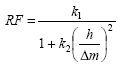
He also showed that the value given here as k2 is actually a function of the Mach number, the flow angle, and of
the method used to calculate the curvature of the streamlines. The
aspect ratio of the grid ( ) in this equation is the ratio of the calculating
station length to the meridional spacing of the grid lines. The equation
above was used in older versions of Vista TF to determine the streamline
curvature relaxation factor with the numerical values of k1 = 0.5 and k2 = 20/96. The value
of
) in this equation is the ratio of the calculating
station length to the meridional spacing of the grid lines. The equation
above was used in older versions of Vista TF to determine the streamline
curvature relaxation factor with the numerical values of k1 = 0.5 and k2 = 20/96. The value
of  used was based on the largest aspect ratio that
can be found in the domain. This is then further reduced if the calculations
show any tendency to diverge during the iterations. The largest aspect
ratio in the whole grid was used, whereby the meridional spacing is
the shortest meridional distance between two adjacent grid lines,
which may be on the hub or casing.
used was based on the largest aspect ratio that
can be found in the domain. This is then further reduced if the calculations
show any tendency to diverge during the iterations. The largest aspect
ratio in the whole grid was used, whereby the meridional spacing is
the shortest meridional distance between two adjacent grid lines,
which may be on the hub or casing.
A value of 0.01 for this relaxation factor corresponds to an aspect ratio of around 15 and will lead to long calculation times because only 1% of the new solution can be taken into account and 99% is carried forward from the earlier solution. In order to reduce an error in the initial solution to 0.01% of its initial value then the number of iterations required would be
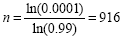
A value of 0.001 for this relaxation factor (aspect ratio near to 50) would lead to ten times as many iterations. Values of the aspect ratio larger than 15 are therefore not recommended but in cases where this is unavoidable (such as low aspect ratio blades with high span and small chord with internal calculating stations) then the program still converges but at a much slower rate.
A different stability scheme has been incorporated in Vista TF. In this, the relaxation factor ratio is calculated as:
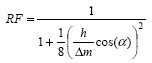
Where  is the absolute flow angle in ducts and
stator rows and the relative flow angle in rotor rows. In the new
scheme, the relaxation factor can vary from quasi-orthogonal to quasi-orthogonal
so that regions of the grid with small aspect ratios are not penalized
by a locally poor grid spacing elsewhere. In addition to this improvement,
experience with many difficult cases has been incorporated in the
selection of the maximum relaxation factor. With this new model, you
should not need to adjust the damping factors because the program
does this automatically.
is the absolute flow angle in ducts and
stator rows and the relative flow angle in rotor rows. In the new
scheme, the relaxation factor can vary from quasi-orthogonal to quasi-orthogonal
so that regions of the grid with small aspect ratios are not penalized
by a locally poor grid spacing elsewhere. In addition to this improvement,
experience with many difficult cases has been incorporated in the
selection of the maximum relaxation factor. With this new model, you
should not need to adjust the damping factors because the program
does this automatically.
The new damping factor has proven to be very successful except when it is used for highly-staggered blade rows such as low flow coefficient compressor impellers or pumps. A further refinement has been added for these cases, in which the damping factor is applied to both the changes in the meridional velocity and the shift in the streamlines.
All flow gradients in the radial equilibrium equation and the curvature of the streamlines in the solution are determined by a piecewise parabolic interpolation through three points. This is a very rapid numerical procedure but experience shows that this can cause errors in the estimation of the curvature of the hub and casing if the quasi-orthogonal spacing is too wide. For the case of an axial to radial bend with circular arc meridional wall contours the error in curvature is of the order 2.5% on a grid with 7 quasi-orthogonal lines (a quasi-orthogonal placed every 15° around the bend). This decreases to 0.2% for 19 quasi-orthogonals (a quasi-orthogonal every 5°). This suggests that typical radial impellers with an axial inducer should be calculated with around 15 quasi-orthogonals in the bladed region. Moreover, the basic assumptions of the meridional throughflow method (for example: no frictional forces, axisymmetric flow, no spanwise mixing) certainly cause larger errors than this error in the curvature estimate.
It should be noted that decreasing the convergence tolerance to low values does not eradicate this error, so that for typical engineering applications a tolerance of 0.1% on cm is generally adequate because the curvature calculation is not more accurate than this. A lower value is however generally used because this confirms that numerical convergence has really happened.
Using 17 streamlines across the span is recommended. The use of such a large number of streamlines across the span brings little improvement in the accuracy when compared with experimental data compared to using only 9, but nevertheless clearly leads to fewer numerical errors in the integration of the radial equilibrium equation. 17 and 9 streamlines have the advantage that the streamlines split the flow uniformly into 16 or 8 streamtubes, providing streamlines at 0%, 25%, 50%, 75%, and 100% of the mass flow.
The limitations mentioned above on the calculation of flow gradients and curvature also determine the extent to which details of steps in the wall geometry can be taken into account. Steps, kinks and wells in the meridional contour need to be omitted because these features are typically of a sub-grid size. Generally attempts to improve the accuracy by using finer grids with more details are not made in streamline curvature calculations because this is counterproductive. These details need to be examined in CFD.
In axial turbomachinery calculations with quasi-orthogonals at the leading edge and trailing edge planes only and with flare on the hub and casing walls in the blade row followed or preceded by annular channels, inaccuracies will arise because the kinks in the contours cannot be accurately modeled.
Computing a new solution from the restart file of an existing solution, even when no changes have been made in the input data, may require 50 or more iterations to re-converge to the solution on the restart file. This effect is due to the fact that the restart file stores only a small part of the information related to the original solution, and many fine details of the solution have to be recalculated.
In running the program from a cold start (without a restart
file) it is useful to think carefully about the initial value of cm_start that is specified for the control file. This
determines the meridional velocity level of the initial solution and
it has been experienced that an initial value too far from reality
may cause the solution to breakdown. The value that should be specified
for cm_start is the flow coefficient (cm/u) of
the machine concerned, whereby the reference velocity used is the
velocity determined by the reference diameter and reference speed
(ref_d and ref_n). In flows
with a risk of choking, it is better to use a low value of cm_start to ensure that the initial conditions are not
close to choke. When a converged solution is available as a restart
file, it should be used because, although it does not necessarily
reduce the number of iterations needed, it does make the solution
process more robust.
The restart file is continually updated by each converged computation, but also if the solution reaches the limit of the maximum number of iterations without converging. In a case where the solution is actually diverging, the non-converged restart file might be a worse starting condition than the program´s own initial guess, so it can be useful to discard this and start again. If a converged solution has been reached then it is sometimes useful to store the converged restart file for a better starting solution if something later goes wrong during calculations at other operating points.
As with all numerical methods, the use of unconverged results for design decisions is extremely dangerous and is not recommended. Nevertheless, examination of unconverged results can often be extremely useful for identifying numerical issues. In some cases examination of unconverged results may indicate features of the design that can be changed to avoid such problems by modification of the geometry.
One measure that has been incorporated and which may be useful
during debugging of a poor calculation is to set the parameter grad_ree equal to zero. This overrides the radial equilibrium
equation and leads to a spanwise constant meridional velocity (see
below). This can be useful in identifying errors where flow data is
inconsistent with the geometry being calculated. Another alternative
that can be used with turbines is to specify a near-zero swirl velocity
on the mid-streamline at the outlet of the last rotor and let the
program determine the mass flow and pressure ratio consistent with
this ("iteration to outlet swirl"). This has unfortunately
not been thoroughly tested on enough cases to guarantee that it will
always work.
If all else fails then set i_ree = 3 in
the control file. Under these circumstances the value specified as grad_ree in the control file is then used to reduce the
meridional velocity gradient as follows:
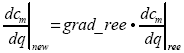
This can be extremely useful for debugging, because it can allow
the program to avoid failing due to high spanwise velocity gradients.
In this way, it effectively becomes a mean-line program with no spanwise
variation in meridional velocity (if grad_ree = 0.0). Other parameters such as the blade speed still vary across the
span, so it is not exactly a mean-line program. Most cases converge
under these conditions and this ensures that the axial matching along
the mean streamline of the blade rows is approximately correct. When
converged it may be possible to approach a solution with the correct
radial distributions by slowly relaxing the value of grad_ree towards unity. During this process, the features of the velocity
gradients that cause trouble slowly become part of the calculation
and this can then help to identify the problem.
Cases that do not converge well are usually either poor designs, or are good designs operating a long way from their design point. Non-convergence generally means that the design is a long way from satisfying the condition of radial equilibrium. If the flow solution converges well then this usually means that the flow is automatically close to radial equilibrium and this will generally indicate a higher-quality machine.
Considerable effort has been made to ensure that the real gas implementation is as robust as other aspects of the program. Nevertheless, errors in the definition data for the real gas can cause stability problems, because they may lead to unrealistic values of the gas properties. In some cases it may be worthwhile to run a particular case using gas equations with a real gas factor (with an estimated ratio of specific heats, an estimated specific heat at constant pressure, and an estimated real gas factor). The restart file for a converged simulation of this type can then be used for subsequent calculations with real gas properties.
The following is a described example of a control data file:
- Section 1
Three lines to identify the run (maximum 72 characters/line):
PCA stage
Control parameters for typical radial impeller
5 October 2013
- Section 2
Two lines for the integer control parameters:
n_sl max_it_main max_it_mass n_points n_speeds n_reserve
17      500           10          1        1         0
- Section 3
Two lines for integer control parameters for output data and the use of the restart file:
i_print_plane i_print_level i_progress i_display i_restart i_interface 4 5 0 0 0 0- Section 4
Two lines for integer control parameters for various models and reference parameters:
i_expert i_flow i_fluid i_inbc i_mass i_mix i_ree 0 1 0 0 0 0 0- Section 5
Two lines for convergence and damping factors:
damp_sc damp_vl cm_start tolerance_cm tolerance_mass grad_ree
  0.00    0.00     0.0       0.0         0.00        1.00
- Section 6
Two lines for mass flow distribution between streamlines (
n_sl- 1 values)f_mass_st(1) f_mass_st(2) ... f_mass_st(n_sl-1) 1.0 1.0 ... 1.0
Section 6 is needed only if a change in mass flow distribution across the streamlines is needed (i_mass > 0).
The following is a described example of a geometry data file. Note that none of the additional parameters required by the correlations for choke, losses, and deviation are specified in section 5 of this case, so if these are needed, the program interprets them from the other geometry data, otherwise it sets the values to zero.
- Section 1
Three lines to identify the run:
PCA Stage from .rtzt file
Thickness converted to tangential thickness
10 blades and 1 splitter
- Section 2
Two lines for the number of quasi-orthogonal lines:
n_qo scale
23  1.00000
- Section 3
A section that defines the quasi-orthogonal type and end points:
i  r_hub    r_shr   z_hub   z_shr    n_blade n_curve i_type  i_row   i_spool
1 0.00069  0.05594 -0.04959 -0.04959  0       1       1       0       0
2 0.00224  0.05215 -0.03682 -0.03757  0       1       1       0       0
3 0.00702  0.04941 -0.02481 -0.02527  0       1       1       0       0
4 0.01189  0.04776 -0.01284 -0.01277  0       1       1       0       0
5 0.01357  0.04720 -0.00004 -0.00018  10      5       3       0       0
6 0.01447  0.04728  0.00570  0.00371  10      5       3       0       0
7 0.01609  0.04758  0.01128  0.00759  10      5       3       0       0
8 0.01832  0.04809  0.01664  0.01145  10      5       3       0       0
9 0.02108  0.04884  0.02175  0.01526  20      5       3       0       0
10 0.02463 0.04993  0.02700  0.01930  20      5       3       0       0
11 0.02867 0.05132  0.03188  0.02325  20      5       3       0       0
12 0.03314 0.05305  0.03637  0.02706  20      5       3       0       0
13 0.03799 0.05513  0.04045  0.03068  20      5       3       0       0
14 0.04318 0.05759  0.04408  0.03407  20      5       3       0       0
15 0.04866 0.06040  0.04726  0.03717  20      5       3       0       0
16 0.05440 0.06358  0.04995  0.03988  20      5       3       0       0
17 0.06035 0.06709  0.05214  0.04216  20      5       3       0       0
18 0.06646 0.07087  0.05379  0.04393  20      5       3       0       0
19 0.07271 0.07488  0.05485  0.04514  20      5       3       0       0
20 0.07902 0.07901  0.05538  0.04575  20      5       3       0       0
21 0.08033 0.08032  0.05544  0.04585   0      1       1       0       0
22 0.08164 0.08164  0.05548  0.04592   0      1       1       0       0
23 0.08295 0.08295  0.05550  0.04597   0      1       1       0       0
- Section 4
A section that defines the quasi-orthogonals and the blade geometry:
i j  r_qo    theta_qo   z_qo   thu_qo gamma_r_qo gamma_z_qo
5 1 0.01357  0.32039 -0.00004  0.00255 -0.18038 -23.15654
5 2 0.02198  0.26684 -0.00008  0.00244 -0.36249 -32.52025
5 3 0.03038  0.21411 -0.00015  0.00251 -0.34266 -41.27189
5 4 0.03879  0.26814 -0.00016  0.00243 -0.00979 -49.73230
5 5 0.04720  0.29630 -0.00018  0.00234 -0.18913 -57.43224
6 1 0.01447 -9.69106  0.00570  0.00269  1.88713 -23.08947
6 2 0.02267 -8.14852  0.00518  0.00256  0.41685 -31.31698
6 3 0.03087 -7.40827  0.00464  0.00243 -0.99339 -39.39957
6 4 0.03908 -6.96808  0.00417  0.00230 -2.04619 -47.44992
6 5 0.04728 -6.75726  0.00371  0.00218 -3.95792 -54.90281
7 1 0.01609 -18.29413  0.01128  0.00262  3.70754 -22.85821
7 2 0.02396 -15.68568  0.01033  0.00248  1.15036 -30.47241
7 3 0.03183 -14.35239  0.00936  0.00234 -1.75718 -37.83696
7 4 0.03970 -13.58089  0.00846  0.00220 -3.70752 -45.35764
7 5 0.04758 -13.16589  0.00759  0.00206 -6.69381 -52.39817
8 1 0.01832 -25.28463  0.01664  0.00254  4.70103 -22.81646
8 2 0.02576 -22.28703  0.01531  0.00241  1.41759 -29.88146
8 3 0.03320 -20.61659  0.01398  0.00227 -2.35690 -36.52612
8 4 0.04065 -19.60303  0.01270  0.00212 -5.03581 -43.43454
8 5 0.04809 -18.99898  0.01145  0.00196 -8.73336 -50.00039
9 1 0.02108 -30.92988  0.02175  0.00248  4.74907 -23.14610
9 2 0.02802 -28.02047  0.02011  0.00234  1.11611 -29.56330
9 3 0.03496 -26.23881  0.01846  0.00220 -2.97754 -35.52497
9 4 0.04190 -25.07781  0.01685  0.00204 -6.21556 -41.74088
9 5 0.04884 -24.32487  0.01526  0.00188 -10.40615 -47.79160
10 1 0.02463 -36.00322  0.02700  0.00242  3.85677 -23.97254
10 2 0.03096 -33.42982  0.02507  0.00228  0.15779 -29.56658
10 3 0.03728 -31.67995  0.02313  0.00213 -3.84908 -34.83600
10 4 0.04361 -30.43321  0.02121  0.00197 -7.49971 -40.24432
10 5 0.04993 -29.55790  0.01930  0.00182 -12.07824 -45.67586
11 1 0.02867 -40.35207  0.03188  0.00236  2.23718 -25.26450
11 2 0.03435 -38.17139  0.02974  0.00222 -1.42539 -29.89481
11 3 0.04001 -36.55263  0.02757  0.00207 -5.15749 -34.49204
11 4 0.04567 -35.29039  0.02542  0.00192 -8.89269 -39.12102
11 5 0.05132 -34.35094  0.02325  0.00177 -13.85353 -43.85841
12 1 0.03314 -44.26280  0.03637  0.00232  0.10221 -26.97474
12 2 0.03816 -42.42247  0.03407  0.00217 -3.48507 -30.56208
12 3 0.04314 -40.96080  0.03175  0.00203 -6.83731 -34.52932
12 4 0.04811 -39.72235  0.02942  0.00188 -10.45941 -38.40800
12 5 0.05305 -38.76700  0.02706  0.00173 -15.90754 -42.28558
13 1 0.03799 -47.91006  0.04045  0.00228 -2.40966 -29.07832
13 2 0.04233 -46.32055  0.03805  0.00214 -5.94640 -31.56104
13 3 0.04663 -45.00031  0.03562  0.00200 -8.93117 -34.88947
13 4 0.05090 -43.80060  0.03317  0.00185 -12.32638 -38.07380
13 5 0.05513 -42.85755  0.03068  0.00171 -18.25871 -40.88997
14 1 0.04318 -51.39712  0.04408  0.00226 -5.26535 -31.52634
14 2 0.04685 -49.96856  0.04163  0.00212 -8.83099 -32.82496
14 3 0.05047 -48.75090  0.03914  0.00198 -11.46588 -35.54585
14 4 0.05405 -47.58476  0.03663  0.00184 -14.51275 -38.15374
14 5 0.05759 -46.66554  0.03407  0.00170 -20.92644 -39.61549
15 1 0.04866 -54.78108  0.04726  0.00224 -8.53323 -34.20149
15 2 0.05168 -53.43857  0.04478  0.00211 -12.12520 -34.30999
15 3 0.05464 -52.27642  0.04227  0.00197 -14.44340 -36.45351
15 4 0.05755 -51.13094  0.03975  0.00184 -17.13253 -38.55727
15 5 0.06040 -50.22395  0.03717  0.00170 -23.67359 -38.40397
16 1 0.05440 -58.09399  0.04995  0.00224 -12.36035 -36.91306
16 2 0.05678 -56.77929  0.04747  0.00211 -15.80725 -36.02020
16 3 0.05910 -55.62589  0.04497  0.00198 -17.90732 -37.55025
16 4 0.06137 -54.47843  0.04245  0.00185 -20.39385 -39.11425
16 5 0.06358 -53.55910  0.03988  0.00172 -26.48486 -37.37148
17 1 0.06035 -61.35160  0.05214  0.00227 -16.87176 -39.31440
17 2 0.06211 -60.02598  0.04967  0.00214 -19.92706 -37.88099
17 3 0.06382 -58.83913  0.04719  0.00201 -21.91242 -38.69098
17 4 0.06548 -57.66538  0.04469  0.00188 -24.33144 -39.57177
17 5 0.06709 -56.69062  0.04216  0.00175 -29.09953 -36.76047
18 1 0.06646 -64.56377  0.05379  0.00231 -22.10267 -40.96566
18 2 0.06763 -63.20368  0.05134  0.00220 -24.62539 -39.61601
18 3 0.06875 -61.94636  0.04888  0.00207 -26.48127 -39.65304
18 4 0.06983 -60.72039  0.04641  0.00195 -28.81198 -39.70950
18 5 0.07087 -59.63480  0.04393  0.00181 -31.57298 -37.06592
19 1 0.07271 -67.72621  0.05485  0.00241 -27.77629 -41.34374
19 2 0.07330 -66.32376  0.05243  0.00231 -29.91973 -40.62141
19 3 0.07384 -64.96857  0.05000  0.00218 -31.51785 -40.06106
19 4 0.07437 -63.66663  0.04757  0.00202 -33.54181 -39.54783
19 5 0.07488 -62.40934  0.04514  0.00194 -34.26011 -38.72800
20 1 0.07902 -70.87669  0.05538  0.00263 -32.69635 -39.92279
20 2 0.07904 -69.41995  0.05297  0.00260 -34.43144 -39.83097
20 3 0.07902 -67.94505  0.05056  0.00239 -36.32393 -39.91470
20 4 0.07901 -66.52396  0.04815  0.00205 -37.25527 -39.78318
20 5 0.07901 -65.01019  0.04575  0.00216 -37.35707 -41.84796
- Section 5
A section for additional geometry data:
J throat  throat_pos clearance max_thick te_thick le_thick chord delta_stagger
1 0.00000  0.00000    0.00000  0.00000   0.00000   0.00    0.00      0.00
2 0.00000  0.00000    0.00000  0.00000   0.00000   0.00    0.00      0.00
3 0.00000  0.00000    0.00000  0.00000   0.00000   0.00    0.00      0.00
4 0.00000  0.00000    0.00000  0.00000   0.00000   0.00    0.00      0.00
5 0.00000  0.00000    0.00000  0.00000   0.00000   0.00    0.00      0.00
The following is a described example of an aerodynamic data file:
- Section 1
Three lines to identify the aerodynamic data:
Radial stage at design flow
ideal gas
15 October 2012
- Section 2
Two lines for the reference aerodynamic parameters, which depend on the value of
i_flowin the.confile. Assumingi_flow= 1:ref_n ref_mass ref_d 60000.0 1.00 0.15804
- Section 3
Two lines for the Reynolds number:
Re_ref
0.0
- Section 4
Two lines for the fluid data, which depend on the value of
i_fluidin the.confile. Assumingi_fluid= 1 (for ideal gas):cp_gas gamma_gas 1005.2 1.40
- Section 5
Two lines for the number of points on the inlet boundary where flow conditions are specified:
n_inbc
1
- Section 6
Lines for the fraction of the inlet boundary where flow conditions are specified (
n_inbcvalues):f_inbc 0.0
- Section 7
Lines for the pressure on the inlet boundary (
n_inbcvalues, which depend oni_bcin the.confile). Assumingi_bc= 0:pt_inbc 98000.0
- Section 8
Lines for the temperature on the inlet boundary (
n_inbcvalues, which depend oni_bcin the.confile). Assumingi_bc= 0:tt_inbc 293.0
- Section 9
Lines for swirl on the inlet boundary (
n_inbcvalues, which depend oni_bcin the.confile). Assumingi_bc= 0:rcu_inbc 0.00
- Section 10
Lines for the relative flow for different operating points (
n_pointsdefined in the.confile):ref_point(1) ref_point(2) ref_point(3) ... ref_point(11) 1.25 1.20 1.10 1.00 0.90 0.80 0.70 0.60
- Section 11
Lines for the relative speed for different operating points (
n_speedsdefined in the.confile):ref_speed(1) ref_speed(2) ref_speed(3) ... ref_speed(11) 0.4 0.5 0.6 0.7 0.8 0.9 1.0 1.1 1.2 1.3 1.4
- Section 12
Lines for the map parameters for estimating surge and choke (11 values)
map_parameter(1) map_parameter(2) .... map_parameter(11)
1.0 1.0 1.0 1.0 1.0 1.0 1.0 1.0 1.0 1.0 1.0
EXAMPLE 1: Radial compressor impeller 1
This example of a correlations data file is for a radial compressor
impeller calculation. For beginners the only parameter of relevance
is the small-scale polytropic efficiency which is represented by k_loss and loss below. For most radial
compressor or pump impeller calculations, the only parameter in this
file that is changed is the small-scale polytropic efficiency. Note
that a single value of the empirical information for flow outlet angle
is specified (k_dev = 3 implies the use of a
slip factor, and because dev is specified as
0.0, the program calculates the slip factor from the Wiesner correlation).
The calculation is without blockage (i_ewb =
0), but the last two lines still need to be specified.
- Section 1
Three lines to identify the run (maximum 72 characters/line):
Typical correlations file for radial compressor
small-scale polytropic efficiency, slip factor of 0.0 (so Wiesner) and no blockage
5 May 2008
- Section 2
Two lines for integer data:
i_loss i_dev i_ewb
1      1     0
- Section 3
Two lines for loss input data:
n_loss_sl n_loss_qo
1         1
- Section 4
Two lines for empirical loss data:
i_qo_loss k_loss f_loss loss
1               1      0.500  0.86
- Section 5
Two lines for deviation input data:
n_dev_sl n_dev_qo
1        1
- Section 6
Two lines for empirical deviation data:
i_qo_dev k_dev f_dev dev
1            3     0.500 0.00
- Section 7
Two lines for blockage input data:
n_ewb_sl n_ewb_qo
1        1
- Section 8
Two lines for empirical blockage data:
i_qo_ewb k_ewb f_ewb ewb
1         1    0.500 0.00
EXAMPLE 2: Radial compressor impeller 2
This example is also for a radial compressor impeller calculation.
In this case, the impeller total-total polytropic efficiency (represented
by k_loss and loss) is specified
on the mean line. Note that a single value of the empirical information
for flow outlet angle is specified. In this case a blockage of 2%
is included everywhere in the domain.
- Section 1
Three lines of characters identifying the run (maximum of 72 characters/line):
Typical correlations file for radial compressor
small-scale efficiency, slip factor of 0.0 and 2% blockage
26 October 2012
- Section 2
Two lines for integer data:
i_loss i_dev i_ewb
   1        1       1
- Section 3
Two lines for loss input data:
n_loss_sl n_loss_qo 1 1- Section 4
Two lines for empirical loss data:
i_qo_loss k_loss f_loss loss
   1        4    0.500  0.90
- Section 5
Two lines for deviation input data:
n_dev_sl n_dev_qo 1 1- Section 6
Two lines for empirical deviation data:
i_qo_dev k_dev f_dev  dev
   1      5    0.500  0.00
- Section 7
Two lines for blockage input data:
n_ewb_sl n_ewb_qo 1 1- Section 8
Two lines for empirical blockage data:
i_qo_ewb k_ewb f_ewb  ewb
   1      1    0.500  0.02
EXAMPLE 3: Radial compressor stage
This example is a radial compressor stage with a vaned diffuser and a return channel for a gas turbine application. In this case the diffuser also requires a specification of the deviation. Note that the value of 22 in section 6 implies that the diffuser trailing edge is downstream of this quasi-orthogonal. If the number of quasi-orthogonals changes then this value needs to change as well.
- Section 1
Three lines of characters identifying the run (maximum 72 characters/line):
Correlations file for radial compressor stage
Small-scale poytropic efficiency, slip factor in rotor, deviation in stator and 5% blockage
26 October 2012
- Section 2
Two lines for integer data:
i_loss i_dev i_ewb
  1      1     1
- Section 3
Two lines for loss input data:
n_loss_sl n_loss_qo 1 1- Section 4
Two lines for empirical loss data:
i_qo k_loss f_loss loss
 1    1     0.500  0.85
- Section 5
Two lines for deviation input data:
n_dev_sl n_dev_qo 1 2- Section 6
Two lines for empirical deviation data:
i_qo k_dev f_dev dev
1    3     0.500 0.09
22   1     0.500 2.00
- Section 7
Two lines for blockage input data:
n_ewb_sl n_ewb_qo
1        1
- Section 8
Two lines for empirical blockage data:
i_qo k_ewb f_ewb   ewb
  1    1   0.500   0.05
EXAMPLE 4: Multistage (9-stage) radial compressor
This example of a correlations data file is for a nine-stage
radial compressor with a vaneless diffuser and a return channel downstream
of each impeller except the ninth, which exhausts into a volute. The
losses in this case are specified as a single polytropic efficiency
for everything, and the blockage is zero. But for the deviation of
the flow from the blade angle at the trailing edge, it is sensible
to use a slip factor for the impeller and a deviation angle for the
stator vanes. In this case 0.0 is specified as the slip factor so
the Wiesner slip factor is used, and 5.00° is specified for the
return channel deviation angle. The value of k_dev controls whether the slip factor or deviation is used. The values
of i_qo in section 6 control where the slip factor
or deviation is applied. A sensible rule would be to make the value
of i_qo equal to the number of the q-o at the trailing edge. However, the program can accept
any value between the previous trailing edge and the current one.
A vaned diffuser with a different deviation angle would require an
additional line, with k_dev set to 1 between
each impeller and return channel line, and with the appropriate value
of i_qo.
- Section 1
Three lines to identify the run (maximum 72 characters/line):
Typical correlations file for multistage radial compressor
Efficiency, slip factor in impeller, deviation in stators, no blockage
18 September 2008
- Section 2
Two lines for integer data:
i_loss i_dev i_ewb
1      1     0
- Section 3
Two lines for loss input data:
n_loss_sl n_loss_qo
1         1
- Section 4
Two lines for empirical loss data:
i_qo_loss k_loss f_loss loss
1         1      0.500  0.80
- Section 5
Two lines for deviation input data:
n_dev_sl n_dev_qo
1        17
- Section 6
Lines for empirical deviation data:
i_qo_dev k_dev f_dev dev
1    3   0.500   0.00
45   1   0.500   5.00
65   3   0.500   0.0
95   1   0.500   5.00
115  3   0.500   0.0
145  1   0.500   5.00
165  3   0.500   0.0
195  1   0.500   5.00
215  3   0.500   0.0
245  1   0.500   5.00
265  3   0.500   0.0
295  1   0.500   5.00
315  3   0.500   0.0
345  1   0.500   5.00
365  3   0.500   0.0
395  1   0.500   5.00
415  3   0.500   0.0
- Section 7
Two lines for blockage input data:
n_ewb_sl n_ewb_qo
1        1
- Section 8
Two lines for empirical blockage data:
i_qo_ewb k_ewb f_ewb ewb
1        1     0.500 0.00
EXAMPLE 5: Axial ventilator stage
- Section 1
Three lines of characters identifying the run (maximum 72 characters/line):
Typical correlations file for axial ventilators without an inlet guide vane
Miller-Wright Correlations as modified by John Calvert (PCA) for ventilators
DCA blade types assumed. Blockage calculated and changed.
- Section 2
Two lines for integer data:
i_loss i_dev i_ewb
   2     2     2
- Section 3
Two lines for loss input data:
n_loss_bladerow n_dummy 1 1- Section 4
Two lines for empirical deviation data (
i_loss= 2):i_blrow i_loss_type f_loss(1) f_loss(2) f_loss(3) f_loss(4) f_loss(5) f_loss(6) 1 203 1.0 1.0 1.0 1.0 1.0 1.0- Section 5
Two lines for deviation input data (
i_dev= 2):n_dev_bladerow n_dummy 1 1- Section 6
Two lines for empirical deviation data (
i_dev= 2):i_blrow i_dev_type f_dev(1) f_dev(2) f_dev(3) f_dev(4) f_dev(5) f_dev(6) 1 203 0.0 0.0 0.0 0.0 0.0 0.0- Section 7
Two lines for blockage input data (
i_ewb= 2):n_ewb_bladerow n_dummy 1 0- Section 8
Two lines for empirical blockage data:
i_blrow i_ewb_type f_ewb(1) ... ... .... ... f_ewb(6)
   1        202      1.0   1.0  1.0  1.0  1.0  1.0
EXAMPLE 6: Radial turbine stage with inlet nozzle and impeller
In this example, the losses are different for the two components.
The deviation angle is specified by using the cosine rule for both
components (k_dev = 5) but a correction to this
(2.00°) is applied in the rotor.
- Section 1
Three lines to identify the run (maximum 72 characters/line):
Typical correlations file for radial turbine stage
Efficiency, deviation as mod to cosine rule and no blockage
18 September 2008
- Section 2
Two lines for integer data:
i_loss i_dev i_ewb
1      1     0
- Section 3
Two lines for loss input data:
n_loss_sl n_loss_qo
1         2
- Section 4
Three lines for empirical loss data:
i_qo_loss k_loss f_loss loss
1         1      0.500  0.88
35        1      0.500  0.75
- Section 5
Two lines for deviation input data:
n_dev_sl n_dev_qo
1        2
- Section 6
Lines for empirical deviation data:
i_qo_dev k_dev f_dev dev
1        5    0.500  0.00
35       5    0.500  2.00
- Section 7
Two lines for blockage input data:
n_ewb_sl n_ewb_qo
1        1
- Section 8
Two lines for empirical blockage data:
i_qo_ewb k_ewb f_ewb ewb
1        1     0.500 0.00
EXAMPLE 7: Spanwise variations in empirical data
In all of the above examples, a constant value of the empirical information is applied on all streamlines, so only a single value is specified. However, this data is allowed to vary across the span for each blade row. In such a case, there would be an additional line for each fraction of the span. This is shown with regard to the losses, which specifies the efficiency at 0%, 25%, 50%, 75%, and 100% of the span.
- Section 1
Three lines to identify the run (maximum 72 characters/line):
Radial compressor impeller with spanwise variation of eta
Efficiency, slip factor for impeller with no blockage
18 September 2008
- Section 2
Two lines for integer data:
i_loss i_dev i_ewb
1      1     0
- Section 3
Two lines for loss input data:
n_loss_sl n_loss_qo
5         1
- Section 4
Lines for empirical loss data:
i_qo_loss k_loss f_loss loss
1        1      0.000  0.77
1        1      0.250  0.79
1        1      0.500  0.80
1        1      0.750  0.79
1        1      1.000  0.77
- Section 5
Two lines for deviation input data:
n_dev_sl n_dev_qo
1        1
- Section 6
Lines for empirical deviation data:
i_qo_dev k_dev f_dev dev
1        3   0.500   0.00
- Section 7
Two lines for blockage input data:
n_ewb_sl n_ewb_qo
1        1
- Section 8
Two lines for empirical blockage data:
i_qo_ewb k_ewb f_ewb ewb
1        1     0.500 0.00
EXAMPLE 8: Kacker Okapuu correlations for an axial turbine
This example of a correlations data file shows the use of a blade oriented specification for the Kacker Okapuu correlations for an axial turbine calculation. No blockage is specified.
- Section 1
Three lines to identify the run (maximum 72 characters/line):
Typical correlations file for axial turbine - no blockage
Kacker-Okapuu
10 September 2008
- Section 2
Two lines for integer data:
i_loss i_dev i_ewb
2      2     0
- Section 3
Two lines for loss input data:
n_loss_bladerow placeholder 1 1- Section 4
Two lines for empirical deviation data (
i_loss= 2):i_blrow i_loss_type f_loss(1) f_loss(2) f_loss(3) f_loss(4) f_loss(5) f_loss(6) 1 1 1.0 1.0 1.0 1.0 1.0 1.0
- Section 5
Two lines for deviation input data:
n_dev_bladerow placeholder
1              1
- Section 6
Lines for empirical deviation data:
i_blrow i_dev_type f_dev(1) f_dev(2) f_dev(3) f_dev(4) f_dev(5) f_dev(6)
1       1          0.0      0.0      0.0      0.0      0.0      0.0
- Section 7
Two lines for blockage input data:
n_ewb_sl n_ewb_qo
1        1
- Section 8
Two lines for empirical blockage data:
i_qo k_ewb f_ewb ewb
1    1     0.500 0.00
EXAMPLE 9
This example of a correlations data file shows the use of a blade-oriented specification for the Miller-Wright correlations for an axial compressor calculation.
- Section 1
Three lines to identify the run (maximum 72 characters/line):
Typical correlations file for multistage axial compressor
Miller Wright Correlations
10 September 2008
- Section 2
Two lines for integer data:
i_loss i_dev i_ewb
2      2     2
- Section 3
Two lines for loss input data:
n_loss_bladerow placeholder 1 1- Section 4
Two lines for empirical loss data (
i_loss= 2):i_blrow i_loss_type f_loss(1) f_loss(2) f_loss(3) f_loss(4) f_loss(5) f_loss(6) 1 11 1.0 1.0 1.0 1.0 1.0 1.0
- Section 5
Two lines for deviation input data (
i_dev= 2):n_dev_bladerow placeholder 1 1
- Section 6
Lines for empirical deviation data (
i_dev= 2):i_blrow i_dev_type f_dev(1) f_dev(2) f_dev(3) f_dev(4) f_dev(5) f_dev(6) 1 11 0.0 0.0 0.0 0.0 0.0 0.0
- Section 7
Two lines for blockage input data:
n_ewb_bladerow placeholder 1 1- Section 8
Two lines for empirical blockage data:
i_blrow i_ewb_type f_ewb(1) f_ewb(2) f_ewb(3) f_ewb(4) f_ewb(5) f_ewb(6)
   1       11         1.0      1.0      1.0      1.0      1.0      1.0
The ANSYS .rtzt and the Vista TF .geo Geometry Definition File
The data in the .rtzt file is the meanline
coordinate data as produced by the program BladeGen on a number of
layers from hub to shroud, with a format as described in Description of the RTZT
File. There are several differences
to the .rtzt option in BladeGen and the geometry
actually needed by a throughflow program, and for this reason the
RTZTtoGEO program has been written to convert this data into a more
suitable format, rather than working directly with the .rtzt file.
The first difference is related to the need for a throughflow
program to work with blade angles, in the case of Vista TF with the
blade lean angles gamma_r and gamma_z (see Definition of Blade Lean Angles). Throughflow programs
work on relatively coarse grids and so it is sensible to provide the
programs with the blade angles rather than just the blade coordinates.
Otherwise the blade angles would have to be calculated by interpolation
and differentiation on a coarse grid which will lead to errors. In
axial duct flow programs with planes just at the leading and trailing
edges, this is done by specifying the axial blade angles or flow angles
at the inlet and the outlet. In Vista TF, which includes the blade
force in the solution and is designed for radial machines, both the
axial and the radial lean angles (gamma_r and gamma_z) have to be defined and, because the program includes
internal planes, these are defined throughout the blade, not just
at the edges.
The second key difference is that RTZT concentrates on the information
required on each stream-surface (or layer) at a certain percentage
of the span of the blade, or on blade sections or layers. Throughflow
programs concentrate on the information in a plane at right angles
to this and require information along equally spaced quasi-orthogonal
lines at fixed meridional positions through the blade rows, and upstream
and downstream. In .rtzt files, the number
of points and spacing in the meridional direction is not the same
on each layer. In a throughflow program, it is the location of the
layers on each quasi-orthogonal line that may be different, but the
points along the streamline must be evenly spaced for all layers.
The throughflow program also needs additional data upstream
and downstream of a blade row to define the position of the quasi-orthogonal
in a region of duct. This is not the case in the current .rtzt file, because different levels of information
are available on each layer in this region, and curved quasi-orthogonals
outside of the bladed regions are difficult to define. In some of
the cases tested with highly curved leading edges, it was necessary
to modify the .geo file by hand to avoid
problems with the quasi-orthogonals upstream or downstream of the
leading edge crossing the leading or trailing edge.
Conversion of a .rtzt File into a .geo File
A program, RTZTtoGEO, can be used to generate the geometrical
input data file (file extension .geo) for
the Vista TF streamline curvature program from the BladeGen RTZT output
format (file extension .rtzt). The RTZTtoGEO
program can be obtained from PCA, although the preferred method to
generate the .geo file is to use the BladeEditor
VistaTFExport feature (see Export to Vista TF (.geo)).
No guarantee can be given that the RTZTtoGEO program will work on
all cases. This program can be used to merge several separate .rtzt files from BladeGen into a single .geo file for multiple-blade-row simulations with Vista TF.
For a single blade row, the program makes use of three files:
One input data file is needed: RTZT geometrical data file (
.rtzt).The program creates one output file: Vista TF geometrical data file (
.geo).The input and output file names are specified by you in an auxiliary data file that must be called
rtzt.fil. It must contain the necessary file names in the following order and form:
Number of blade rows                 1
RTZT datafile name                   impeller.rtzt
Vista TF geometry datafile name      impeller.geo
For multiple blade rows, additional .rtzt files are needed for each blade row and the associated .geo files are merged into a single .geo file for the whole domain. The number of individual blade rows is
given in the first line and the names of the individual .rtzt files follow this.
For n blade rows the program makes use
of n+2 files:
ninput data files are needed:nRTZT geometrical data files (.rtzt).The program creates one output file: Vista TF geometrical data file (
.geo).The input and output file names are specified by you in an auxiliary data file that must be called
rtzt.fil. It must contain the necessary filenames in the following order and form:
Number of blade rows                 n
RTZT datafile name                   Prefix1.rtzt
RTZT datafile name                   Prefix2.rtzt
: :
RTZT datafile name                   Prefixn.rtzt
Vista TF geometry datafile name      impeller.geo
Note that the different .rtzt files
must be generated from BladeGen files that join up to each other consistently
with no gaps. If the domains between adjacent blade rows as defined
by the .rtzt files meet exactly at the boundary
of the domains then the program includes a single quasi-orthogonal
at this boundary.
Running the RTZTtoGEO Program
The file impeller.rtzt and the file rtztgeo.fil should be in the same directory as the executable
of the compiled program files. Starting the program produces the .geo file from the .rtzt file.
If the .geo file already exists, there is
a prompt as to whether this should be overwritten.
The program prompts you to identify whether the blade row is a compressor (pump) or turbine, and whether it is a rotor or stator. In addition the program suggests the number of quasi-orthogonals upstream of the leading edge and downstream of the trailing edge but you can change these numbers if this seems appropriate, simply by replying with n (n = "no") to the prompt and then suggesting the new number of quasi-orthogonals to be used. If you reply with a y (y= "yes") then the automatic choice of the program is used, which is fairly sensible in most cases.
Note: The limit on the number of points in each layer of the .rtzt files is 1000. The limit on the number of layers
is 15. The maximum number of blade rows is 20. Up to 3000 quasi-orthogonals
can be included in the final .geo file.
There are options to modify the number of quasi-orthogonals in the blade row and to change the orientation of the calculating grid so that this is oriented in the positive z direction. The change in orientation is needed because in some BladeGen files the flow travels in the direction of the negative z axis, and Vista TF assumes that the flow is traveling in the direction of the positive x axis. Without this switch the hub and shroud contours become reversed. The option to modify the number of quasi-orthogonals in a blade row has been included so that RTZTtoGEO can better cope with axial blades with short chords relative to radial machines with long chords. The program makes its own choice of the number of quasi-orthogonals needed, based on the aspect ratio of the blade; this is more or less consistent with the stability requirements of the Vista TF program. The rule used leads to 16 quasi-orthogonals in most radial compressors. You can change this number if this seems appropriate, simply by replying with n (n = "no") to the prompt and then suggesting the new number of quasi-orthogonals to be used. If you reply with a y (y= "yes") then the automatic choice of the program is used, which is fairly sensible in most cases.
Merging Several .rtzt Files into a Single .geo File
Vista TF can run a computation for up to 20 blade rows. BladeGen
can currently only be used to define the blade rows individually so
each .rtzt file contains only a single blade
row. It is possible to merge these into a single .geo file automatically using Vista RTZTtoGEO, as explained above. The
procedure below describes how to merge individual .geo files by hand, just in case the automatic option fails.
Run RTZTtoGEO for the first blade row.
Set up a Vista TF calculation for this blade row with all the appropriate input files and get this to converge.
Run RTZTtoGEO for the next blade row.
Edit the
.geofile of the first blade row to include the additional information for the downstream blade row, as follows:Change the title section as appropriate (section 1).
Add new quasi-orthogonals in section 3 (copy from the
.geofile of the next blade row and add to the.geofile of the first blade row). This may require modifications by hand in the duct region between the blade rows because the quasi-orthogonals have to step smoothly from inlet to outlet and not overlap. Usually this means deleting some quasi-orthogonals downstream of the first blade row and upstream of following blade row where the domains would overlap. Note that the numbering of the quasi-orthogonals does not have to be changed because the program does not read this information. The numbering of each quasi-orthogonal can then be left as originally output by the RTZTtoGEO program. Be careful in this process not to add any extra empty lines to the.geofile between the different lines or to take any away. Note that the type and orientation of the blade row should be correct automatically (withi_type2 for stators and 3 for rotors) and that the number of upstream and downstream quasi-orthogonals can be modified so that this process is easier.Do the same for the blade definition section (section 4), whereby only those lines within the blade row need to be copied in.
At the end of the
.geofile, the details in section 5 need to be modified to give throat areas for the blade row that has been added (which is actually zero because the,rtztfile does not provide this information. Thus if there are two blade rows each defined with five sections then there would be 10 lines at the end of the.geofile. These extra lines can also be cut and pasted from the.geofiles for the appropriate blade row if you want.Count the number of quasi-orthogonals that are left and change this in section 2. If you are lucky and have not had to delete any quasi-orthogonals, this is straightforward.
Edit the
.corfile of the first blade row to include additional downstream blade row losses, deviation, and blockage data, noting that the location of the deviation is related to the number of the quasi-orthogonal and not the blade row. Note that the aerodynamic and control data files (.aerand.con) do not usually need to be changed in this process.Delete the restart
.rstfile because the restart capability only works if there has been no change to the number of quasi-orthogonals. Vista TF recognizes this and recreates a new restart file automatically.Run Vista TF, and repeat from step 3 for each additional blade row. Note that experienced users might manage to make the modifications to the
.geofile and the.corfile for several blade rows together in 1 step, but doing it step-by-step gives better control of where any errors have been introduced.
Description of the RTZT File
This section describes the generic RTZT data file format for
BladeGen. The file is an ASCII file that uses space separation between
values. Users who have geometrical data, in particular, forms involving
blade coordinates on certain spanwise sections in which the radius,
axial coordinate, the circumferential blade angle and the thickness
are given may find it useful to first generate an RTZT file and use
the RTZTtoGEO utility for the generation of the .geo file.
Note: Angular values must be in radians.
Example file:
text enclosed in {} is a data item
text enclosed in () is a comment
text enclosed in [] is optional

{number of blades}
{number of splitters}   (0 is main blade only)
(for each blade, main and splitter)
     {pitch fraction}   (Ignored for main blade)
     {number of layers}
     [N] [T]          (Normal or Tangential Thickness Flag)

            (for each layer)
            {span fraction} {number of points} [a][t][b]
            (for each point)

            {r} {theta} {z} {thickness}
                   :
:Example 1
The example given here is for air.
- Section 1
3 lines of characters identifying the run (max 72 characters/line)
Real gas data for air
First test case of real gas data
6 January 2010
- Section 2
Name of gas (72 characters)
gas_name
air
- Section 3
Molecular mass and/or Gas constant
MW (kg/kmol) Gas_R (J/kg/K)
28.97 287.1
- Section 4
Critical point parameters and acentric factor
Pc (Pa) Tc (K) Vc (m3/kg) gas_omega (-)
3758000.0 132.3 0.002857 0.033
- Section 5
Temperature limits of piecewise specific heat curves
T_min (K) T_max(K) order_T_poly (max 8)
100.0 1000.0 8
- Section 6
Coefficients of cp_polynomial for lower temperature region (T_min < T < T_mid)
A1 A2 A3 A4 A5 A6 A7 A8
1.161482e+003 -2.368819e+000 1.485511e-002 -5.034909e-005 9.928569e-008 -1.111097e-010 6.540196e-014 -1.573588e-017