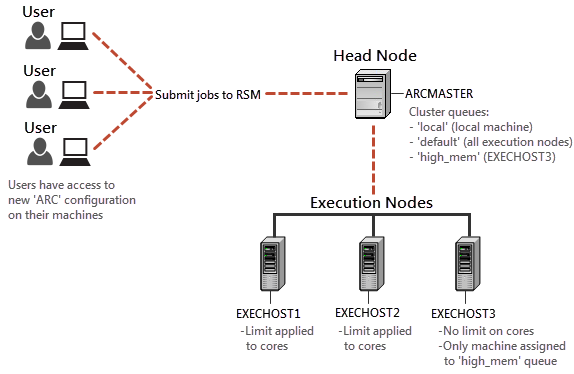
The first step in configuring a cluster is planning which servers will form the cluster, and selecting the services that will run on each node.
Machine Layout
For this example, we are going to form a cluster using 4 machines:
A machine named ARCMASTER will serve as the cluster submit host, or master node. This is the machine to which jobs will be submitted from users' client machines for scheduling. At a minimum this machine will have Workbench and RSM installed, as well as the RSM launcher service.
Three machines (named EXECHOST1, EXECHOST2 and EXECHOST3) will serve as execution nodes. These machines will have access to a network installation of Ansys Workbench and solvers, and will be used for running jobs.
On EXECHOST1 and EXECHOST2 we will restrict the number of cores that can be used by ARC jobs on those machines, and place no restrictions on EXECHOST3 so that it can handle larger jobs.
Note: All nodes in an Ansys RSM Cluster must run on the same platform (Windows or Linux). Instructions for both platforms are provided in this example.
Cluster Queues
The ARC will have the following 3 queues:
local: Used for running jobs on the local machine
default: Used for running jobs on any of the execution nodes
high_mem: Used for running jobs on EXECHOST3 only, which is the execution node with unrestricted core usage. We will also set the maximum number of jobs that can be run on this queue to 100.
Summary