


FEM > Element and Mesh > Block Mesher.
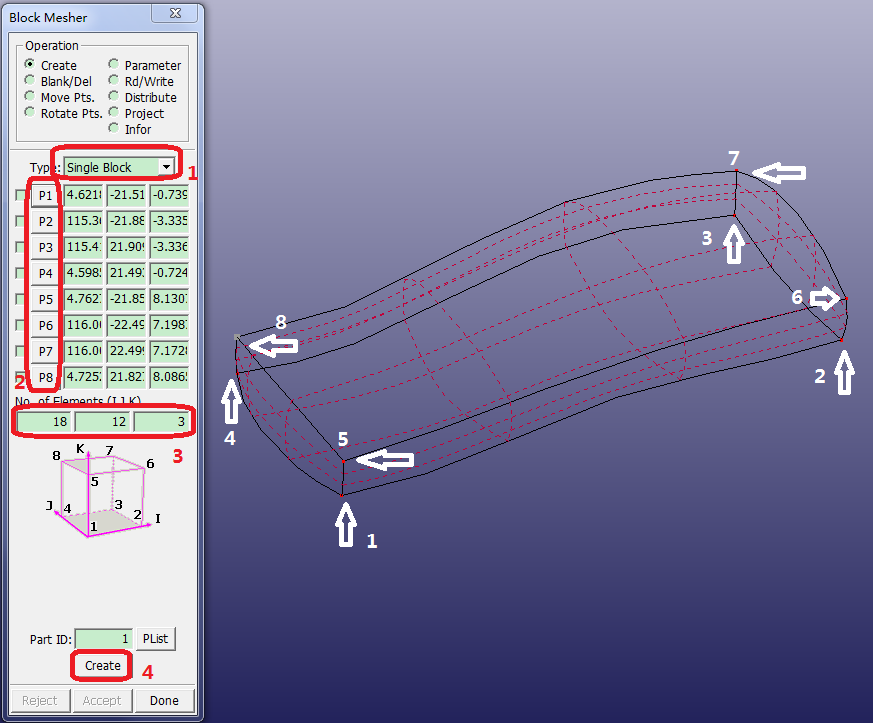
Select Type: Single Block.
Click render button.
Activate P1.
Pick the nearest bottom corner of the block in the graphics window.
P2 will be automatically activated after picking P1.
Pick the other 7 corners corresponding to P2-P8.
Enter Num of Element (I J K) =
18 12 3.Click (the BlockM Computation window will pop up).
(Do NOT click ).
Note: The figure in the BlockM Computation window can be rotated using Ctrl + left mouse, and the main window will be simultaneously updated. The Computation model can also be panned and zoomed, but these operations will not effect the main window.