


You can define additional new parameters, also called design
variables, or edit existing parameters using the Parameters
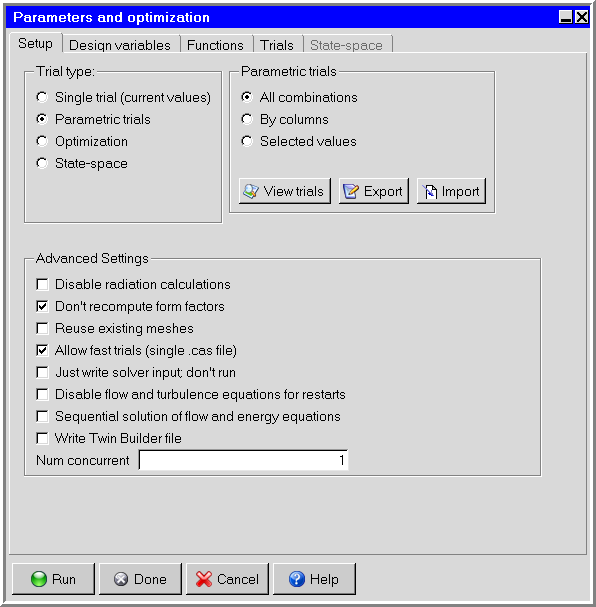
and optimization panel (Figure 30.6: The Parameters and optimization Panel (Setup Tab), Figure 30.7: The Parameters and optimization Panel (Design variables Tab)).
To open this panel, click the  button in the Model and solve toolbar.
In the Design variables tab, the Parameters and optimization panel displays all the parameter names that are currently defined, along with their associated values (Figure 30.7: The Parameters and optimization Panel (Design variables Tab)).
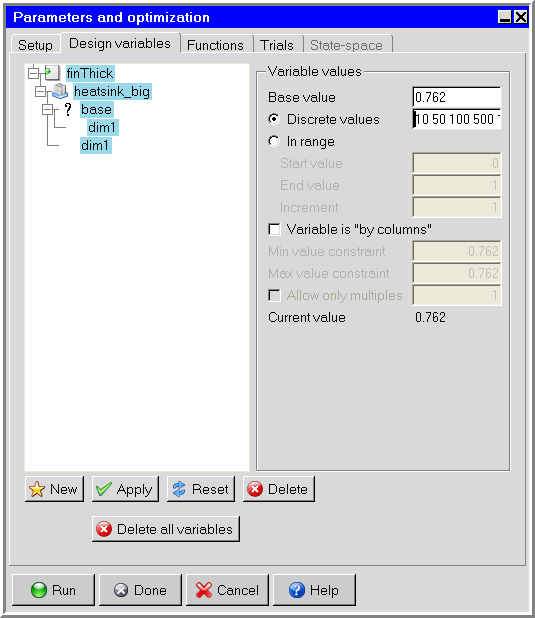
To define a new parameter, click New in the Design variables tab and enter the name of the parameter in the New design variable name? field in the Define design variable dialog box. Ansys Icepak will add the new parameter to the list in the Parameters and optimization panel. You can specify any combination of alphanumeric characters and symbols (except spaces) for the parameter name. Enter the value(s) of the parameter. There are two ways of specifying values for parameters:
Select Discrete, and in the text entry field enter multiple values for a parameter separated by commas or spaces.
Select In range, and enter Start value, End value, and Increment.
Click Apply to update the list of available trials corresponding to the new set of parameters (see Defining Trials).
To edit previously defined parameters, enter the new value for the parameter in the corresponding Base value field. You can then enter multiple values for a parameter using one of the above two methods.
Opening up a design variable’s tree displays the object(s) and properties associated with the variable.
Note: You can use a parameter in the definition of another parameter’s
values, but you must precede the parameter name with a $ sign in the Base value field
of the Parameters and optimization panel.
Once you have defined or edited parameters, you can click the Run button at the bottom of the Parameters and optimization panel to begin solving your Ansys Icepak model. Once Ansys Icepak begins solving, trials are displayed in the Parametric trials panel.