


To include a heat sink in your Ansys Icepak model, click
the  button in the Object creation toolbar and then
click the
button in the Object creation toolbar and then
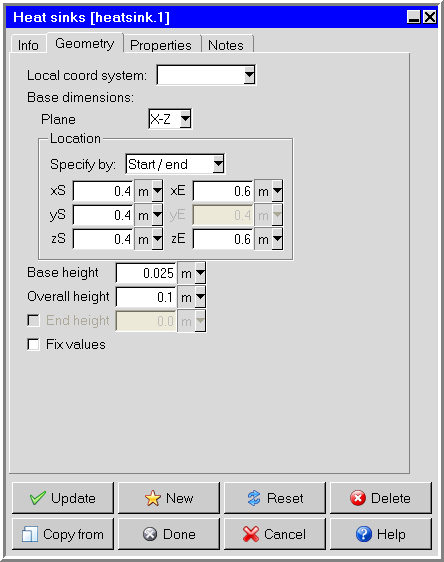
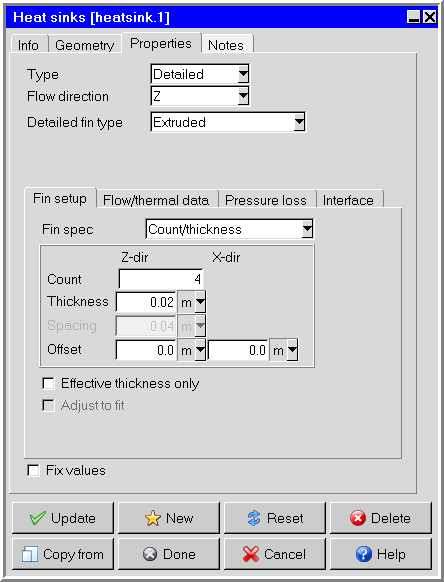
click the  button to open the Heat sinks panel, shown in Figure 24.5: The Heat sinks Panel (Geometry Tab) and Figure 24.6: The Heat sinks Panel (Properties Tab).
The procedure for adding a heat sink to your model is as follows:
Create a heat sink. See Creating a New Object for details on creating a new object and Copying an Object for details on copying an existing object.
Change the description of the heat sink, if required. See Description for details.
Change the graphical style of the heat sink, if required. See Graphical Style for details.
Specify the position and size of the heat sink. (See also Resizing an Object for details on resizing an object and Repositioning an Object for details on repositioning an object).
In the Geometry tab, specify the plane in which the base lies (Y-Z, X-Z, or X-Y) in the Plane drop-down list under Base dimensions.
Under Location, select Start/end in the Specify by drop-down list and enter values for the start coordinates (xS, yS, zS) and end coordinates (xE, yE, zE, as appropriate) of the base, or select Start/length and enter values for the start coordinates (xS, yS, zS) and the lengths of the sides (xL, yL, zL, as appropriate) of the base. The height of the base is defined by the Base height (described below), so one of the endpoint coordinates will be grayed out.
Specify the height of the base next to Base height.
Specify the Overall height of the heat sink (the height of the base and pins/fins).
(optional, detailed heat sinks only) Specify the End height of the pins/fins. The end height is the height of the pins/fins on the ends of the array.
In the Properties tab, specify the type of the heat sink by selecting Simple or Detailed in the Type drop-down list.
Specify the Flow direction parallel to the base by selecting X, Y, or Z in the drop-down list. Note that only two options will be available based on the plane you selected for the base.
Specify the characteristics related to the selected Fin type. These options are described below.
In the Flow/thermal tab, select Radiation if the heat sink is subject to radiative heat transfer. You can modify the default radiation characteristics of the heat sink (for example, the view factor) by using the Radiation specification panel. To open this panel, select Radiation and then click Edit. See Radiation Modeling for details on radiation modeling.