


Data drop-down
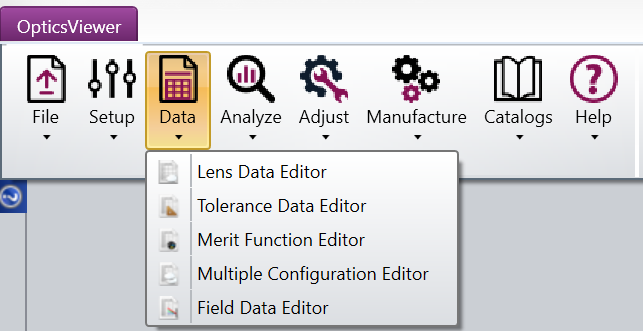
This tab contains access to OpticsViewer's spreadsheet data editors.
Lens Data Editor: Opens the Lens Data Editor window. It is the primary spreadsheet where the majority of the lens data will be entered. This data includes the radius of curvature, thickness, and glass for each surface in the system. See also Lens Data Editor.
Tolerance Data Editor: Opens the Tolerance Data Editor window which is used to define, modify, and review the system tolerance values. See also Tolerance Data Editor.
Merit Function Editor: Opens the Merit Function Editor which is used to define, modify, and review the system merit function. See also Merit Function Editor.
Multiple Configuration Editor: Opens the Multiple Configuration Editor that lets you define variants of the optical system by setting different configurations for the same parameter. For more information, please, see Multiple Configuration Editor.
Field Data Editor: Opens The Field Data Editor which includes the same information and settings as the Fields section of the System Explorer and contains tools for automatically creating several different field distributions and converting to alternate field types. See also Field Data Editor.
Next: