


Standard Spot Diagram

Traces bundles of rays through the system to the specific surface to show ray distributions.
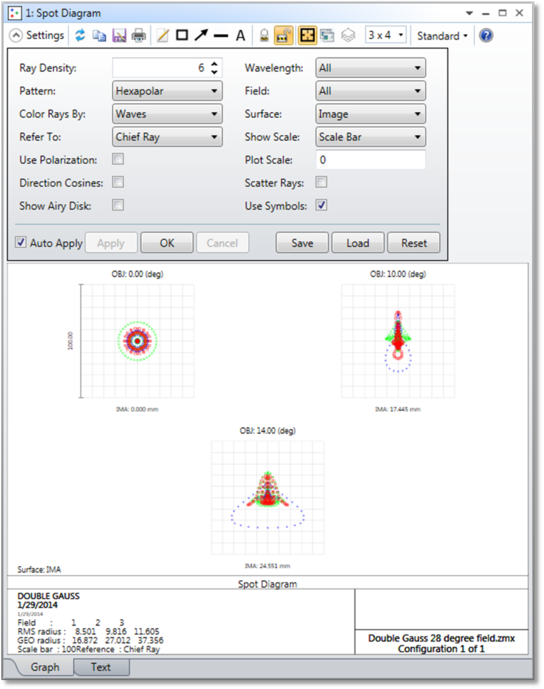
Pattern The pattern may be either hexapolar, square, or dithered. These terms refer to the pattern of rays as they appear in a pupil plane. Defocus the lens significantly to see the pattern, if desired. Dithered spot diagrams are generated by pseudo-random rays which eliminate the symmetrical artifacts in the spot diagram typical of rectangular or hexapolar patterns. The pattern is distorted to give the correct distribution of rays if pupil apodization is specified. There is no "best" pattern to use; each shows a different character of the spot diagram.
Refer To The spot diagrams by default are referenced to the real chief ray. The RMS and GEO spot radii listed at the bottom of the diagram (and defined in the discussion section) are calculated assuming the chief ray is the "zero aberration" point. However, this option allows selection of other reference points. The centroid is defined by the average position of the rays traced. The middle is defined so that the maximum ray errors are equal in the plus and minus x and y directions. The vertex is defined by the local coordinates 0,0 on the selected surface. If the system is in afocal mode, the chief ray reference will be used instead of the vertex reference.
Show Scale Scale bar is the default. Selecting "Square" will draw a box, centered on the reference point, whose width is twice the distance from the reference point to the outermost ray. Selecting "Cross" will draw a cross through the reference point location.
The "Circle" setting will draw a circle centered on the reference point.
Wavelength The wavelength number for which the calculation should be performed.
Field The field number for which the calculation should be performed.
Surface Selects the surface at which the spot diagram is to be evaluated. This is useful for evaluating intermediate images or vignetting.
Plot Scale Sets the maximum scale size of the display in micrometers. A setting of zero will generate a default scale.
Delta Focus The delta focus option is only used if through-focus spot diagrams are selected.
For focal systems, delta focus is the Z-axis spacing between the spot diagrams in micrometers. For afocal systems, delta focus is the optical power spacing between the spot diagrams in diopters.
Five spot diagrams will be shown for each field position. The defocus will be -2, -1, 0, 1, and 2 times the delta focus provided.
Ray Density The Ray Density specifies the number of Hexapolar Rings to be traced if a Hexapolar or Dithered Pattern is selected, or the Number of Rays across the Width and Height if a Rectangular Pattern is selected. The more Rays traced, the greater the accuracy of the RMS Spot Radius, although the computation time increases. There are 6 Rays in the first Hexapolar Ring, 12 in the second, 18 in the third, and so on. The Ray Density Minimum Value is 3.
Use Symbols If checked, this option will draw different symbols rather than dots for each wavelength. This helps distinguish the various wavelengths.
Use Polarization If checked, polarization is considered. See "polarization (system explorer)" for information on defining the polarization state and how polarization is used by analysis features.
Scatter Rays If checked, rays will be statistically scattered at ray-surface intercepts that have defined scattering properties. See "Surface scattering settings".
Airy Disk If checked, an elliptical ring around each spot showing the size of the Airy ellipse will be drawn. The Airy disk radius is 1.22 times the wavelength (primary wavelength is used if polychromatic) multiplied by the F/# of the system; which in general depends upon field position, pupil orientation, and possibly vignetting of rays if the marginal rays cannot be traced.
Direction Cosines If checked, the data presented will be the direction cosines of the rays rather than the spatial coordinates of the rays. The x direction data will be the x direction cosine of the ray, the y direction data will be the y direction cosine. The image coordinates will also be given as the reference point direction cosines. Direction cosines are dimensionless.
Configuration Select "All" to show data for all configurations at once, or select the one configuration to show, or select "Current" to show the active configuration. If "All" is selected, and both focal and afocal mode configurations are defined, the Configuration setting will automatically be reset to "Current".
Color Rays By Select "Field #" to use color to distinguish between each field position, or "Wave #" to distinguish between each wavelength, or "Config #" to distinguish between configurations, and "Wavelength" to approximate the color of wavelengths in the visible spectrum.
Discussion
The ray density has a maximum value based upon the number of fields displayed, the number of wavelengths defined, and available memory. Through-focus spot diagrams will trace half of the maximum number of rays possible on standard spot diagrams.
The GEO spot radius listed on the plot for each field point is the distance from the reference point (which is either the chief ray at the primary wavelength, the centroid of all the rays traced, or the middle of the spot cluster) to the ray which is farthest away from the reference point. In other words, the GEO spot radius is the radius of the circle centered at the reference point which encloses all the rays.
The RMS spot radius is the root-mean-square radial size. The distance between each ray and the reference point is squared, and averaged over all the rays, and then the square root is taken. The RMS spot radius gives a rough idea of the spread of the rays, since it depends upon every ray. The GEO spot radius only gives information about the one ray which is farthest from the reference point.
For information on the X and Y RMS spot radii, see the "text" listing for the spot diagram.
The Airy disk radius is given by 1.22 times the wavelength (primary wavelength is used if polychromatic) times the F/# of the beam, which in general depends upon field position and pupil orientation. This is the radius to the first dark ring of the Airy disk for a circular, uniformly illuminated entrance pupil. The Airy disk may be optionally drawn to give an idea of the scale of the plot. For example, if all the rays are well within the Airy disk, then the system is often said to be "diffraction limited". If the RMS spot radius is significantly larger than the Airy disk radius, then the system is not diffraction limited. The threshold for diffraction limited performance depends upon which criterion is used. There is no absolute boundary at which the system becomes diffraction limited. The Airy disk shown is not an accurate representation of the diffraction dark ring shape or size if the system does not have uniform illumination or if vignetting is used to eliminate some of the rays. OpticStudio does not plot vignetted rays on spot diagrams, nor are they used in computing the RMS or GEO spot radii.
OpticStudio generates grids of rays based upon the wavelength weighting factors and the pupil apodization, if any. The wavelength with the largest weight uses the maximum grid size set by the "Ray Density" option. Wavelengths with lower weights use grids with fewer rays to maintain the correct representation in the diagram. Ray grids are also distorted to maintain the correct ray distribution, if apodization is specified. The RMS spot radius stated on the spot diagram considers the wavelength weighting and apodization factors. However, it is only an estimate of the RMS spot radius based on the rays actually traced. It is not a very accurate estimate for some systems.
The image surface intercept coordinates of the reference point are shown underneath each spot diagram. If a surface other than the image surface is specified, then the coordinates are the intercept coordinates of the reference point on that surface. Since the reference point may be selected to be the centroid, this provides a convenient way of determining the centroid coordinates. If the system is using afocal mode, the image coordinates are given in radians with respect to the local Z axis.
For graphic windows, the left/right cursor keys will change the surface number and recompute the data.
Next: