


ActiveX Excel Example
Here we describe how to write an ActiveX macro in VBA to run in Excel.
Excel VBA Code:
In a VBA script the following header must be included:
Public Sub script_name()
Dim mcad
Set mcad = CreateObject("MotorCAD.AppAutomation")
Typical commands to set input variables and read input or output variables are shown below:
Res = mcad.GetVariable("Schematic_Node_Winding_Outer_Layer",MyOuter_Winding_Node)
If Res = -1 Then
MsgBox "Error getting Outer_Wining_Node"
End If
If Res = -2 Then
MsgBox "Variable not found"
End If
Res = mcad.SetVariable("Wet_Rotor_Fluid_Volume_Flow_Rate",My_Flow_Rate)
If Res = -1 Then
MsgBox "Error setting Flow Rate"
End If
If Res = -2 Then
MsgBox "Variable not found"
End If
The parameter names can be copy+pasted from the ActiveX Parameters list. All input parameters should be input in SI units (except dimensions in mm and areas in mm2).
A electromagnetic calculation is made using the following command:
mcad.DoMagneticCalculation
A steady state or transient thermal calculation is made using the following commands:
mcad.DoSteadyStateAnalysis
mcad.DoTransientAnalysis
A combined electromagnetic and steady state thermal calculation is made using the following command:
mcad.DoMagneticThermalCalculation
A .mot file is read or saved using the commands below:
mcad.LoadFromFile "C:\Documents and Settings\Dave\My Documents\Motor-CAD Data\filename.mot"
mcad.SaveToFile "C:\Documents and Settings\Dave\My Documents\Motor-CAD Data\filename.mot"
Motor-CAD can be Quit using the command:
mcad.Quit
Excel VBA Script Examples:
The easiest way to write a new script is to edit and old one. The Motor-CAD installation CD gives a few examples are given on the Motor-CAD installation CD. Copies can also be found in the ActiveX folder placed in the folder where Motor-CAD is installed using the setup.exe command. This is typically:
- C:\Motor-CAD\VersionNumber\ActiveX_Automation_in_Motor-CAD\ActiveX_Examples\ (eg "C:\Motor-CAD\10_4_1\ActiveX_Automation_in_Motor-CAD\ActiveX_Examples\")
1. Motor-CAD_VBA_Macro_Script_Example_1.xls
Variation in winding temperature with Fin Spacing in a Natural Convection cooled motor with Radial Fins
2. Motor-CAD_VBA_Macro_Script_Example_2.xls
Run a thermal transient as set up in the loaded .mot datafile and plots the transient in Excel. Uses the Append_Next_Transient_To_Existing_Data call to change parameters part way through a transient calculation.
Example (1):
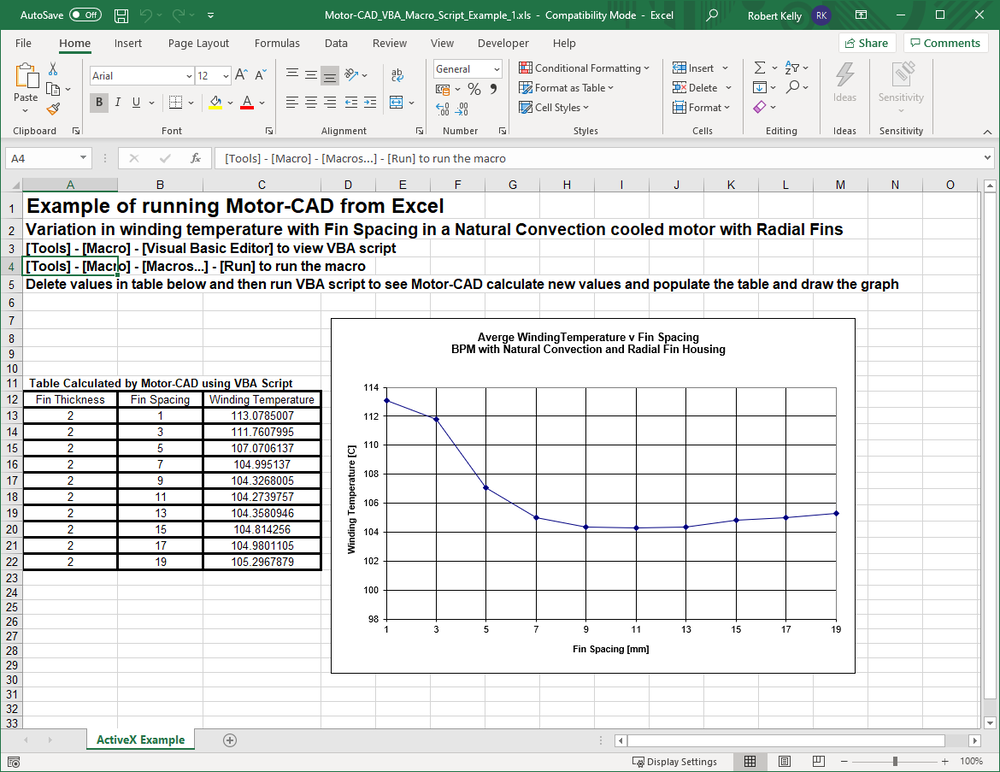
'Example of a VBA Script used to run Motor-CAD from Excel
'Calulates the variation in winding inner layer temperature with fin spacing
'in a natural convection cooled BPM motor with a radial finned housing
'
'Note - can obtain [compile error: User-defined type not defined ] if not set [Tools] - [References] - [MotorCAD Library]
Public Sub testmotorcad()
Dim mcad
Set mcad = CreateObject("MotorCAD.AppAutomation")
mcad.Visible = True
'load a Motor-CAD datafile - the file is "c:\motor-cad\radial_test_1.mot" in this case
'just change the file and folder name if you wish to read an alternative file
mcad.LoadFromFile "c:\motor-cad\radial_test1.mot"
'---------- MAKE SURE HOUSING TYPE IS SET TO RADIAL FINS [Type 3] --------------
Res = mcad.SetVariable("Housing_Type", 3)
If Res = -1 Then
MsgBox "Error setting Housing_Type"
End If
If Res = -2 Then
MsgBox "Variable not found"
End If
'+++ GET INNER WINDING NODE (depends on the number of layers in the winding) +++
Res = mcad.GetVariable("Schematic_Node_Winding_Outer_Layer", MyOuter_Winding_Node)
If Res = -1 Then
MsgBox "Error getting Outer_Wining_Node"
End If
If Res = -2 Then
MsgBox "Variable not found"
End If
Res = mcad.GetVariable("Number_Winding_Layers", MyNumber_Winding_Layers)
If Res = -1 Then
MsgBox "Error getting Number_Winding_Layers"
End If
If Res = -2 Then
MsgBox "Variable not found"
End If
'calculate which node is the inner most winding layer
MyInner_Winding_Node = MyOuter_Winding_Node + MyNumber_Winding_Layers - 1
'show message on screen with Winding Inner Node Number
mcad.ShowMessage ("Inner Winding Node Number = " + CStr(MyInner_Winding_Node))
'set up a string so we can get the temperature of the inner most winding layer
'string details are given in the Output Parameters worksheet
Winding_Temperature_String = "Node_Temp[" + CStr(MyInner_Winding_Node) + "]"
'----------------------- SET FIN THICKNESS ------------------
My_Fin_Thickness = 2
Res = mcad.SetVariable("Fin_Thickness", My_Fin_Thickness)
If Res = -1 Then
MsgBox "Error setting Fin Thickness"
End If
If Res = -2 Then
MsgBox "Variable not found"
End If
'WorkSheet Table Title Strings
Worksheets("ActiveX Example").Cells(12, 1).Value = "Fin Thickness"
Worksheets("ActiveX Example").Cells(12, 2).Value = "Fin Spacing"
Worksheets("ActiveX Example").Cells(12, 3).Value = "Winding Temperature"
'Initial Spacing
My_Fin_Spacing = 1
'----------------------- CHANGE FIN SPACING [1mm to 19mm] ------------------
For i = 1 To 10
My_Fin_Pitch_Div_Thickness = (My_Fin_Spacing + My_Fin_Thickness) / My_Fin_Thickness
Res = mcad.SetVariable("Fin_Pitch/Thick", My_Fin_Pitch_Div_Thickness)
If Res = -1 Then
MsgBox "Error setting Fin Spacing"
End If
If Res = -2 Then
MsgBox "Variable not found"
End If
'+++++++++++++++++++ GET AND DISPLAY INNER WINDING NODE TEMPERATURE +++++++++++
'carry out steady state thermal calculation
mcad.DoSteadyStateAnalysis
Res = mcad.GetVariable(Winding_Temperature_String, MyWinding_Temperature)
If Res = -1 Then
MsgBox "Error getting Winding_Temperature"
End If
If Res = -2 Then
MsgBox "Variable not found"
End If
'Fill worksheet table with data
Worksheets("ActiveX Example").Cells(12 + i, 1).Value = My_Fin_Thickness
Worksheets("ActiveX Example").Cells(12 + i, 2).Value = My_Fin_Spacing
Worksheets("ActiveX Example").Cells(12 + i, 3).Value = MyWinding_Temperature
My_Fin_Spacing = My_Fin_Spacing + 2
Next
mcad.Quit
Set mcad = Nothing
End Sub
Example (2):
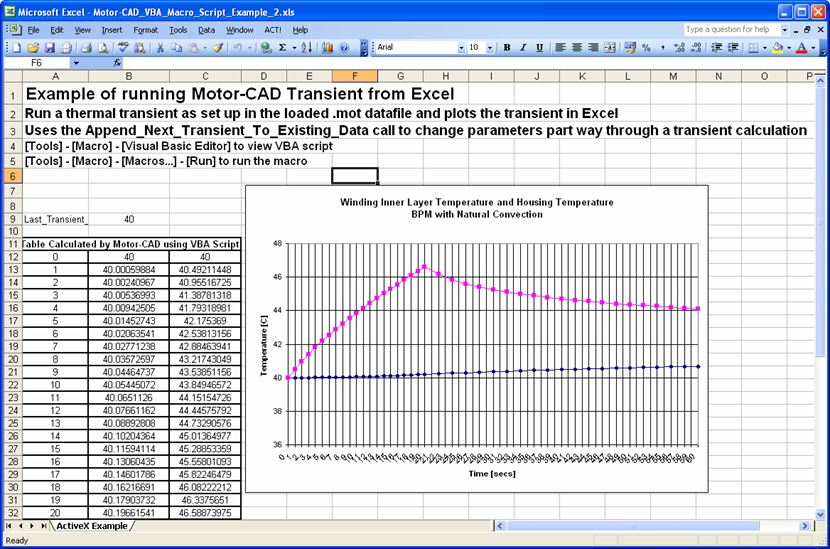
'Example of a VBA Script used to run Motor-CAD from Excel
'Calulates a transient and uses the Append_Next_Transient_To_Existing_Data call to change parameters part way through a transient calculation
'
'Note - can obtain [compile error: User-defined type not defined ] if not set [Tools] - [References] - [MotorCAD Library]
Public Sub testmotorcad()
Dim mcad
Set mcad = CreateObject("MotorCAD.AppAutomation")
mcad.ShowMessage ("Example of ActiveX Transient call in Motor-CAD")
mcad.Visible = True
mcad.ShowMessage ("Example of ActiveX Transient call in Motor-CAD")
'show message on screen that "This is MotorCAD controlled from Excel"
'mcad.ShowMessage ("Example of ActiveX Transient call in Motor-CAD")
'create a Motor-CAD data file based on the default motor (we could load an existing .mot if required instead)
mcad.SaveToFile "c:\motor-cad\Test_Trans.mot"
'Set to simple transient and then set losses to a given value
'we will model 20 seconds with Pcu = 400W at 3000rpm and then 40 seconds with Pcu = 20W at 100rpm
'the iron losses will vary with speed according to the simple model set up in Motor-CAD
'we could however vary them independently
Res = mcad.SetVariable("Transient_Calculation_Type", 0) 'Simple Transient
If Res = -1 Then
MsgBox "Error setting Transient_Calculation_Type"
End If
If Res = -2 Then
MsgBox "Transient_Calculation_Type not found"
End If
Res = mcad.SetVariable("Number_Transient_Points", 20) '20 points over part of cycle
If Res = -1 Then
MsgBox "Error setting Number_Transient_Points"
End If
If Res = -2 Then
MsgBox "Number_Transient_Points not found"
End If
Res = mcad.SetVariable("Stator_Copper_Loss_@Ref_Speed", 400) 'Pcu = 400W
If Res = -1 Then
MsgBox "Error setting Stator_Copper_Loss_@Ref_Speed"
End If
If Res = -2 Then
MsgBox "Stator_Copper_Loss_@Ref_Speed not found"
End If
Res = mcad.SetVariable("Shaft_Speed_[RPM]", 3000) '3000 rpm
If Res = -1 Then
MsgBox "Error setting Shaft_Speed_[RPM]"
End If
If Res = -2 Then
MsgBox "Shaft_Speed_[RPM] not found"
End If
Res = mcad.SetVariable("Transient_Time_Period", 20) '20 seconds for 1st period
If Res = -1 Then
MsgBox "Error setting Transient_Time_Period"
End If
If Res = -2 Then
MsgBox "Transient_Time_Period not found"
End If
'calculate 1st transient period
mcad.DoTransientAnalysis
'append next transient calculation to existing data
Res = mcad.SetVariable("Append_Next_Transient_To_Existing_Data", 1)
If Res = -1 Then
MsgBox "Error setting Append_Next_Transient_To_Existing_Data"
End If
If Res = -2 Then
MsgBox "Append_Next_Transient_To_Existing_Data not found"
End If
Res = mcad.SetVariable("Stator_Copper_Loss_@Ref_Speed", 20) 'Pcu = 20W
If Res = -1 Then
MsgBox "Error setting Stator_Copper_Loss_@Ref_Speed"
End If
If Res = -2 Then
MsgBox "Stator_Copper_Loss_@Ref_Speed not found"
End If
Res = mcad.SetVariable("Shaft_Speed_[RPM]", 100) '100 rpm
If Res = -1 Then
MsgBox "Error setting Shaft_Speed_[RPM]"
End If
If Res = -2 Then
MsgBox "Shaft_Speed_[RPM] not found"
End If
Res = mcad.SetVariable("Transient_Time_Period", 40) '40 seconds for 2nd period
If Res = -1 Then
MsgBox "Error setting Transient_Time_Period"
End If
If Res = -2 Then
MsgBox "Transient_Time_Period not found"
End If
'calculate 2nd transient period
mcad.DoTransientAnalysis
'+++++++++++GET INNER WINDING NODE (this can change if winding changes) +++++++++++
'details of Schematic_Node_Winding_Outer_Layer parameter given in Output Parameters worksheet in Excel
Res = mcad.GetVariable("Schematic_Node_Winding_Outer_Layer", MyOuter_Winding_Node)
If Res = -1 Then
MsgBox "Error getting Outer_Wining_Node"
End If
If Res = -2 Then
MsgBox "Schematic_Node_Winding_Outer_Layer not found"
End If
Res = mcad.GetVariable("Schematic_Node_Housing", MyHousing_Node)
If Res = -1 Then
MsgBox "Error getting Housing_Node"
End If
If Res = -2 Then
MsgBox "Schematic_Node_Housing not found"
End If
Res = mcad.GetVariable("Number_Winding_Layers", MyNumber_Winding_Layers)
If Res = -1 Then
MsgBox "Error getting Number_Winding_Layers"
End If
If Res = -2 Then
MsgBox "Number_Winding_Layers not found"
End If
'calculate which node is the inner most winding layer
MyInner_Winding_Node = MyOuter_Winding_Node + MyNumber_Winding_Layers - 1
'set up a string so we can get the temperature of the inner most winding layer
'string details are given in the Output Parameters worksheet
Winding_Temperature_String = "Node_Temp[" + CStr(MyInner_Winding_Node) + "]"
Housing_Temperature_String = "Node_Temp[" + CStr(MyHousing_Node) + "]"
'Get number of nodes in Transient
Res = mcad.GetVariable("Last_Transient_Point", MyLast_Transient_Point)
If Res = -1 Then
MsgBox "Error getting Last_Transient_Point"
End If
If Res = -2 Then
MsgBox "Last_Transient_Point not found"
End If
'MsgBox "Last_Transient_Point = " + CStr(MyLast_Transient_Point) - we could write out data to the sceen message box if we wanted
Worksheets("ActiveX Example").Cells(9, 1).Value = "Last_Transient_Point"
Worksheets("ActiveX Example").Cells(9, 2).Value = MyLast_Transient_Point
'WorkSheet Table Title Strings
Worksheets("ActiveX Example").Cells(12, 1).Value = "Time [secs]"
Worksheets("ActiveX Example").Cells(12, 2).Value = "T[Housing] - degC"
Worksheets("ActiveX Example").Cells(12, 3).Value = "T[Winding Inner Layer] - degC"
'----------------------- Fill In Excel Table with Transient Data ------------------
For i = 0 To MyLast_Transient_Point
Trans_Time_String = "Transient_X[" + CStr(i) + "]"
Winding_Trans_Temp_String = "Transient_Y[" + CStr(MyInner_Winding_Node) + "," + CStr(i) + "]"
Housing_Trans_Temp_String = "Transient_Y[" + CStr(MyHousing_Node) + "," + CStr(i) + "]"
Res = mcad.GetVariable(Trans_Time_String, MyTrans_Time)
If Res = -1 Then
MsgBox "Error getting Trans_Time"
End If
If Res = -2 Then
MsgBox "Trans_Time_String not found"
End If
Res = mcad.GetVariable(Winding_Trans_Temp_String, MyWinding_Trans_Temp)
If Res = -1 Then
MsgBox "Error getting Winding_Trans_Temp"
End If
If Res = -2 Then
MsgBox "Winding_Trans_Temp_String not found"
End If
Res = mcad.GetVariable(Housing_Trans_Temp_String, MyHousing_Trans_Temp)
If Res = -1 Then
MsgBox "Error getting Housing_Trans_Temp"
End If
If Res = -2 Then
MsgBox "Housing_Trans_Temp_String not found"
End If
'Fill worksheet table with data
Worksheets("ActiveX Example").Cells(12 + i, 1).Value = MyTrans_Time
Worksheets("ActiveX Example").Cells(12 + i, 2).Value = MyHousing_Trans_Temp
Worksheets("ActiveX Example").Cells(12 + i, 3).Value = MyWinding_Trans_Temp
Next
'close down Motor-CAD
mcad.Quit
Set mcad = Nothing
End Sub
Information on the full range of Motor-CAD input and output variables can be viewed by following the following link - ActiveX Input and Output Variables
For Matlab script examples follow the link - ActiveX Matlab Example