Components
In ModelCenter, a component encapsulates an analysis or control function. It exposes inputs/outputs and executes a run method to transform inputs into outputs. Components are shown as boxes in the Analysis View and as expandable branches in the Component Tree, with variables listed under the component.
The state of the component is also indicated in the Analysis View. A component that has invalid outputs (the component has not to be run) will be displayed in a slightly darker shade than a component that does not need to be run.


Analysis Components
An Analysis Component is a standard component. This type of component is the workhorse of a workflow. Analysis Components perform calculations and are usually connected to some external program, such as an in-house FORTRAN code or an Excel spreadsheet.
Assembly Components

An Assembly Component is a component that holds other components. Assembly Components can be used to hierarchically manage the components in your workflow. An Assembly Component can also contain variables. The workflow is actually just a top-level Assembly Component.
Geometry Components

A Geometry Component is simply any component that has geometry as an output. ModelCenter supports several types of Geometry.
Driver Components

A Driver Component is different from a standard component in that, while it is running, it will repeatedly set and get values for other variables in the workflow until some condition is satisfied. The result is a feedback loop.
Exporting a Component
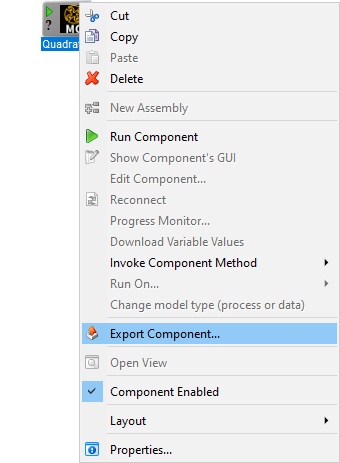
Components can be saved as a file apart from being saved with the workflow. To export a Component:
- Right-click the Component and select the Export Component option from the menu.
- A save file dialog will appear. Select the appropriate file name, destination, and file type and then click the Save button.